Ecosmart Live time clock issue with Natural Reef mode

ug.mac

New member
Hi

I just recently switched to Natural Shallow Reef mode on my XR15 Pro and noticed light doesn't come on and off at scheduled time.

Light been setup to turn on at 8:00 and night time starts 21:00, light follow such schedule without issues in other modes with exception in natural shallow reef mode. Light didn't turn on until 9:30ish this morning and won't turn off last night even at 10pm with still good amount of intensity (10~15%).

I login to ESL last night noticed system time was 1 hour backwards, but I can't correct it with neither Automatic nor Manual time as long as I'm in natural reef mode. Tired with high growth and time corrected on its own.

I have done a system reset and issue seems to persists. I don't have Reef Link, I use USB cable to control this light.

Any suggestions?
 

Attachments

  • Screen Shot 2015-09-12 at 1.42.47 PM.jpg
    Screen Shot 2015-09-12 at 1.42.47 PM.jpg
    37.3 KB · Views: 4
Hi

I just recently switched to Natural Shallow Reef mode on my XR15 Pro and noticed light doesn't come on and off at scheduled time.

Light been setup to turn on at 8:00 and night time starts 21:00, light follow such schedule without issues in other modes with exception in natural shallow reef mode. Light didn't turn on until 9:30ish this morning and won't turn off last night even at 10pm with still good amount of intensity (10~15%).

I login to ESL last night noticed system time was 1 hour backwards, but I can't correct it with neither Automatic nor Manual time as long as I'm in natural reef mode. Tired with high growth and time corrected on its own.

I have done a system reset and issue seems to persists. I don't have Reef Link, I use USB cable to control this light.

Any suggestions?

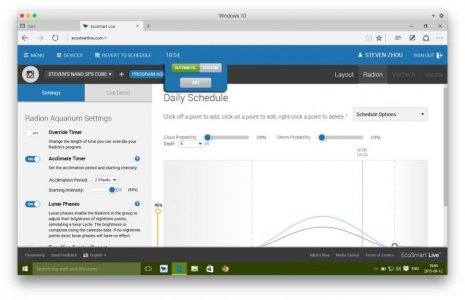
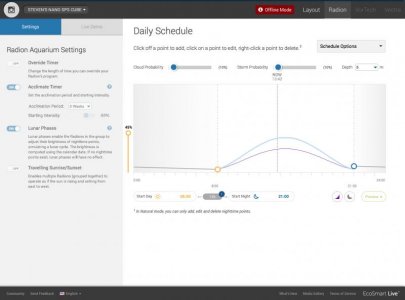
Based on your screenshot, it appears that you are offline. To adjust the time, log out of ESL, start your Connection Manager, then log back in and wait for the time to appear in the header bar. Once you see the time, click it and then click the Set button. This should update your time based on your selected timezone.
 
Based on your screenshot, it appears that you are offline. To adjust the time, log out of ESL, start your Connection Manager, then log back in and wait for the time to appear in the header bar. Once you see the time, click it and then click the Set button. This should update your time based on your selected timezone.

I just took that screen shot while at work to show my graphic, not trying to indicate my issue.

Now I have my light plugged in, ESL time clock is 1 hour backwards. It's 18:57 when I took the screenshot but ESL displaying 17:57. Time stamp and OS time as accurate and in sync.

Since I'm on 10.11 so no legacy Java SE6 runtime support so run connection manager via Windows 10 in Parallels, and using Safari in 10.11 to make changes. Windows 10 time is correct as well.
 

Attachments

  • Screen Shot 2015-09-12 at 18.57.13.jpg
    Screen Shot 2015-09-12 at 18.57.13.jpg
    12.2 KB · Views: 2
Now I'm back in Windows, ESL clock is under Automatic and you can see it's 1 hour backwards than actual time. ESL script have no issue getting the current time but I simply can't updated with custom setting, time stays the same.
 

Attachments

  • Screen Shot 2015-09-12 at 19.04.58.jpg
    Screen Shot 2015-09-12 at 19.04.58.jpg
    46.6 KB · Views: 4
Since I'm on 10.11 so no legacy Java SE6 runtime support so run connection manager via Windows 10 in Parallels

I was wrong, there is Java for OS X 2015-001 that provides Java SE6 runtime for 10.11. Installed connection manager and run everything within OSX seems to solved clock issue.


However, after spent a few hours with programming I still have no idea why light won't just simply turn on after day start time also stays on for few hours passed night start time (without activate lunar phase and nighttime points). I should also mention that natural modes schedule works properly after initial creation, basically allowing light to turn on after 8am then off at 9pm just as how I scheduled. Now if I just change ANYTHING, say I change depth option from 0m to 8m, light then will turn on around 10:30~11am and stay on until around 10pm.

Like I mentioned before, there is no such issue with any other modes.
 
Last edited:
Back
Top