ESL and Vortech sync modes

learjet3

New member
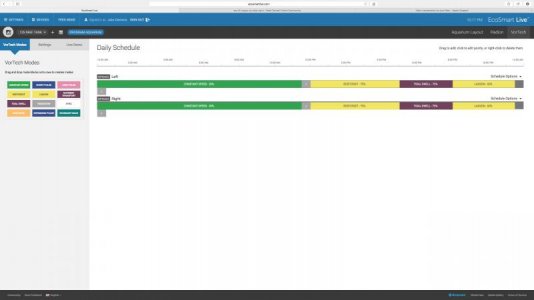
Ok, I think I got my Vortech's set-up to do what I want when I want them to, with the exception of the anti-sync and sync modes. I have attached a screenshot of my current vortices schedule and the export from ESL (had to .zip it). I know that before I was using ESL to control the pumps that one of them was set to master and the other to slave in anti-sync mode, I can't tell if that is the case anymore. Can someone point me in the right direction to set this relationship up? Even better can someone from Ecotech Marine look at my ESL account and see if it's set up the way they recommend?

 

Attachments

  • Screen Shot 2015-01-06 at 10.18.04 PM.jpg
    Screen Shot 2015-01-06 at 10.18.04 PM.jpg
    28.2 KB · Views: 4
  • SavedVorTechSchedule2015-01-06.evg.xml.zip
    SavedVorTechSchedule2015-01-06.evg.xml.zip
    1.1 KB · Views: 4
Your Vortechs are not set to anti-sync based on that image. You will need to select the anti-sync mode from the left (under Vortech Modes) and then drag it over to the Vortech that you want to run in anti-sync mode. You will then be asked which pump you want to anti-sync with. You will have to click e other Vortech to specify that you want to anti-sync with it. If you double click on the anti-sync block you will see the option for "all day". That option will cause that Vortech to run in anti-sync mode all of the time if that is what you want.
 
Your Vortechs are not set to anti-sync based on that image. You will need to select the anti-sync mode from the left (under Vortech Modes) and then drag it over to the Vortech that you want to run in anti-sync mode. You will then be asked which pump you want to anti-sync with. You will have to click e other Vortech to specify that you want to anti-sync with it. If you double click on the anti-sync block you will see the option for "all day". That option will cause that Vortech to run in anti-sync mode all of the time if that is what you want.

That is exactly correct. :thumbsup:
 
Ok,I see. Is that what would be the recommended setup? It would be nice if there was some guidance as to what the most beneficial programming was. I have a 125 long with an MP40 on each end.
 
Ok,I see. Is that what would be the recommended setup? It would be nice if there was some guidance as to what the most beneficial programming was. I have a 125 long with an MP40 on each end.

Learjet,

There isn't recommended setup because each aquarium varies so greatly and requires different amounts and types of flow.
 
I understand different tanks need different flow based on load and what not, thats not what I meant. I mean when operating two pumps in reefcrest mode on opposite ends of a tank should one be set to anti-sync? Or when the pumps are in one of the ecosmart modes such as nutrient transport it seems that the sync/anti-sync relationship does not matter, only master/slave. How does one set this in ESL? The mp40 manual only addresses setting up these relationships using the drivers themselves. When I updated the MP40's to the latest firmware to be compatible with ESL I assumed the master/slave setup that I had programmed before was no longer in place. I expected the ESL interface to set these parameters. It would be nice if there were a little clearer instructions written is all. Ideally I would like to use the nutrient transport mode in the middle of my light cycle to keep things clean, If I just set both pumps the that mode at the same time in ESL will they automatically work together as master/slave? Or do you have to seethed up at the driver again?
 
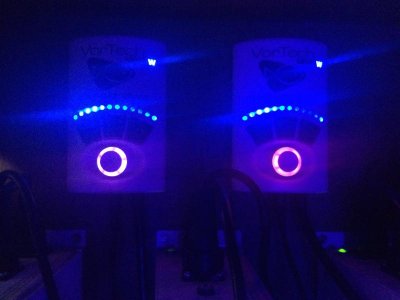
For instance I just changed the 4pm to 8pm to nutrient transport mode at 100% max on both pumps. When I look at the lights on the drivers the right one is purple and the left one looks like maybe white. Does this mean my right pump is the master and the left is in sync mode? So to make the left anti-sync do I have to much the mode key on the left pump? Or drag anti-sync to the left pump in ESL?
 

Attachments

  • IMG_0733.jpg
    IMG_0733.jpg
    33.4 KB · Views: 4
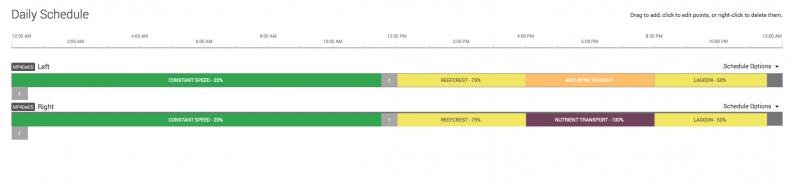
I tried pushing mode on the left driver and it went to green constant speed mode. I deleted the nutrient transport mode from ESL and replaced it with anti-sync during the time the right pump is in Nutrient transport mode. I will see what that does.
 
This doesn't appear to work right either, there should be one master and a slave pump in nutrient transport mode. The Driver LED's do not indicate nutrient transport mode either, one it purple and the other is orange. Does the master slave relationship have to be set first at the driver before ESL config works properly?
 

Attachments

  • Screen Shot 2015-01-09 at 6.27.17 PM.jpg
    Screen Shot 2015-01-09 at 6.27.17 PM.jpg
    14.5 KB · Views: 4
Back
Top