
You are using an out of date browser. It may not display this or other websites correctly.
You should upgrade or use an alternative browser.
You should upgrade or use an alternative browser.
Compatible webcam for Apex Fusion gold
- Thread starter ScubaNemo
- Start date
I use old iPhone. Gave it IP address and linked to apex. Great being able to watch fish from anywhere
Any tips on how to set it up?
Anyone else who might be using an actual camera?

FullBoreReefer
New member
I do the same old iPhone 4. I use the app IpCamera, .99cents.
Then setup port forwarding via your router.
Then setup fusion with the IP address.
Used iPhone ccan be found cheap on e*ay
Then setup port forwarding via your router.
Then setup fusion with the IP address.
Used iPhone ccan be found cheap on e*ay

Herbie
Yep,that one
Can you guys who use the iphone give some details on how you got it all set-up.
I have been looking for an easy way to incorporate a camera set-up to go with the Apex Fusion . I have an old iPhone 4 that I can use , and I am sure others do as well !
Some are not too computer savvy (me included) ...............so maybe you guys can do a complete iphone set-up for the Apex running the Fusion interface ? It would be very helpful !
I just dug out an old iPhone 4 ............ready to go ! lol
Also, any other cams that work well with the Apex fusion , that are EASY to set-up ?
Thanks guys !
Herbie
I have been looking for an easy way to incorporate a camera set-up to go with the Apex Fusion . I have an old iPhone 4 that I can use , and I am sure others do as well !
Some are not too computer savvy (me included) ...............so maybe you guys can do a complete iphone set-up for the Apex running the Fusion interface ? It would be very helpful !
I just dug out an old iPhone 4 ............ready to go ! lol
Also, any other cams that work well with the Apex fusion , that are EASY to set-up ?
Thanks guys !
Herbie
Last edited:
The phone will have to stay plugged in to the power. I followed this video tutorial step by step and this is how I just set up mine this morning. It is so exciting to be able to see your tank live video remotely 
http://youtu.be/X-4lo2-qWo0
http://youtu.be/X-4lo2-qWo0
Attachments
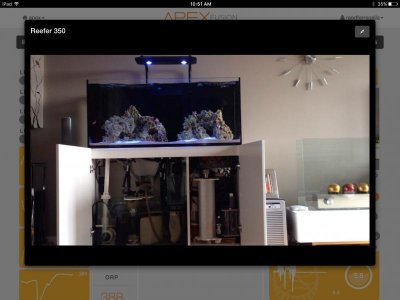
Herbie
Yep,that one
The phone will have to stay plugged in to the power. I followed this video tutorial step by step and this is how I just set up mine this morning. It is so exciting to be able to see your tank live video remotely
http://youtu.be/X-4lo2-qWo0
Awesome ! :thumbsup:
That is very helpful , I think I can handle this ! :twitch:
Will give it a try ...........
Thanks !
Herbie
Awesome ! :thumbsup:
That is very helpful , I think I can handle this ! :twitch:
Will give it a try ...........
Thanks !
Herbie
Ok keep me posted
Herbie
Yep,that one
Ok keep me posted
Ugghhhh , the last one of our old spare iPhone 4's I have on hand is my daughters old iPhone 4 (I upgraded her to a 6) and its password protected , and I cant figure out the code she used. Too many more tries and it will get disabled and locked :sad2: . I will have to wait to hear back from her if she remembers the code . It may take a while as she lives in Australia now :facepalm: . May be a few hours ........
Will update once I get the iPhone unlocked and going.
Herbie
Last edited:
Ugghhhh , the last one of our old spare iPhone 4's I have on hand is my daughters old iPhone 4 (I upgraded her to a 6) and its password protected , and I cant figure out the code she used. Too many more tries and it will get disabled and locked :sad2: . I will have to wait to hear back from her if she remembers the code . It may take a while as she lives in Australia now :facepalm: . May be a few hours ........
Will update once I get the iPhone unlocked and going.
Herbie
Oops, ok. Good luck
Ugghhhh , the last one of our old spare iPhone 4's I have on hand is my daughters old iPhone 4 (I upgraded her to a 6) and its password protected , and I cant figure out the code she used. Too many more tries and it will get disabled and locked :sad2: . I will have to wait to hear back from her if she remembers the code . It may take a while as she lives in Australia now :facepalm: . May be a few hours ........
Will update once I get the iPhone unlocked and going.
Herbie
Plug it into iTunes and factory reset it. May need her iTunes email and password tho.
I have an old Android phone as my apex webcam. Same deal, free app. Just plug it in and prop it up on something lol.

slief
RC Sponsor
There is lots of great info on the different camera options as well as setup for use with the Apex here:
https://forum.neptunesystems.com/fo...ation-with-APEX-Fusion-amp-Classic-Dashboards
https://forum.neptunesystems.com/fo...ation-with-APEX-Fusion-amp-Classic-Dashboards
slief
RC Sponsor
I can only see the live video stream when I'm on my home network. Once I step outside or use my wireless service, I lose the live cam stream on the fusion.
What setting or IP I will have to change to be able to view the video remotely?
You will need to setup port forwarding on your router as well as some sort of dynamic dns service to access your IP cam from outside your network. I would google port forwarding followed by the model of your DSL router. I.E. "Port Forwarding XXXX" XXXX = your router model number. Every router has a different process for setting up port forwarding.
FullBoreReefer
New member
Go to google and search, "what's my IP", while connected to your wifi.
Whatever pops up, copy that.
Go into fusion, and click the settings/gear icon below the pic/video square.
Click the same icon on the next screen and select "edit" from the drop down
Enter a NAME(whatever you want)
Set Level as VIEW
Set Type as IMAGE/MOTION JPEG
Set Url as Http:/ (paste IP address from google search) : (port forwarding #) / live
Click OK
You are done, as long as your port forwarding is setup correct, it will work.
Mine looks like this...
My IP is... xx.xxx.xx.xx
iPhone Ip cam is... 192.168.1.13
Port forwarding is... 1986
Fusion is... Http:/xx.xxx.xx.xx:1986/live
Whatever pops up, copy that.
Go into fusion, and click the settings/gear icon below the pic/video square.
Click the same icon on the next screen and select "edit" from the drop down
Enter a NAME(whatever you want)
Set Level as VIEW
Set Type as IMAGE/MOTION JPEG
Set Url as Http:/ (paste IP address from google search) : (port forwarding #) / live
Click OK
You are done, as long as your port forwarding is setup correct, it will work.
Mine looks like this...
My IP is... xx.xxx.xx.xx
iPhone Ip cam is... 192.168.1.13
Port forwarding is... 1986
Fusion is... Http:/xx.xxx.xx.xx:1986/live
Last edited:
slief
RC Sponsor
Go to google and search, "what's my IP", while connected to your wifi.
Whatever pops up, copy that.
Go into fusion, and click the settings/gear icon below the pic/video square.
Click the same icon on the next screen and select "edit" from the drop down
Enter a NAME(whatever you want)
Set Level as VIEW
Set Type as IMAGE/MOTION JPEG
Set Url as Http:/ (paste IP address from google search) : (port forwarding #) / live
Click OK
You are done, as long as your port forwarding is setup correct, it will work.
Mine looks like this...
My IP is... xx.xxx.xx.xx
iPhone Ip cam is... 192.168.1.13
Port forwarding is... 1986
Fusion is... Http:/xx.xxx.xx.xx:1986/live
While that is partially true, it will only work until the IP address for the DSL router changes unless your ISP has provided a static IP which is rare. If the DSL router power cycles or looses connection to the ISP, the routers external IP address will change. It can also change arbitrarily. This is where dynamic dns comes into play. Companies like DynDns provide an external unique URL to access your internal network. For example, your external url could be something like "myapex.homeip.net". An application on a computer or webcam on your home network or even some routers will update the DynDns servers of your networks external IP so that your Webcam or even Apex can be accessed through the unique URL even if the external IP address changes. In my case, I have a DynDns updater client on a computer at my home and my Dlink webcam also has a Dyn Dns updater in it too. If my IP address ever changes, the Dyn servers are updated and I always have access to my Apex and webcam through my unique urls.
I use DynDns Pro and pay a $40 annual fee so I can access my Apex's native web interface and use the Apex app and can also access my Webcam both with Fusion and without. There are other dynamic dns services out there. Some are free too. I have used DynDns for several years and have stuck with it since it's already setup and works great.
http://dyn.com/dns/?rdr=dyndnsorg
One other thing you may need to do when accessing your webcam from outside is to include the port number as part of the IP address. If for example your external IP is: 178.111.111.1 and your webcam port is 1000, you may need to type: 178.111.111.1:1000 to access the cam from outside your home network.
Similar threads
- Replies
- 8
- Views
- 2K
- Replies
- 8
- Views
- 381
- Replies
- 6
- Views
- 4K

