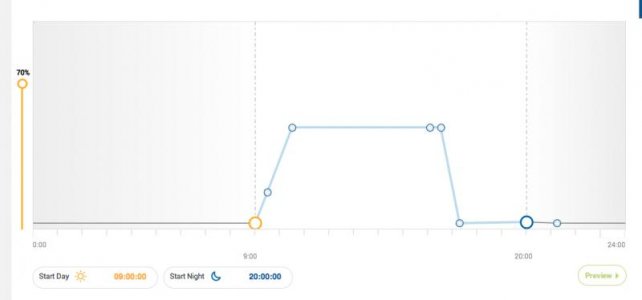
EcoSmart Live Graph/Scheduled Time Issue

marcusbptan

New member
Hello,

Just found this issue today. It seems that the time axis on the ESL graph is out of sync when I attempt to schedule a time point.
eg. 14 K at 2230 will appear as 1930. And I can't program the 'night' or 'End' time point button to any time late than 2030.

Anyone else having this problem? I've reset my Radions and also created a new profile to no avail.

Any assistance greatly appreciated.

Cheers
Marcus
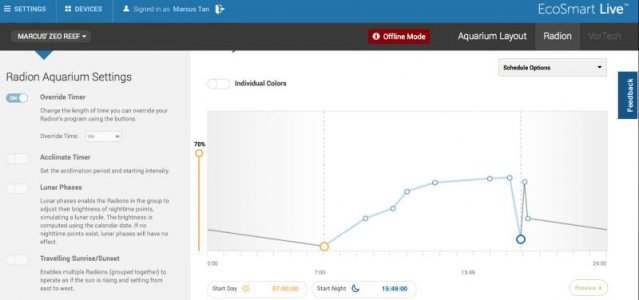
 
Screen shot

Screen shot

My schedule also looks corrupted.
It should be similar to the 'Radiant Colour' graph with some mods, i.e. start time 0700hrs, night time 2230hrs, peak at 14K spectrum, 70% intensity.
 

Attachments

  • ESL screen hot.jpg
    ESL screen hot.jpg
    27.6 KB · Views: 6
My schedule also looks corrupted.
It should be similar to the 'Radiant Colour' graph with some mods, i.e. start time 0700hrs, night time 2230hrs, peak at 14K spectrum, 70% intensity.

What browser and operating system are you using? I just took a look at your graph on a Mac on Chrome.
 

Attachments

  • Screen Shot 2014-10-04 at 8.45.44 AM.jpg
    Screen Shot 2014-10-04 at 8.45.44 AM.jpg
    14.3 KB · Views: 6
EcoSmart Live Graph/Scheduled Time Issue

Running mac osx mavericks. Using safari. It's been very stable until this morning AEST.
I've change the graph profile to a standard form based on growth to circumvent the multiple time points.
 
Last edited:
Running mac osx mavericks. Using safari. It's been very stable until this morning AEST.
I've change the graph profile to a standard form based on growth to circumvent the multiple time points.

Thanks for the info. I would like to investigate this issue further so it can be fixed for good. Do you happen to have a copy of your previous graph (exported)?
 
Hello Shaun,
I do have copies of previous graph. Can't up load here, though.

I used Chrome this morning to .... works perfectly! So, it must be a Safari issue. Version is 7.1 (9537.85.10.17.1).
Mac OSX 10.9.5 Build 13F34.

I will try to reload Safari as a last ditch measure.

Cheers
Marcus
 
Hello Shaun,
I do have copies of previous graph. Can't up load here, though.

I used Chrome this morning to .... works perfectly! So, it must be a Safari issue. Version is 7.1 (9537.85.10.17.1).
Mac OSX 10.9.5 Build 13F34.

I will try to reload Safari as a last ditch measure.

Cheers
Marcus

Thanks for the information. That should help us with diagnosing the issue.
 
Back
Top