Howto: Use a Linksys Router as Wireless Reef Controller - WRRC

On the basis this is a tech thread I'll be brave enough to show my automated 1wire Discus tank which is currently being fitted out...Its a 450 litre / 110 gal ?

setup-3.jpg


IMG_0003-1.jpg

IMG_0004-1.jpg


You can see the three monitors pH (CO2 injection...ORP and conductivity, these meters all have 0-5VDC outputs and relay contacts. I now have my pH and ORP directly in-tank instead of the filter intake line and its much easier to test/calibrate. The only inline measurement I do now is conductivity. The 1wire relay boards are mounted in the middle section. The two wire ducts, top one is for 240VAC and the lower duct is for 24VDC which the automation runs off.

visionrelay-1.jpg
 
Working on the 1-wire T-5 dimming this evening. The ballast works great and dims without a problem using a standard Potentiometer. I will be putting the 1-wire pot inline as soon as I can get some stub code writen.
 
Inferno can you give some details about the probes and interfaces. I am kicking around some ideas and not sure If I want to go 1-wire with them or not (have also considered the USB A/D from phidgets or activewire)
 
<a href=showthread.php?s=&postid=10537635#post10537635 target=_blank>Originally posted</a> by BeanAnimal
Working on the 1-wire T-5 dimming this evening. The ballast works great and dims without a problem using a standard Potentiometer. I will be putting the 1-wire pot inline as soon as I can get some stub code writen.
Awesome - keep us informed on how this goes. I bought dimmable T5 ballasts as well and have it on my feature wish/todo list. Any schematics/code would be very useful!
 
There is not much to it.

look at App Note 191 from Dallas Semi. The ballast has a purple and a gray wire coming from it (standard 0-10V dimmer loop).

The dallas 1-wire pot center pin (DS2890) hooks to the 1-wire master, the RH pin to the purple wire and the ground pin and grey wire are tied to ground.

You could use any digital or motorized analog pot. The ballast reads the voltage between the grey and purple wire and dims accordingly. 10V=full dimming, 0V= full brightness. I just chose to use the digital pot so that I could easily toss it on the 1-wire net.
 
We run a lot of dimmable flourescents at work. Be sure to burn the lamps in for at least 100 hrs at 100% before dimming. It makes them last a LOT longer.

We just ran a bunch of power (Stepped down 480V to 380V for Euro voltage) for an art installation that uses 575 34W T5 lamps, a fairly equal mix of red, green, and blue lamps. Each color bank is dimmed separately, so that any color can be achieved. The dimmers are small DALI Din rail mount type. The room is 360 degrees around you and the lamps are covered by a white translucent stretch film. Pretty neat.

Sorry for the Hijack....
Nice work fellas.
 
Last edited:
Oh yeah, Be SURE you use the correct lampholder for your ballast! I fried a $200 ballast because it was an instant start (pins shorted) and they were supposed to be Rapid start (pins separate) :mad:
 
I think standard T5 sockets are rapid start.... at least i got everything to fire up just fine. I don't feel like burning that damn thing in. I suppose 10 days with no dimming during the regular light cycle will be doable.
 
Yeah thats fine, it doesnt have to be 100 continuous hrs.
Sometimes if they need immediate dimming (ie Boardroom relamp) I'll pull lamps from a different fixture that is non dimmable.
I take it your T5s are new. Have any older lamps?
 
No... just a single T5 to add some supplimination to the (2) 150W phoenix 14Ks. It is an inwall tank with an internal overflow shelf, so I am very limited in the space above the tank. I can only fit the single T5. I am trying out the URI Super Actinic. I hope to get a bit more pop out of the colors.
 
IN Australia we have just got the Heller 4 way power board which includes a LCD timer function where you can set 4 off on/off times for each of the 4 power outlets. Great for Aquariums...however we are looking at how we can takeout the LCD timer and fit 1wire DO adapted to this board to control each of the 4 power outlet sockets.

Sound promising and the board is only US$20.00...couple that with a few dollars for 1wire Digital outputs and we have a way of controlling AC power at low cost and more importantly "SAFE"
 
OK New tank fully cycled and 1 wire digital I/O has been installed. ..and tonight was the first fully automatic water cycle...I have an illuminated push button that starts the sequence....One press starts the cycle, however you can abort each phase if you press the button again during draining and it stops draining and starts the fill...press again and it will skip fill if you want. Although the drain and fill times are just based upon time I do have a float switch installed which will stop filling when the tank is full. Thus press the utton and it will do everything for you. The latest owfs had trouble reading my flow meter so it'll be a little while until I drain based upon metered water draining from the tank. At this stage approx 30 minutes drain time = 50 litres and it takes twice as long to fill. A good thing about this is the fact the tank temperature only drop .5 degrees from start to finish without heating the water

This is an early pic of the 1wire relay control board mounted into the tank when first installed.

visionrelay-1.jpg


IMG_0022.jpg


this is the two solenoids Drain / Fill with the small pump..all is 24VDC
IMG_0025.jpg


For those interested in reading code here is rev 1....

#!/bin/bash

d_max=30 # Max drain timeout minutes
f_max=60 # Max Fill timeout minutes
DO_1="/opt/owfs/bin/owwrite -s 3001 12.276B45000000/PIO.BYTE" # Power
DO_2="/opt/owfs/bin/owwrite -s 3001 12.267745000000/PIO.BYTE" # Fill
DO_3="/opt/owfs/bin/owwrite -s 3001 12.A37645000000/PIO.BYTE" # Drain
DO_4="/opt/owfs/bin/owwrite -s 3001 12.D37245000000/PIO.BYTE" #

## Calculate script loop time based upon sleep = 2 seconds ##
d_max=`expr $d_max \* 60 / 2`
f_max=`expr $f_max \* 60 / 2`

### Reset all Outputs to OFF ###
$DO_1 0
$DO_2 0
$DO_3 0
$DO_4 0


### Main Loop (Wait for button to be pressed) ###
while true ; do
DI_4=$(/opt/owfs/bin/owread -s 3001 uncached/05.FC152D000000/sensed) #Waiting for button press
if [ $DI_4 == 0 ]; then
f_time=0
d_time=0

$DO_1 1 # Enable 24VDC Power
sleep 1
$DO_3 1 # Turn on Drain
while (( d_time <= d_max ))
do
DI_4=$(/opt/owfs/bin/owread -s 3001 uncached/05.FC152D000000/sensed) # Check if button is pressed to abort
if [ $DI_4 == 0 ];
then
break
fi
((d_time +=1 ))
sleep 2
done
$DO_3 0 # Turn drain off
sleep 1

$DO_2 1 # Turn on fill
while (( f_time <= f_max ))
do
DI_4=$(/opt/owfs/bin/owread -s 3001 uncached/05.FC152D000000/sensed) # Check if button is pressed to abort
DI_3=$(/opt/owfs/bin/owread -s 3001 uncached/05.65142D000000/sensed) # Abort if level sensor is HIGH
if [ $DI_4 == 0 ] || [ $DI_3 == 1 ];
then
break
fi
((f_time +=1 ))
sleep 2
done
$DO_2 0 # Turn off fill
sleep 1
$DO_1 0 # Turn power off
fi
sleep 2
done

 
New achievement

New achievement

Since a few days now I have a DIY pH-amp running.

pH-grafiek.jpg


The period to view is selectable in the top-right corner. The picture showed is a 48-hour period. The night-period is shown with the grey-colored shade. This makes it obvious that when the lights are on, the CO2 gets used till the solenoid jumps in.
The bottom left window is for selecting alarm-levels (visable in the graphic (left-top) and generates an email. The right window is for calibration with the well-known solutions.
 
Wow some pretty impressive things going on here. I'll be tagging along for the ride.

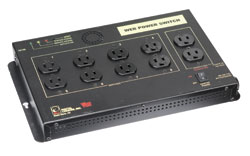
Does anyone know how you could get software to control an ethernet based power controller?

These by DLI look like they're great value but I'm not sure how easy it'd be to automate timers and ultimately code things like MH shut-off if temp exceeded a certain level etc.

lpcweb.jpg


I would think this would be quite a cost-effective alternative for x10 setups? (and wouldn't require any potentially dangerous DIY work with 110/220v for those of us who are less experienced ;))
 
You would need to use your favorite 3G language to write code... C++, Visual Basic, Delphi, C#, VB.NET... etc.

You COULD use linux and C

You COULD use an ethernet enabled PIC, ATMEL, or other uC to do the logic as well.
 
Back
Top