Hydros awc experts

I’m very confused at what my hydros was doing. I switched from a hob aio setup to a sump to accommodate a rollermat filter. I had an ato/awc program scheduled and running fine but when I switched to the sump I set up the ato first and let it operate a couple days. Then today I added the awc schedule and let it run. All went fine. System drained and then refilled. About 10 minutes later I could hear water running and checked to see why. The return chamber was refilling like it wa repeating a water change. I let it finish and immediately checked the awc schedule and could not find anything wrong. 10 minutes later I could hear water running again. Sure enough it was doing another awc! So I immediately deleted the awc schedule and let it finish. 10 minutes later I hear water running so I go to the drain line and find it is pumping out. I check the app status and it says ato is off, drain is off, fill is off, yet they’re running! I manually toggle them off even though it says they’re off but they shut down. Anyone understand what is going on and how to fix? Do I delete everything and start over? This seems like a serious bug in the firmware.
 
I have had that function running for years now.
I hate to say it but it is probably doing exactly what you programmed it to do.

That fact that deleting the schedule didn’t change anything tells me it wasn’t using it.
 
You are correct, mine has never done that.
Yes I have changed it from daily to weekly and back again. Turned it off and on. Changed the amount.
I am sorry you are insulted. It is much more likely that a bit of the programming is wrong than anything else.
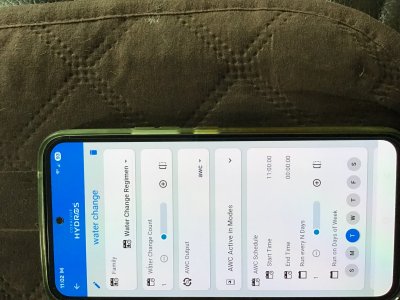
This runs a daily water change once every day at 11am
Untitled.png


  • Water Change Count: In this field, you specify the number of water changes evenly spaced out between the AWC Start and End Times defined below.
    TIP: The count defines the STARTING time of the water change. If you set the count to 1 and the Start and End time range is 24 hours, the water change will start at midnight. It will NOT slowly run for 24 hours.
  • AWC Output: You select the previously created AWC Output in this field.
  • AWC Active in Modes: Select the modes you want the AWC to “automatically” trigger. Do not select the mode you want to use for MANUAL water changes.
    TIP: We recommend using the Normal mode so the AWC triggers during normal day-to-day times.
  • Schedule: You can create a simple or complex schedule to run the output.
    • AWC Start Time: This is when the controller triggers the first AWC of the schedule. If you only have 1 “Water Change Count,” then this is the time when that AWC starts.
    • AWC End Time: This establishes the end of the time range for multiple triggers to activate. If you only have one “Water Change Count,” this field becomes irrelevant. If you have multiple Water Change Counts, the system will divide the starting and ending time range equally by the Water Change Counts’ number.
and then it runs it that many times.
I suspect you had this set to something other than one.
 
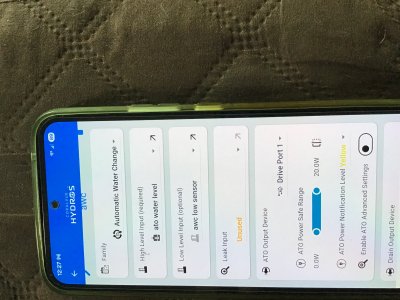
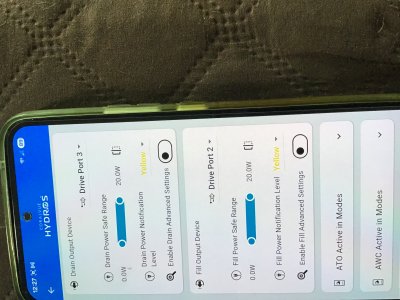
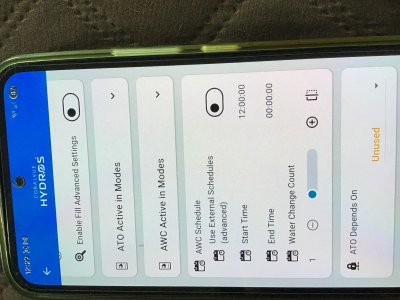
These are my settings that I went all through again today and again it repeated after 5 or 10 minutes. In both the schedule and the awc output the “water change count” is 1.
 

Attachments

  • IMG_1164.jpeg
    IMG_1164.jpeg
    1.6 MB · Views: 1
  • IMG_1163.jpeg
    IMG_1163.jpeg
    1.6 MB · Views: 1
  • IMG_1162.jpeg
    IMG_1162.jpeg
    1.6 MB · Views: 3
  • IMG_1161.jpeg
    IMG_1161.jpeg
    2 MB · Views: 3
I am guessing a bit. I never program on my phone and only use it for turning stuff on and off if the power is off.

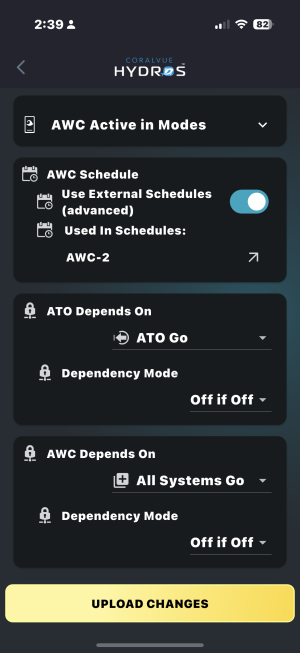
You have a schedule but don't have it turned on and selected.
That is done with the slider on the right in the 4th pic. When you enable that you will get a space to pick the water change schedule.
Off
IMG_0344.PNG

on
IMG_0343.PNG

my schedule
IMG_0345.PNG


I think your problem is being caused by the time entries when the schedule isn't selected. Your end time 00:00:00 is before your start time of 11:00:00. So it is running over and over. That is just a guess.

I would move the slider to use the schedule and select it.

I would change the end time to be an hour or some time close to how long the water change takes plus 10 minutes in the entries on the schedule page. I use 40 minutes.

It is a mistake when program a controller to think they understand anything. Something simple like tomorrow is a concept they don't understand. They live in the 24 clock cycle and thats all they understand. Anything else is undefined and sometimes you get nothing happens and sometimes you get starts but never stops.

Another reason why the time limit important is if the water change fails for some reason then it defines when normal ATO function resumes.

I have built overrides into mine that use water level sensors in the ATO reservoir and NSW tank so a water change wont happen unless
There was enough RODI so the ATO had the system level normal before the water change
and
There is enough NSW to refill the system during the change.

Am I a guru. Nope. Just used it for a while. Programming a Hydros is nothing like the many threads I read over the years for programming an APEX system. So for I have managed to make Hydros do what I want.
I don't do the wave engine. I let the pumps run on the controllers they came with. If I want Hydros to control something I use simple AC pumps and turn them on and off by time or condition. It used to run my MH/T5 lighting but I changed over to LEDs separately programmed.
I started with a XS controller and added an X4 and X3 to it latter. I have another XS on my 75 gallon freshwater tank.
Originally the AWC and ATO were separate programs and got unified to the way they are now. I had to redo mine but even that was a couple of years now.
There is a forum for programming questions and an excellent guide online. That can be opened by hitting the three dots at the top right of the status page and selecting help.

 

Attachments

  • IMG_0343.PNG
    IMG_0343.PNG
    1 MB · Views: 0
Thanks I will set that. Odd to me that it started on schedule without that. Also the manual said the end time is immaterial if only running once but I sure don’t know. Hopefully setting the “use external schedule” slider does it. I’ll have to give the tank a little time though before I run another water change as it’s run 6 times in a day and a half. I want to keep the nutrients as close to current as possible. Thanks again I’ll let you know.
 
There are 2 places where times are entered. On yours one is set at 11 and the other at 12.
Are you sure which time it actually started?
If it is truly acting wonky I assume you would have to default it and reload the software and program.
I did that once but dont remember all of how to do It. I had to reseat a component inside and reload it. That was under the direction of Coralvue on a help ticket. What's inside looks a lot like a Raspberry Pi if you have ever fooled with one of those. All the programming is stored on a memory card.

If you want gurus post on the forum. I haven't been there in a while but there used to be excellent people to help answer stuff..
 
Times are different because I took the pictures at different times when I changed the schedule to keep checking what was happening. I know it started on schedule because on my app I can only set times by The hour. So minutes aren't available. I would then have to wait for the schedule to run. Which it did. Never messed with the Pi but have done alot with arduino. I went with hydros because I didn't think it made sense to recreate the wheel.
 
Back
Top