redtop's Ferduino controller

I will use a barrel connector to the arduino mega from the Power supply, that way if I use some stepdown voltage reducer from the main LED array circuit power supply I can retro-fit easily and free up the 5V supply for yet another impetuous project.
 
Thanks for the info, equivalents on the way from fleabay as Amazon.ca does not have the listings... I will take me a couple of weeks to get the protoscrew shield soldered and figure out the best layout. Good thing we have a lot of tanks... Willie with the Jarduino comment you are going to make me buy another screen!

no problem :)

everybody needs 2 of everything LOL I had to buy a second screen for tinkering and testing with the Ferduino, since I'm pretty well happy with it, I needed something else to do with the screen :D

is it possible to wear out a USB cable? mine has been used a lot LOL

ok I had to re read that soldered to the arduino 5v pin can you show me where you soldered it to I am having a hard time picturing it in my head

rott, it is as simple as it sounds, just connect directly to the 5v and gnd pin headed just as if you were connecting the RTC or any other 5v accessory to the board...

I actually soldered the wires directly to my proto board so that when it is plugged into the Mega, it powers the Mega and then anything else that is connected to the proto shield via the 5v pin

I don't have an actual photo but looking at the Mega in this photo, notice the power pin section on the board at the bottom directly to the right of the factory 7 to 12v power input, I connected directly to those pins, the 5v and gnd there are 2 gnd pins there and either can be used for the ground wire and you no longer need the 7 to 12v wall wart, the 5v 6a supply will power the Mega, the screen ,and pretty much anything else you'll ever connect to the board :D

index.php
 
no problem :)

everybody needs 2 of everything LOL I had to buy a second screen for tinkering and testing with the Ferduino, since I'm pretty well happy with it, I needed something else to do with the screen :D

is it possible to wear out a USB cable? mine has been used a lot LOL


rott, it is as simple as it sounds, just connect directly to the 5v and gnd pin headed just as if you were connecting the RTC or any other 5v accessory to the board...

I actually soldered the wires directly to my proto board so that when it is plugged into the Mega, it powers the Mega and then anything else that is connected to the proto shield via the 5v pin

I don't have an actual photo but looking at the Mega in this photo, notice the power pin section on the board at the bottom directly to the right of the factory 7 to 12v power input, I connected directly to those pins, the 5v and gnd there are 2 gnd pins there and either can be used for the ground wire and you no longer need the 7 to 12v wall wart, the 5v 6a supply will power the Mega, the screen ,and pretty much anything else you'll ever connect to the board :D

index.php

Hi all I'm new to this thread but not RC.
It seems that the mega has no reverse voltage protection. Very interesting to know. I have a nutshell board from Marspeed (thank you Marc) that I will now try to power the mega with through the power pins instead of the power connector.
I would never of thought of it. I'm an electrician by trade and in my field that would be a no no.

This is a great thread and build. I will be following along. Gonna load the sketch up this weekend!

sb
 
Hi!

Take care to connect 5V directly because this bypasses the regulator, and can damage your board.

Is better use a power supply of 7 or 9V on power jack to not heat too the board.

Best regards.

Fernando Garcia
 
marspeed you forgot the rest of the pins I know they are for lcd but what if thee isn't an lcd used or if a 20x4 with back pack is used that is only 2 wires for tx and rx
 
Willie did you use the Temperature probe setup screen to set your temp probs it doesn't find the 3 I have connected I wonder if it is a problem with how long the cables are I believe they are about 12 feet each maybe a little longer (15 foot) and the data pin is 49 for the 3 probes
 
Ok that would be 18 screw terminals across the back they won't fit 2nd thing that board is already 10 cm long and third the traces where to run them
 
Hi all I'm new to this thread but not RC.
It seems that the mega has no reverse voltage protection. Very interesting to know. I have a nutshell board from Marspeed (thank you Marc) that I will now try to power the mega with through the power pins instead of the power connector.
I would never of thought of it. I'm an electrician by trade and in my field that would be a no no.

This is a great thread and build. I will be following along. Gonna load the sketch up this weekend!

sb

Hi!

Take care to connect 5V directly because this bypasses the regulator, and can damage your board.

Is better use a power supply of 7 or 9V on power jack to not heat too the board.

Best regards.

Fernando Garcia

Fernando, it does the same no matter the power supply if you're connecting via the power port, it is the regulator on the Mega that is getting hot, not the power supply, I tried it with a 12v 15a supply and a 9v 3a, and the 10v 1a that was recommended for the Arduino, the regulator on the Mega got too hot to touch with any power supply I used

you are correct sharkboy, most places with electricity, this would be a big no no

my thought on this is, since this is a regulated 5v 6a power supply, and I wouldn't recommend any supply that isn't regulated for this,

what I'm doing is bypassing the Arduino regulator for a much better regulator and stronger power source but supplying the same voltage that is required to power the board...the Mega regulator was designed to regulate the power from the cheap wall warts that are most of the time very unstable with their voltage output, a regulated power supply is always more stable than the wall warts, the Arduino designers just didn't build the Mega for the 7 inch screens power needs

as for bypassing the weaker regulator on the Mega, I think it would be better to disconnect the weaker stuff from the board but I'm not sure what would need removed LOL

I also tried this power supply connected to the USB port and it worked just as well that way, but it tied up the USB port so I couldn't reload the code after tweaking.....

if you'll uncomfortable with bypassing anything in the Mega, with a volt meter you could test the USB port and find the 5v pin from it and connect directly to the Mega board there and still leave the USB port available for data transfer (and that is no different than power from the PC via the USB port if you're using the 5v regulated supply) but then, that is basically the same as connecting to the 5v pin :D
 
Willie did you use the Temperature probe setup screen to set your temp probs it doesn't find the 3 I have connected I wonder if it is a problem with how long the cables are I believe they are about 12 feet each maybe a little longer (15 foot) and the data pin is 49 for the 3 probes

yes, once I had them wired correctly, the controller found them on problem, not sure about the lead length but I assume it could cause a problem if they're a lot too long, but I honestly can't say for sure

I made my own probes using the DS18B20 transistor and a 15 foot long RCA patch cables, I think I cut is down to about 10 feet long though, and I use the parasitic power so that only 2 wires are needed, but after getting the wiring connected correctly and shrink tubing on the connections, I then sealed the transistor in a AP water test tube with silicon, I also added thermal paste to the bottom of the vial to help with temperature transfer through the glass of the tube, once the silicon set up, I then used shrink tubing and made it all look a little better by hiding most of the test tube

I used the test tube because it is a perfect fit in my probe holder :D

I don't like the stainless steel probes because they will still rust through and become useless if you don't seal them with something, I figured that since I would have to seal it anyway, why not just make my own and save a few bucks, besides, I wanted one that will last at least until I break the glass vial :D LOL
 
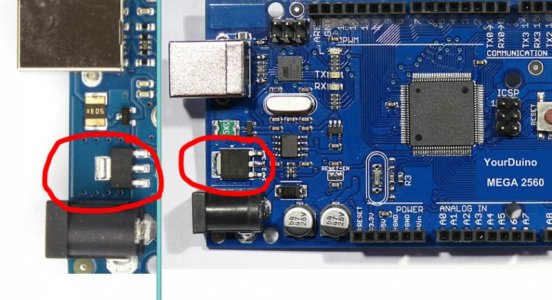
Willie, your arduino have a regulator 117-5 or 269-5?

The regulator used on official design is smaller (117-5) and it has a less capacity to dissipate heat.

The 117-5 is very sensitive to heat.

See the image.

117-5 (left) 269-5 (right)

I have a board with the 269-5 and works very using 12V, even being extremely hot.
 

Attachments

  • IMG_10072014_133520.jpg
    IMG_10072014_133520.jpg
    66.8 KB · Views: 26
wow I did not know about the regulator but just jumped on fleabay to look most all sainsmart is megas are sold with lower ones even the cheap $12 to 15$ ones have the 295-5 guess that is some thing to look for from now on I used a 9v 1.5 amp wall wart today on my sainsmart mega and the back got so hot I unplugged it that board has a 117-5
 
Back
Top