
You are using an out of date browser. It may not display this or other websites correctly.
You should upgrade or use an alternative browser.
You should upgrade or use an alternative browser.
(Another) DIY LED Controller - Simple Arduino Style
- Thread starter katchupoy
- Start date

studog86
New member
Wow, I am glad I could help someone out.
Wow, I am glad I could help someone out.
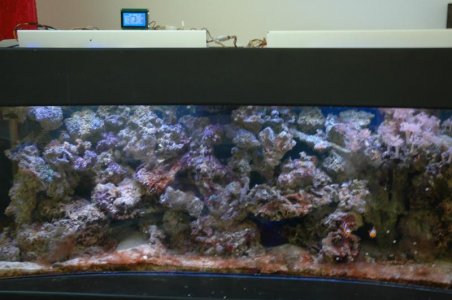
I am here to help if you have any questions on how I have setup that sketch. I am still working on getting temp, ph and Orp setup, I will keep updating my sketch as I conquer each step, and would love to see how your sketch is coming alone. Here is a picture of my setup, I still have not been able to construct and enclosure for everything, kids are taking up all my time.
Matt.:fun2:
Wow, I am glad I could help someone out.
I am here to help if you have any questions on how I have setup that sketch. I am still working on getting temp, ph and Orp setup, I will keep updating my sketch as I conquer each step, and would love to see how your sketch is coming alone. Here is a picture of my setup, I still have not been able to construct and enclosure for everything, kids are taking up all my time.
Matt.:fun2:
studog86
New member
Potentiometer
Potentiometer
I noticed you haven't set up any pots for your backlight, or contrast. That would make a huge difference on how your GLCD looks. I allows you a lot of adjustments to tune in your GLCD. You could get some cheap ones from Radio Shack for less than a dollar. You will also need two more for manually dimming your Strings of LEDs for acclimating to animals. I can send a picture on how to wire those up if you need it.
Potentiometer
Hi to all today i managed to switch on my Arduino mega 2560 and uploaded the sketch that studog86 posted .I am waiting for my RTC so I can start the project.

I noticed you haven't set up any pots for your backlight, or contrast. That would make a huge difference on how your GLCD looks. I allows you a lot of adjustments to tune in your GLCD. You could get some cheap ones from Radio Shack for less than a dollar. You will also need two more for manually dimming your Strings of LEDs for acclimating to animals. I can send a picture on how to wire those up if you need it.
studog86
New member
The clock is off.
The clock is off.
The clock leaves an extra character on the end, and there are a few more little bugs that I have managed to iron out. I am on my third day of testing and all looks good, I will update my sketch tomorrow when I get my kids off to school. Make sure you use the updated sketch.
Matt.
The clock is off.
Hi to all today i managed to switch on my Arduino mega 2560 and uploaded the sketch that studog86 posted .I am waiting for my RTC so I can start the project.
The clock leaves an extra character on the end, and there are a few more little bugs that I have managed to iron out. I am on my third day of testing and all looks good, I will update my sketch tomorrow when I get my kids off to school. Make sure you use the updated sketch.
Matt.
I noticed you haven't set up any pots for your backlight, or contrast. That would make a huge difference on how your GLCD looks. I allows you a lot of adjustments to tune in your GLCD. You could get some cheap ones from Radio Shack for less than a dollar. You will also need two more for manually dimming your Strings of LEDs for acclimating to animals. I can send a picture on how to wire those up if you need it.
I have 1 pot but it is just under the wires .

you know what can help if you can try to post a sketch on how to wire all the things and pins you are using as I am very very green on these things .
I am doing a LED with 4 meanwell "p" and from the Led and the meanwells I am going to have about 1.2m Can I use a VGA cable to connect them or I need ticker cables?
That's interesting question. I was always wondered how to properly calculate optimal wire gauge for different projects. Amperage and wire length are two things that define gauge. Or not ?
Googled a bit and found table for cooper wires :http://http://diyaudioprojects.com/Technical/American-Wire-Gauge/
According it :
0.35A need at least 26 gauge wire (0.13 mm2 = d 0.40 mm)
0.7 A need at least 23 gauge wire (0.26 mm2 = d 0.57 mm)
1.0 A need at least 21 gauge wire (0.40 mm2 = d 0.72 mm)
Please correct me if wrong.
Last edited:
studog86
New member
That's interesting question. I was always wondered how to properly calculate optimal wire gauge for different projects. Amperage and wire length are two things that define gauge. Or not ?
Googled a bit and found table for cooper wires :http://http://diyaudioprojects.com/Technical/American-Wire-Gauge/
According it :
0.35A need at least 26 gauge wire (0.13 mm2 = d 0.40 mm)
0.7 A need at least 23 gauge wire (0.26 mm2 = d 0.57 mm)
1.0 A need at least 21 gauge wire (0.40 mm2 = d 0.72 mm)
Please correct me if wrong.
Actually you are right, but to clarify, Gauge is just the thickness a particular wire, the amount of amps you will need to draw and length of run will determine which Gauge (thickness) of wire you will need. There are also more determining factors of which wire you should use, low voltage lines will run much better when highly stranded. Make sure your wire is marked for low voltage, using a higher voltage wire will cause a huge votage drop over any length of run.
So in closing, figure out your length and amperage and what voltage you will be drawing, grab and uglys book from any box store, and look up what gauge you should be running.
Hope that makes sense.
studog86
New member
VGA cable uses
VGA cable uses
Most typical VGA cables are around 24 gauge. That gauge could run a 12volt 3.5 amp signal no problem. I am not sure what current you are trying to run but I have nothing running through my Arduino thats even comes close to that.
VGA cable uses
I am doing a LED with 4 meanwell "p" and from the Led and the meanwells I am going to have about 1.2m Can I use a VGA cable to connect them or I need ticker cables?
Most typical VGA cables are around 24 gauge. That gauge could run a 12volt 3.5 amp signal no problem. I am not sure what current you are trying to run but I have nothing running through my Arduino thats even comes close to that.
studog86
New member
VGA cable vs ethernet.
VGA cable vs ethernet.
Have you thought about using an ethernet cable, the connectors are cheap and clean, and can be purchased everywhere.
VGA cable vs ethernet.
Most typical VGA cables are around 24 gauge. That gauge could run a 12volt 3.5 amp signal no problem. I am not sure what current you are trying to run but I have nothing running through my Arduino thats even comes close to that.
Have you thought about using an ethernet cable, the connectors are cheap and clean, and can be purchased everywhere.
studog86
New member
I have 1 pot but it is just under the wires .
you know what can help if you can try to post a sketch on how to wire all the things and pins you are using as I am very very green on these things .
For Blue lights, use pin PWM 2
For White lights, use pin PWM 4
For Fans use pin anaolg 0. Whoops, I mean A0.
These values are easy to change
int blueramptime = 60 ; // time for blue LEDs to dim on and off in minutes
int whiteramptime = 120 ; // time for white LEDs to dim on and off in minutes
int bluemin = 0 ; // minimmum dimming value of blue LEDs, range of 0-255
int bluemax = 255 ; // maximum dimming value of blue LEDs, range of 0-255
int whitemin = 0 ; // minimum dimming value of white LEDs, range of 0-255
int whitemax = 255 ; // maximum dimming value of white LEDs, range of 0-255
int photoperiod = 540 ; // amount of time array is on at full power in minutes
int ontime = 10 ; // time of day (hour, 24h clock) to begin photoperiod fade in
int blue = 2; // blue LEDs connected to digital pin 2 (pwm)
int white = 4; // white LEDs connected to digital pin 4 (pwm)
int fan = A0; // Fan power relay connected to analog pin 0
int fuge = A1; // fuge light power relay connected to analog pin 1
int moon = A4; // moon light power relay connected to analog pin 4
When you use int, you are introducing to Arduino what pins you will control later in sketch.
Change int blue, white to any pwm switch you would like, and int fan can be changed as well.
Dimming time for blue and white, and total time at 100 percent brightness can also be changed.
These are in increments of minutes. int blueramptime, int whiteramptime and photoperiod. When you are testing change all three to 2 minutes, so you dont have to sit around for 11 hours.
Whenever you change any value make sure you compile sketch, just in case you did something wrong. If you dont, bad things can happen.
Last edited:
studog86
New member
Diagrams
Diagrams
For a great wiring diagram goto post#34 click on The updated list.
Diagrams
For Blue lights, use pin PWM 2
For White lights, use pin PWM 4
For Fans use pin anaolg 0. Whoops, I mean A0.
These values are easy to change
int blueramptime = 60 ; // time for blue LEDs to dim on and off in minutes
int whiteramptime = 120 ; // time for white LEDs to dim on and off in minutes
int bluemin = 0 ; // minimmum dimming value of blue LEDs, range of 0-255
int bluemax = 255 ; // maximum dimming value of blue LEDs, range of 0-255
int whitemin = 0 ; // minimum dimming value of white LEDs, range of 0-255
int whitemax = 255 ; // maximum dimming value of white LEDs, range of 0-255
int photoperiod = 540 ; // amount of time array is on at full power in minutes
int ontime = 10 ; // time of day (hour, 24h clock) to begin photoperiod fade in
int blue = 2; // blue LEDs connected to digital pin 2 (pwm)
int white = 4; // white LEDs connected to digital pin 4 (pwm)
int fan = A0; // Fan power relay connected to analog pin 0
int fuge = A1; // fuge light power relay connected to analog pin 1
int moon = A4; // moon light power relay connected to analog pin 4
When you use int, you are introducing to Arduino what pins you will control later in sketch.
Change int blue, white to any pwm switch you would like, and int fan can be changed as well.
Dimming time for blue and white, and total time at 100 percent brightness can also be changed.
These are in increments of minutes. int blueramptime, int whiteramptime and photoperiod. When you are testing change all three to 2 minutes, so you dont have to sit around for 11 hours.
Whenever you change any value make sure you compile sketch, just in case you did something wrong. If you dont, bad things can happen.
For a great wiring diagram goto post#34 click on The updated list.
TheFishMan65
New member
I am not yet and Arduino programmer (so not familiar with the pecularities of this processor), but I do program for a living. But here is a comment. I keep seeing lines like:
int blue = 2; // blue LEDs connected to digital pin 2 (pwm)
This allocates a memory location and sets it to a value of 2. Unless you are going to change it this seems to me a waste of memory. It seems to me you would be much better of using
#define blue 2 // blue LEDs connected to digital pin 2 (pwm)
or since it is constant most programmer I know use upper case
#define BLUE 2 // blue LEDs connected to digital pin 2 (pwm)
Now any time BLUE is used in the code the compiler will subsistute 2. Your code may also run faster since it may require fewer memory accesses to obtain the value (depends on how it behaves).
int blue = 2; // blue LEDs connected to digital pin 2 (pwm)
This allocates a memory location and sets it to a value of 2. Unless you are going to change it this seems to me a waste of memory. It seems to me you would be much better of using
#define blue 2 // blue LEDs connected to digital pin 2 (pwm)
or since it is constant most programmer I know use upper case
#define BLUE 2 // blue LEDs connected to digital pin 2 (pwm)
Now any time BLUE is used in the code the compiler will subsistute 2. Your code may also run faster since it may require fewer memory accesses to obtain the value (depends on how it behaves).

katchupoy
New member
Hi to all today i managed to switch on my Arduino mega 2560 and uploaded the sketch that studog86 posted .I am waiting for my RTC so I can start the project.
That is one gorgeous LCD. Wish I can learn to program the same... Some other time maybe.
studog86
New member
Yes I mean that. Not a big trouble - just aesthetic thing. But more important, that i hardly can leave puzzle unsolved
Have you looked at my sketch, I was able to add a 0% at the end to read 00% to 100% granted I am using GLCD.print instead of LCD.print but it worked for me. Arduino still spits single digits but I cheated and just printed a 10ths place 0 at the end, works great.
studog86
New member
define instead of int. Ill try it and get back to you.
define instead of int. Ill try it and get back to you.
Ill try that and get back to you
define instead of int. Ill try it and get back to you.
I am not yet and Arduino programmer (so not familiar with the pecularities of this processor), but I do program for a living. But here is a comment. I keep seeing lines like:
int blue = 2; // blue LEDs connected to digital pin 2 (pwm)
This allocates a memory location and sets it to a value of 2. Unless you are going to change it this seems to me a waste of memory. It seems to me you would be much better of using
#define blue 2 // blue LEDs connected to digital pin 2 (pwm)
or since it is constant most programmer I know use upper case
#define BLUE 2 // blue LEDs connected to digital pin 2 (pwm)
Now any time BLUE is used in the code the compiler will subsistute 2. Your code may also run faster since it may require fewer memory accesses to obtain the value (depends on how it behaves).
Ill try that and get back to you
studog86
New member
Glcd
Glcd
If I can do it you can, I am an electrician by trade and a computer geek, but know nothing about programming. If you buy a GLCD and send me your sketch I will set it up for you, I owe you that much. I could never have done this with out a nudge from you, and this thread. That also goes for the rest of you on this forum, if you need help with your GLCD, I will pave the way.
Matt.
Glcd
That is one gorgeous LCD. Wish I can learn to program the same... Some other time maybe.
If I can do it you can, I am an electrician by trade and a computer geek, but know nothing about programming. If you buy a GLCD and send me your sketch I will set it up for you, I owe you that much. I could never have done this with out a nudge from you, and this thread. That also goes for the rest of you on this forum, if you need help with your GLCD, I will pave the way.
Matt.
Have you looked at my sketch, I was able to add a 0% at the end to read 00% to 100% granted I am using GLCD.print instead of LCD.print but it worked for me. Arduino still spits single digits but I cheated and just printed a 10ths place 0 at the end, works great.
Thanks , I will look in to it .
katchupoy, I second studog with his plaudits ... and the same to you other followers. I enviously read about this "arduino aquarium controller" over a year ago and just gave it up until you started this thread. Your focus (and refocusing) on simplicity gave me the impetus to order, build, write, and test code - learning with each baby step.
Now (very proudly) I have one @ R,B,G LEDs following my code to come on, off, ramp up and ramp down - all with appropriate text on that 128 pixel screen telling me what it is doing. At 72 there are fewer things that ring my bell ... but you did. Thanks to all you great guys for the replies and inspiration. Now, I bet I can create a 3-LED lightning simulation ... hummm ...
Now (very proudly) I have one @ R,B,G LEDs following my code to come on, off, ramp up and ramp down - all with appropriate text on that 128 pixel screen telling me what it is doing. At 72 there are fewer things that ring my bell ... but you did. Thanks to all you great guys for the replies and inspiration. Now, I bet I can create a 3-LED lightning simulation ... hummm ...
Similar threads

- Replies
- 6
- Views
- 2K

- Replies
- 2
- Views
- 189
- Replies
- 0
- Views
- 374