Apex Android App

I am not able to get into my apex thru my browser on my phone
This issue is commonly discussed on the threads as "accessing the controller from outside the home" and depends on which specific router you have and which specific ISP (ie Comcast, Verizon, etc) you have at home.

I suggest reading the Unofficial Users guide posted at the top of the forum in the section on Port Forwarding or posting separately.
 
It has nothing to do with the HTC EVO. The same problem would likely exist if you were trying to get access to your controller from work or school.

Well, I suppose there is a small chance that it could be related to the phone but unlikely. Have you ever been able to access your controller from any computer outside the home.

Sorry, I can't call, stealing a few minutes of time on the forum is enough to drive my wife crazy. Spending 45 minutes on the phone would be grounds for divorce. I hope you understand.
 
I have never tried getting on from another computer....I have gotten on with my computer when on vacation to look at it but have never tried it on a different computer
 
Which URL did you use to access your controller when you were on vacation? Neither http: //192.168.1.50 nor http:/apex should have worked
 
For those who are interested in trying out the beta next release, you can download the "AquaNotes" app from the Google Android Market.

A couple of significant caveats:
  • It is really more of an Alpha than a Beta.
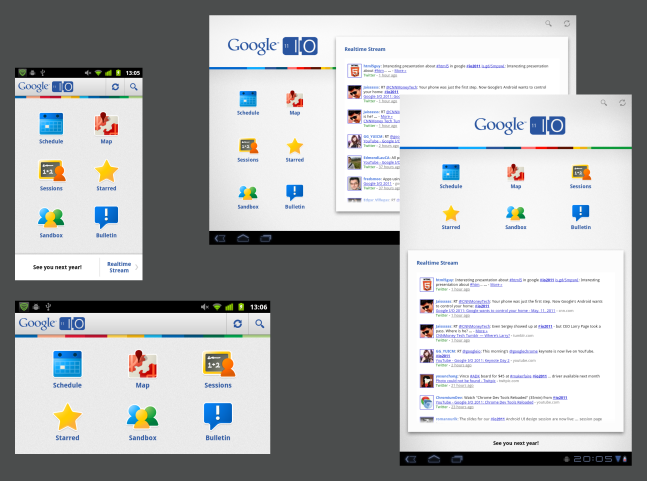
  • The goal is to use a Google sample app that is phone/tablet friendly. The sample UI is shown just below here.
  • But"¦. The tablet version is not ready yet, don't bother.
    iosched.png
  • Widgets don't work yet. They may be there but don't use them.
  • Fire up the app then go to the preference screen to enter your credentials
  • Add as many controllers as you wish.
  • Each controller you enter will be a left/right swipeable screen in the controllers icon.
  • ACiii works in monitor only mode, Apex in monitor/update.

To-Do List:
  • Get the tablet version working.
  • Fix update for ACiii
  • Fix the widgets
  • Port the graphing code over from the original app and update it.
  • Add new features as new icons such as notes, inhabitants database, manual parameters (ie alk/ca).
  • oh, and get rid of the copyrighted Neptune material :)


(comments via email please at heneryh@verizon.net not PM. My PM box is full.)
 
This is going well Henry.
I have the app on my phone and there seem to be alot of extra home icons at the top of the probes data page they go from three to about six.
and when i tap one of them it takes me to the home screen and then it does a sync.
 
That bar at the top is called an ActionBar and is a bit of a mystery. There is a lot of vodoo magic going on there and I am still trying to figure it out. Bear with me on that one.

It should be a House Icon (for Home), a Title and a circular refresh button. It is driving me crazy because it acts differently in the emulator than it does on my phone and other phones.

The Controllers page is especially slick if you have multiple controllers. You can simply swipe l/r through them.

I still have a ton of clean-up to do but I want to spend a little time getting the tablet version back up and running. The real challenge with the tablet is figuring out how to best take advantage of the multiple panes.
 
The ActionBar is supposed to look like this but with just a refresh circle on the right instead of the search and that other icon.
162366-1.png
 
V 0.25 released to the market with an update for that top bar called the ActionBar.

Specifically, it is intended to settle out the text, icons and refresh button for both pre and post Ice-Cream-Sandwich versions of the operating system.

If anyone can confirm the ActionBar operations for your OS version it would be great.

This release nearly completes the functionality for the phone version of the controller section.

Only remaining items for core capability that I know of are:
  • Graphical/organization of the screens. (Ie put title here, url there etc)
  • ACiii outlet change.

I believe monitor works for both ACiii and Apex for one or multiple controllers on both pre and post ICS.

I believe control works for Apex.

I believe the refresh button should accurately display the update status. Note - if you enter the app and go into the controller details in the middle of a refresh it may be incomplete. Hit refresh again.

Please comment on any discrepancies.

Priorities now are:
  • Tablet format
  • Widgets
  • Graphs
  • Other features as described above

Bug found - hitting the <home> button in the action bar on the controller page rather than the <back> button to get back to the main dashboard causes a FC.
 
Last edited:
I put the "home" and "back" in my bug comment above in brackets and the forum interpreted as something thus hiding the text. Sorry for the confusion. I meant to say "hitting the home button in the action bar rather than the back button causes a FC."

It doesn't make much sense the way it is displayed.
 
V 0.28 has been pushed to the market with Tablet support.

The app should now support:
  • All phone handsets up to ICS.
  • Tablets running Honeycomb have been tested. I suppose Tablet ICS might work too.

The app should now support:
  • Apex in both monitor and control
  • ACiii in monitor only

To-Do List:
  • ACiii control
  • Widgets
  • Graphing
  • Overall cleanup of UI with sizing and spacing etc as well as defining what goes where. This is especially true in the controllers tab area. I now have the title like three places. It was mostly tech trial to make sure I could access the differnt graphical areas.
  • Other new features.


Bugs and other issues list is maintained here: https://github.com/AquaNotes/AquaNotesTest/issues
 
Back
Top