Digital Aquatics Archon Owners Thread

Try pushing the reset button thru the tiny hole on the front. That usually will force the Archon to go back to the initial set up mode.


The weird thing it does is when I unplug and plug it in no network is found. If I hold the reset button in it finds it but nothing will connect except laptop that says limited and won't do anything. And if I unplug and plug back in the network disappears and won't come back until I hold in reset button again. When u plugged in the usb thing to make a backup into my computer it said the drive needs repaired. I didn't do it , but do I need to let the computer repair it?
 
I am not at home but if I remember correctly you log into the archon instead of you router as your WiFi. Then you type in 192.168.10.1 to connect with the Archon. This is in the instructions if you download them from the DA website. I am going from memory so double check the IP address if it doesn't work.
 
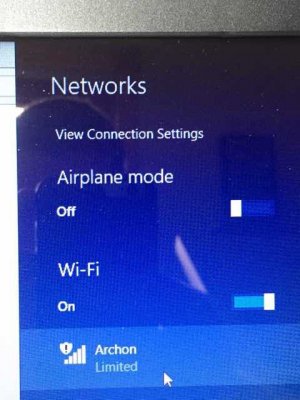
When you see the Archon wireless network appear in your wifi setup, make sure you disconnect from your home network, and connect only to the Archon network. (It will say Limited). After that type in your URL 192.168.10.1 as others have suggested, and you should see a setup screen appear. After you enter the information and save, the Archon network will disappear and then you have to reconnect to your home network and enter the address that has been assigned to the Archon by your DHCP server. Like 192.168.0.xx
 
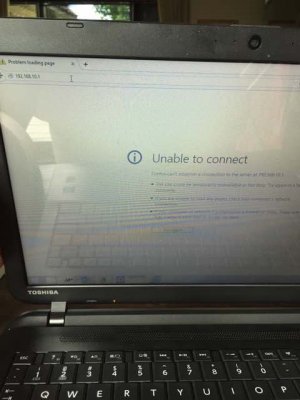
ImageUploadedByTapatalk1434807185.782288.jpgImageUploadedByTapatalk1434807206.572025.jpg
 
When you see the Archon wireless network appear in your wifi setup, make sure you disconnect from your home network, and connect only to the Archon network. (It will say Limited). After that type in your URL 192.168.10.1 as others have suggested, and you should see a setup screen appear. After you enter the information and save, the Archon network will disappear and then you have to reconnect to your home network and enter the address that has been assigned to the Archon by your DHCP server. Like 192.168.0.xx


That's what I see.
 
This thing makes a great paper weight.

I am not much help at work. I responded to your post on the DA website. If you still cannot connect before I get home. PM me on the DA website and I will give you a call if needed.

A couple of questions. Did you change any of the files on the USB memory stick? If so did you copy the original files to your computer first? The files have to match the software and firmware install on the Archon.
 
I am not much help at work. I responded to your post on the DA website. If you still cannot connect before I get home. PM me on the DA website and I will give you a call if needed.


A couple of questions. Did you change any of the files on the USB memory stick? If so did you copy the original files to your computer first? The files have to match the software and firmware install on the Archon.


Ok sounds good.

I didn't change a thing. I hit copy and paste.
 
That's OK. I get home about 7:00pm Central time. Hopefully you are up and running by then. If not I can give you a call after I get through eating dinner. I have done this from the iPad before. It should work. The only issue with the iPad is once it is setup I have to use the internet address or type in the local IP to connect. The local name won't work with the iPad.
 
the only other thing I can think to tell you right now is, as long as you are connected to the Archon server, try to use Internet Explorer instead of Firefox and see what happens. I had to do that a few times.

And your right, so far it has more drawbacks than advantages. I ended up putting my fuge light back on the RKE because it was on 24 hours no matter what I did to the timer.
 
That's OK. I get home about 7:00pm Central time. Hopefully you are up and running by then. If not I can give you a call after I get through eating dinner. I have done this from the iPad before. It should work. The only issue with the iPad is once it is setup I have to use the internet address or type in the local IP to connect. The local name won't work with the iPad.


I'm at a graduation party tonight so it might be to late to call tonight I'll let ya know.

I've tried ie, chrome, and Firefox. I'm at a loss as to what it could even be. I'm thinking its defective. There's only so many things it can be. The only thing I noticed as odd was that when I copied the files to my computer one wouldn't copy. Said it couldn't.
 
I'm at a graduation party tonight so it might be to late to call tonight I'll let ya know.

I've tried ie, chrome, and Firefox. I'm at a loss as to what it could even be. I'm thinking its defective. There's only so many things it can be. The only thing I noticed as odd was that when I copied the files to my computer one wouldn't copy. Said it couldn't.

Tomorrow is ok also.
 
the only other thing I can think to tell you right now is, as long as you are connected to the Archon server, try to use Internet Explorer instead of Firefox and see what happens. I had to do that a few times.

And your right, so far it has more drawbacks than advantages. I ended up putting my fuge light back on the RKE because it was on 24 hours no matter what I did to the timer.

I programmed an output with a timer to turn on at 9:00pm and stay on for 8 hrs using multi- timer function. We will see what happens.
 
I'm at a loss as to what to do. I've tried different USB drives, I've downloaded the files from the DA website and started fresh. Ive reset it countless times. Ive tried different devices. I have no idea what is going on. How is this a finished product? Its a brick unless you can find some way to access it and even that seemingly simple task is this difficult for no apparent reason. I dont even know where to begin as there is no smoking gun here. Im sure the files on the drive are ok as they are direct from DA so its got to be the hardware. I just want to clarify one thing. I dont have to have anything plugged into any ports to do this initial set up right? I have nothing plugged into it at the moment. The manual does say to plug in the itemp probe and the power bars, but I dont want to do that until this is set up and I can factory reset my whole system and start setting this up. Thank God I havent done that yet or Id be setting my RKE back up in a hurry.
 
One thing I noticed in your pic above showing the "unable to connect" message, is you are entering the wrong IP address. It should be 192.168.1.10, not 192.168.10.1.

Try that and see if you can connect.
 
Back
Top