i run the telnet.
AquaController Login
login: Clownnut
password: ****
AquaController> cons
AquaController> 1 maild
AquaController> mail
AquaController> SMTP: mail.gmx.com unkn host
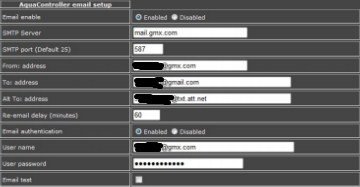
i also attached the email setting as well.
as far as port forwarding goes. i did the forwarding part. just no matter what i cant get port 587 to open. i am emailing the motarola for support.
SBG 6580 is the modem.
any help would be great.
AquaController Login
login: Clownnut
password: ****
AquaController> cons
AquaController> 1 maild
AquaController> mail
AquaController> SMTP: mail.gmx.com unkn host
i also attached the email setting as well.
as far as port forwarding goes. i did the forwarding part. just no matter what i cant get port 587 to open. i am emailing the motarola for support.
SBG 6580 is the modem.
any help would be great.