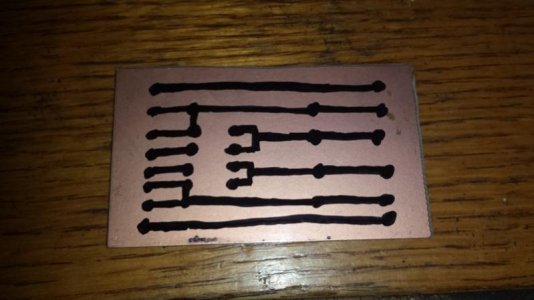
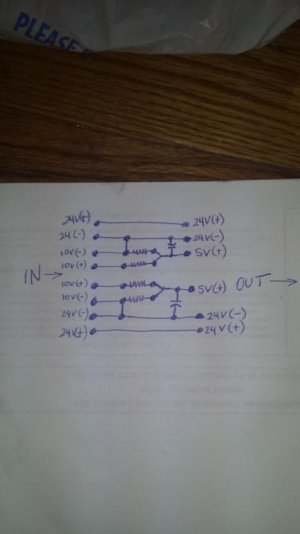
I have seen some cables out there made w/o capacitors and even with instructions telling you to use any two resistors as long as they are the same resistance.
I strongly advise against those instructions as they can be very wrong. (Yes there are some out there that are correct, but little explanation as to why certain resistors are used). First of all The apex works with a 10v analog signal to control variable speed DC pumps. What does this mean? There is a constant voltage output at the v1/v2 to control devices. With Jebao pump, It works on a 24V power supply. Inside the WP40, there is a voltage controller that looks like this:
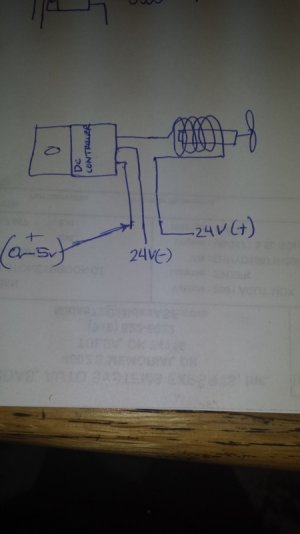
Now the problem is the Jebao works on a 3V-5V analog signal. The speed controller consumes much less than .008 amps. It is strictly used for speed control of the 24V signal to the pump motor. The Apex 10V analog signal is also used for controlling devices using analog DC signal, so there is hardly ever any kind of load. I have tested the Apex 10V control signal under a variable load with an oscilloscope and can tell you that it starts to get distorted starting at about .020 amps. That means obviously it is not designed to handle any kind of load. So you can use a .001 amp load for calculating components to be used. Using Ohms law: V=IR where V is voltage, (I) is amperage and (R) is resistance, we want to solve for resistance. Using MAX safe amperage draw from the Apex 10V control signal. We get 10,000 ohms. Now we can't go too high of an ohm range either because that would also be like having an open circuit, meaning the Apex can think there is no connection at all. So assuming you let the Apex know it is connected to something you simulate a .0005 amp draw and again solve for (R) using that, you get 20,000 ohms. The nearest value resistors that are easily available at the Shack are 10,000 ohms and 22,000 ohms But any resistor in this range is absolutely safe and good to use for this project. I used 10,200 ohm resistors also know as 10.2K ohm or 10K2 ohm. The next question is, WHY Use a CAPACITOR? A capacitor is an electrical device that stores electricity and discharge it over and over again. There are many other functions with capacitors but I wont go into these since it does not apply for this project. In this project it is used to absorb the electric spike produced when the Jebao pump is cycling from a completely OFF position to an ON State. How do I know that? I also used an oscilloscope to monitor the pump while it was working using the resistor only method. When the pump is cycling from OFF to ON using only resistors, there was a 17 volt voltage spike on the 5V control wire from that lasted in the milliseconds range. If this is connected through resistors to the Apex 10V output, you can imagine after a while you'll probably damage something inside your $4OO+ Apex. The capacitor is installed on the 5V output of the resistors and it will instantly absorb any spike and slowly discharge it to ground without damaging any components. The capacitor used for this project is a 25 Volt, 10 uF capacitor or bigger. You can use up to a 50 Volt, 47 uF capacitors but any thing greater than this is unnecessary and won't hurt anything for our purpose. If there are any questions or more information which is not clearly explained, feel free to ask and I'll do my best to clarify. I wish I could have taken pictures of the oscilloscope readings when I took them, but I was not thinking of writing this tutorial at the time. Here is the finished product pictures on the inside:
Top View

The bottom View:
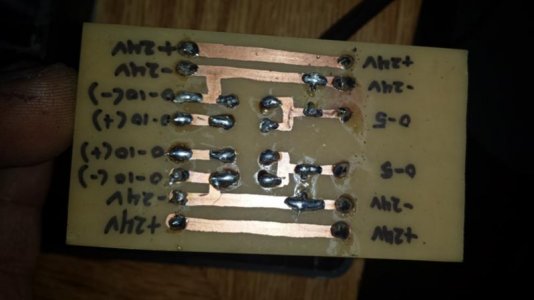
Thanks, Enjoy.