LED Full Spectrum Controller based on Mega2560 board

Led full spectrum controller documentation help.

Led full spectrum controller documentation help.

Can anyone help me on this , as this thread seems to be dead.
I do not seem to be able to find documentation on this controller i.e. what each pin of the arduino controls what function led channel etc. , is it available. .Newby help !!!!.
 
One wire bus for temperature sensor DS1820: A3
Timer DS1307 rtc( 42,43)
LED pins: 13,12,11,10,9,8,44,45
Cooler for LED: 46
PH: A1
ORP: A0
Power lines: A8,A9,A10,A11,A12,A13,A14,A15
To contact sensors (overflow): A4,A5,A6,A7
 
full spectrum controller

full spectrum controller

Hi Kapelan

Thank you very much for that information , i am going to have me some fun.
Cheers.
 
LED set up

LED set up

That's kind of innovation.
LED levels are configured as a chart now: just point the desired level on the screen.
The system will create a chart and all related timers.

LedLevelSetUp_zpsd13b02a8.png


nice and easy ;)
 
new design

new design

I'm thinking about a new design:
Create a PCB: all in one.
I.e. we actualy do not need a shield between Arduino and TFT screen.
So it would make sense to create a new arduino to which TFT attached directly.
I mean it would be the same chip, all compatible to Mega2560, that should work with touch screen without any other PCB.
So assembled device will have only 2 parts:
- a new PCB, which is equivalent to Arduino+TFT shield
- touch screen.
Anybody would be interesting?
 
led output

led output

I'm thinking about a new design:
Create a PCB: all in one.
I.e. we actualy do not need a shield between Arduino and TFT screen.
So it would make sense to create a new arduino to which TFT attached directly.
I mean it would be the same chip, all compatible to Mega2560, that should work with touch screen without any other PCB.
So assembled device will have only 2 parts:
- a new PCB, which is equivalent to Arduino+TFT shield
- touch screen.
Anybody would be interesting?
 
Hi Kapelan is the new led level screen that you posted 44 available in version 4 of your code , or do I have to download another updated version.
 
I'm thinking about a new design:
Create a PCB: all in one.
I.e. we actualy do not need a shield between Arduino and TFT screen.
So it would make sense to create a new arduino to which TFT attached directly.
I mean it would be the same chip, all compatible to Mega2560, that should work with touch screen without any other PCB.
So assembled device will have only 2 parts:
- a new PCB, which is equivalent to Arduino+TFT shield
- touch screen.
Anybody would be interesting?

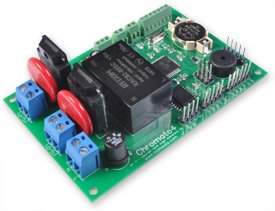
Here's one I've been working on. Went a little different route. Instead of going Atmega 2560 I went with the 1284P. Less flash, but more RAM (16MB) and EEPROM (4 MB). Good trade off I thought since it allows more flexibility to work with data at run time.

This is only 2.7" x 4", has 6 PWM ports, 2 x 16 AMP SSR controlled AC outputs, a DS3231 RTC, 2 ports for float switches and on board 115 AC to 5V DC conversion. 1 AC plug (no wall warts) drives it all. This can control anything from LED strings to metal halide lights, dosers, pumps, etc.

Working on a version that has 24 pin sockets for Meanwell LDD drivers on board. That one will be controlled off a DC power supply similar to what you've done. All one board though.
 

Attachments

  • quarter-front_r.jpg
    quarter-front_r.jpg
    27.9 KB · Views: 5
v.2.05 update: https://drive.google.com/folderview?id=0B42ZJMUnbPuWNktMcGNfR0E4QkU&usp=sharing
1. Added Chiller. One sensor can control chiller and heater.
From touch screen we configure Area of Comfort.
If the temperature greater then Alarm Level – chiller turn ON. If less than some level - turn on the heater.
2. Added support for up to 4 temperature sensors.

From this screen Comfort Area set 26 to 29 Celsius
IMG_0924_zpsd5c3ffc3.jpg

display sensors from touch screen
IMG_0922_zpsbac1a58d.jpg

Select temperature sensors:
IMG_0921_zps9148fd13.jpg
 
beautiful work....What software did you use to design the screens? Or did you hard code them yourself?
thanks, Arduino is not exactly friendly environment :)
There is no any software to do it.
And I think that's right - Arduino was designed to control external devices. What we are doing here is using cheap displays as an input/output device.
So do not think we will see a software specifically for TFT.
Just no needs to anyone :( except us
 
Video how to customize spectrum:
http://youtu.be/zewIPu9LBrQ
It is a first step to set desired spectrum. Then during the day it is changed.
3 hours just blue and UV - since nobody home and no one is watching it
then 4 hours -about 10-30% others colors, that's better for human eyes
Looks pretty cool ;)
 
WiFi

WiFi

When project was started WiFi modules were quite expensive, that's why it was a decision to use touch screen as input/output device.
Now I see prices on WiFi become affordable:
https://learn.sparkfun.com/tutorials/cc3000-hookup-guide#webclient-example
http://www.ebay.com/itm/CC3000-WiFi...492?pt=LH_DefaultDomain_0&hash=item2599ebdcd4
It looks like it may make sense to add network to the device.
If last year the price was about a hundred now $20 - I think is affordable.
If anybody wish to join the project and do the code for android please PM.
 
When project was started WiFi modules were quite expensive, that's why it was a decision to use touch screen as input/output device.
Now I see prices on WiFi become affordable:
https://learn.sparkfun.com/tutorials/cc3000-hookup-guide#webclient-example
http://www.ebay.com/itm/CC3000-WiFi...492?pt=LH_DefaultDomain_0&hash=item2599ebdcd4
It looks like it may make sense to add network to the device.
If last year the price was about a hundred now $20 - I think is affordable.
If anybody wish to join the project and do the code for android please PM.

and then there's the nifty nRF24L01 transmitter/reciever boards now all over the net. ($10 for 10 of them if you can wait on the slow boat) not WiFi per say but awesome for wireless programming of devices. I just finished building a doser using them and it was way too cheap and simple (following another thread on RC for the how to) going to be the new user interface device on any projects I build from now on instead of buttons and menus and just leave the LCD screens for at a glance monitoring.
 
Wireless is now fairly easy and cheap to add. Getting the control software on another device is maybe not so easy, unless you can code for andriod, etc. I am thinking of putting together a wireless arduino controller that can be used to pass commands over nRF24L01 connections, using the same doser thread as inspiration :)

The controller will be able to find and connect to any other nRF24L01 devices it finds, so one controller will be used for any devices i build, meaning i don't necessarily need a UI or screen on any other devices!

WiFi opens up the option to use phones, tablets, computers, etc so is very good, but the price of the nRF24L01 makes them very inviting!

Tim
 
Back
Top