
Radion Gen 3 lunar phase not working

lacosta28

Premium Member
I recently purchased 2 gen 3 Radion lights and the web page seems like it is very finicky. If I change anything or even attempt Live Demo then it messes up the entire schedule and the lights will not stay programmed. I then have to reset both lights and start the setup over from the very beginning. I got the travelling sunset/sunrise to finally work but lunar phase will not work no matter what I have tried.

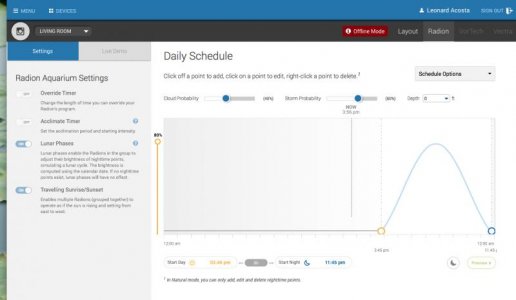
I am using one of the templates and right now it should be on at night but they turn off completely. Am I supposed to create a night point in order for this to work? If I do that will the lunar phase over ride it or will it always be on every night? I have inluded a screen shot of my current setup.

BTW is the only way to add my MP40's is via a reeflink?
 

Attachments

  • Tank1 setup.jpg
    Tank1 setup.jpg
    33.3 KB · Views: 5
I picked the shallow reef template I believe. Which one do you know that uses the lunar phase? When I click on the moon it says it is supposed to be on the last 2 nights but they weren't.
 
High Growth, radiant color, and traditional reef all have them. When you select the templates, they all say whether or not they have moonlight phases in the description. From the Traditional reef description, "...there is also a moonlight period for three hours before the lights turn off." From the Shallow Reef template, "...There is no moonlight period set for this mode."
 
High Growth, radiant color, and traditional reef all have them. When you select the templates, they all say whether or not they have moonlight phases in the description. From the Traditional reef description, "...there is also a moonlight period for three hours before the lights turn off." From the Shallow Reef template, "...There is no moonlight period set for this mode."

In order to achieve a "lunar phase" on your schedule, you can select a template that contains nighttime points. In other words, the schedule must contain a nighttime period with at least one point that causes your lights to be on. As others have mentioned, you can start with a template such as High Growth, Radiant Color, Traditional Reef or Freshwater Planted.

If you would like to use the other Shallow Reef or Deep Water templates (which are off at night by default), simply add a nighttime point after the start night point, set the desired colors and intensity (which would be your full moon intensity), save and program. If you have lunar phases enabled for the aquarium, your nighttime will vary based on the moon phase in the northern hemisphere.

Please let us know if you have more questions regarding this feature.
 
Back
Top