Radions not sticking to a schedule

nzsilentone

New member
Hey all, Hopefully i'm not doing something dumb but i've got two gen 1 Ecotech radions.

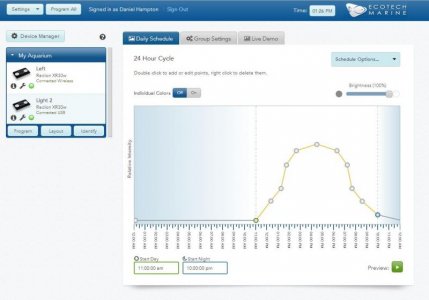
I've setup a schedule on ecosmartlive.com and programmed all of the lights but they don't seem to follow it - Like doesn't turn on at set time or off :(

Have tried unplugging, then reprogramming, factory resetting and reprogramming, ungrouping and reprogramming but seems to be the same issue.

One is connected via USB and the other wireless.


Any suggestions?
 
nz,

It sounds as though the buttons on your Radions need to be disabled. Please follow the steps below to resolve the issue:

1. Power down all Radions for 30 seconds
2. Power on All Radions
3. Connect via USB to a single Radion
4. Open the Connection Manager - If NOT using a ReefLink
5. Log in to EcoSmart Live using either Google Chrome or Safari
6. Select the "Wrench" icon below "Light 1"
7. Click the check box to disable the Radion buttons
8. Repeat step 6 for each Radion
9. Select the "Program" button to save changes
 
Hey all, Hopefully i'm not doing something dumb but i've got two gen 1 Ecotech radions.

I've setup a schedule on ecosmartlive.com and programmed all of the lights but they don't seem to follow it - Like doesn't turn on at set time or off :(

Have tried unplugging, then reprogramming, factory resetting and reprogramming, ungrouping and reprogramming but seems to be the same issue.

One is connected via USB and the other wireless.


Any suggestions?

Another thing to try is to set the time on Radions. It might be as simple as the Radions having an incorrect time. To set the time, log into EcoSmart Live then click the time button in the upper right-hand corner of the header (on the left of the EcoTech Marine logo). Click Set on the small popup and wait for the message that the time was set. Then reprogram your lights. Please let us know the outcome.
 
nz,

It sounds as though the buttons on your Radions need to be disabled. Please follow the steps below to resolve the issue:

1. Power down all Radions for 30 seconds
2. Power on All Radions
3. Connect via USB to a single Radion
4. Open the Connection Manager - If NOT using a ReefLink
5. Log in to EcoSmart Live using either Google Chrome or Safari
6. Select the "Wrench" icon below "Light 1"
7. Click the check box to disable the Radion buttons
8. Repeat step 6 for each Radion
9. Select the "Program" button to save changes

Hi Alex,

Thanks! I've just done this and will report back how i go!
 
Another thing to try is to set the time on Radions. It might be as simple as the Radions having an incorrect time. To set the time, log into EcoSmart Live then click the time button in the upper right-hand corner of the header (on the left of the EcoTech Marine logo). Click Set on the small popup and wait for the message that the time was set. Then reprogram your lights. Please let us know the outcome.

I did check this last night - I did notice that the time was changing randomly - Like last night i set it to the correct time and then around 24 hours later it had jumped two 2 hours in the future.

Have changed it from automatic to custom and will see how it goes
 
So after resetting my lights 2 hours ago

Its now 10:31pm - One light says 10:31pm (left) and the other says 10:06pm (right) so have one light on one light off, guess its an improvement but will see in the morning
 
Just under 24 hours later from my last post, Its now 8:29pm and my left light thinks its 8:01PM and the other thinks its 8:32pm so they *seem* to be working, so will report back tomorrow.
 
So it seems the time is sticking, but its 1:32pm here and one of my lights isn't even on and is sitting on a blue led light on the top

Actually need to unplug and plug the light back in for it to work properly.. i have todo the same to turn the light off
 

Attachments

  • light.jpg
    light.jpg
    43.8 KB · Views: 20
Looks my left light is faulty :( You have to power cycle it before it behaves properly, so i could setup a timer to restart it 4-5 times a day for each phase of brightness change - what a shame for such an expensive light
 
nzsilentone,

I would recommend contacting the retailer who you purchased the Radion from and they will advise you on how to have the unit repaired.
 
Back
Top