redtop's Ferduino controller

Hi!

I'll not implement this function.

She'll be disappointed.

Prepare to buy gifts for his wife.

Anyway if you want try make, here have a project to start:

http://forum.arduino.cc/index.php?topic=62135.0

Best regards.

Fernando Garcia


LOL someone is already using an Arduino to run their dishwasher, I knew it was just a matter of time, that is a Maytag dishwasher too, they ain't supposed to mess up....we had one just like it that didn't last much over a year, and it was the same issue that guy had, a bad control panel....I replaced the panel for just over 100 bucks and the new panel didn't last a full year, we now have a GE dishwasher LOL
 
thanks entirely to Fernando spending several hours via Skype and Team Viewer, working around with several things on my PC (that was way cool watching him work on my PC, me in Ky., him in Brazil...awesome :) )

but I now have a web based controller with touch screen technology and full of reefing features that is just freaking awesome

I'll try to do a video of this thing working later but I'm still playing with it myself LOL
 
Fernando, I have one other issue now LOL I changed the blue LED to green in the ferduino code but it is still displayed as blue on JoyReef...

how do I change blue to green for JoyReef ?
 
On moment it's impossible.

But you change a color shown on TFT.

In tab "ferduino" find:

Code:
byte cor_canal2[] = {9, 184, 255};    // Azul

Replace this numbers to another combination RGB.

{ red, gree, blue}

No forget to talk that you had problem of hardware not software.
 
On moment it's impossible.

But you change a color shown on TFT.

In tab "ferduino" find:

Code:
byte cor_canal2[] = {9, 184, 255};    // Azul

Replace this numbers to another combination RGB.

{ red, gree, blue}

No forget to talk that you had problem of hardware not software.

after figuring out that that is where the color set was located, I changed the TFT display from blue to green

and went from,

byte cor_canal2[] = {9, 184, 255}; // Blue

to this,

byte cor_canal2[] = {0, 255, 0}; // Green

as well as change the name display from blue to green, I left all the code the same because I didn't want to screw something up LOL

there's never been any problem with the software, every issue I've had so far has been of my own creation LOL

my wiring up the temp sensors backwards made them inoperable, and my forgetting to remove the 4 pins that control the LCD's built-in SD card reader from the new LCD shield, which made the ethernet shield not want to connect to Joyreef...

and it is plainly stated everywhere this code download is located that not removing those pins will cause problems LOL I just forgot, I do that a lot lately, I must be getting old :)

every issue is and will likely continue to be of my own doing...thankfully, Fernando is a lot smarter than me and was able to troubleshoot my issues from hundreds of miles away LOL

I'm not too much concerned with the LED stuff Fernando, my touch screen shows it as a green channel and I can live with the blue display on Joyreef, I'm using it to control green LEDs, it works great so that's not really a problem :)

so far this has been a complete joy to build, even with all my screw ups LOL

I'm extremely happy with how this is turning out, I decided to take a few screen shots of all this and post them too :)

homescreen_zpsce37969e.jpg


RCscreenshot_zps8a1b0d53.jpg


calibratedosing_zpsd269165f.jpg


manualdosing_zps436ac04e.jpg


ledadj_zps2ec2d4fa.jpg


this is just a few screen shots, there's plenty more, but thought I'd share a little of what I see here on my desk top :)

 
Last edited:
and just for anybody here who tries to duplicate this build, note the 4 pins removed from the TFT shield in these pics of Fernando's...these 4 pins must be removed, they will cause conflicts if not LOL

7679776116_0ca27758d8_z.jpg


7679774708_cea7138e4b_z.jpg


the Ethernet shield has it's own SD card reader built in and the software uses it instead of the one located on the LCD board, so these 4 pins that control it must be removed :)
 
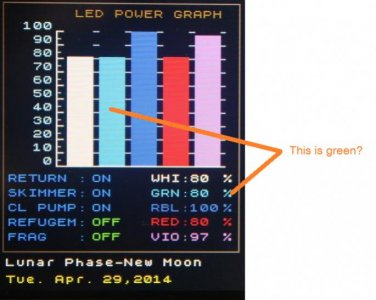
Willie i'm talking about this color.

There appears be green.

see this: http://www.rapidtables.com/web/color/RGB_Color.htm

yes, it was still blue in that photo, it is green now, I hadn't located the place in the code to change it before I snapped that pic :)

my lights are off now but I will post an updated pic of it tomorrow :)

and just for those who may not know, changing those 3 sets of numbers changed every bar graph in the software, every screen that displays any of the LED bar graphs will change when those setting are altered, Fernando did an amazing job simplifying this extremely advanced software, adding the text tab/folder so that changing the names of different function is incredibly easy, changing it in one location instead of hundreds :)

I started studying this code trying to figure out how to use the wavemaker in my Jarduino controller, but after months of messing with it, I have been nothing but amazed at all the time and effort that has gone into creating this code.......translating all the side notes in the code from Portuguese to English was a bit challenging but hey, I love a good challenge, and now I love google translator too LOL
 
Last edited:
alright, I couldn't wait til tomorrow, I ran the LEDs up and snapped a few pics LOL

IMG_3181_zpse9cfb1bd.jpg


IMG_3180_zps45730cfe.jpg


as you can see, the green is now green, and it's the same on every LED screen with the bar graphs :)
 
here's another feature I think a lot of folks will love, this is the automatic partial water change program built into this controller, it is completely programmable for any day or every day of the week, depending on how much you wanna change

I altered the text on this pic of Fernandos to English for better understanding for us English talking peoples and I hope I'm explaining this correctly :)

DinacircmicadaTPA_zps319469df.jpg


if I'm understanding this correctly, when the AWC ( or TPA in Portuguese:) ) is activated, pump 1 will drain water from a Quarantine tank into the house drain or septic system until it triggers the float switch in that tank.....

at which time, pump 1 stops and pump 2 starts, pumping water from the sump back into the Quarantine tank, the sump has 2 float sensors, somehow those 2 sensors tell pump 2 to stop and pump 3 to start.....

pump 3 pulls water from a reservoir with newly mixed saltwater to refill the sump.....

this does a partial water change of the main system as well as change the water in the Quarantine system...

I'm thinking that with a little adjusting of the float sensor positions, this will be a very accurate system
 
Last edited:
Perfect explanation.

nice, I was hoping I got that correct...it took me a while to figure out what was going on there :)

the Quarantine tank could be skipped and just pump the old water from the sump and refill it from the reservoir, looks easy enough to change to suite anybody else needs too, I like it :)

Now is better. :)

:) my first set of pics were actually a little too soon to post but I wanted to get started LOL
 
Fernando, for the auto water change system, what pumps are you using ?

I assume any small pump would work fine but would 3 peristaltic dosing pumps be a better option, or would they be too slow ?
 
If it's float switch driven and works how you describe, the rate of the pumps shouldn't matter. They'll just run until the switch changes state :)

Just to add - not posted before, but been reading from the start. Software looks very good :)

Tim
 
If it's float switch driven and works how you describe, the rate of the pumps shouldn't matter. They'll just run until the switch changes state :)

Just to add - not posted before, but been reading from the start. Software looks very good :)

Tim

that is true, in the program is has a time and date to set to activate the AWC and the floats do all the triggering to turn pumps on and off....

I wondered if it needed to do it quickly because I assume that the return pump would need to be off until the water change was complete, otherwise, the float for the ATO would activate to refill with top off water and mess things up

if the return pump has to be off until the AWC is complete, I think it would be best to have the water change happen as fast as possible so the return pump could get back to work with the filtering....

I'm really just trying to get a better understanding of how all this works :)

jump in any time and post away, all ideas and suggestions are welcome and appreciated :)

and yep, Fernando has done a remarkable job with this software, the more I mess with it, the more I find it does :)
 
You can use any model of pump.

The flow no matter.

Pumps of return are not disconnected. I have division on sump.

Also I prefer change few liters per day.

So don't interfere much in the flow of the return pump.

ATO don't work during water change or during a fail.

See tab "parametros".

Code:
void reposicao_agua_doce () // abre a solenoide 1 se o nível estiver baixo e se a tpa não estiver em andamento
//e se o chiller estiver desligado e se o nível do sump não estiver anormal e se não houve falha durante uma tpa.
{
  if((analogRead(sensor3) > 400) && (analogRead(sensor2) > 400) && (bitRead(tpa_status,1) == false) && (bitRead(status_parametros,0) == false) && (bitRead(tpa_status,2) == false))
  {
    digitalWrite(solenoide1Pin,HIGH);
    bitWrite(Status,1,1); //sinaliza reposição em andamento
  }
  else
  {
    digitalWrite(solenoide1Pin,LOW);
    bitWrite(Status,1,0); 
  }
}
 
You can use any model of pump.

The flow no matter.

Pumps of return are not disconnected. I have division on sump.

Also I prefer change few liters per day.

So don't interfere much in the flow of the return pump.

ATO don't work during water change or during a fail.

See tab "parametros".

Code:
void spare freshwater () // opens the solenoid 1 if the level is low and if the tpa is not in progress
// and if the chiller is turned off and the sump level is not abnormal and there was no failure during a tpa.
{
   if ((analogRead (Sensor3)> 400) && (analogRead (sensor2)> 400) && (bitRead (tpa_status, 1) == false) && (bitRead (status_parametros, 0) == false) && (bitRead (tpa_status, 2 ) == false))
   {
     digitalWrite (solenoide1Pin, HIGH);
     bitWrite (status, 1,1); // indicates replacement in progress
   }
   else
   {
     digitalWrite (solenoide1Pin, LOW);
     bitWrite (status, 1,0);

that would work too :) I ran that section of code through google translator :)

a small amount changed every day is less stressful to the tank than a large change and would be easier to keep your parameters in check too

this full automation is all new to me and I'm still trying to figure it all out :)
 
Last edited:
Back
Top