Share Your Vortech Schedule

Tradewinds

Well-known member
I have been playing around with different schedules as of late and thought it would be interesting to see what Vortech schedules others are running.

If you care to share, please give the tank dimensions and what size Vortechs you are running.

At this time, I'm not sure if we can export the Vortech schedules as we can the Radion schedules, but it would still be interesting to see what others are doing.

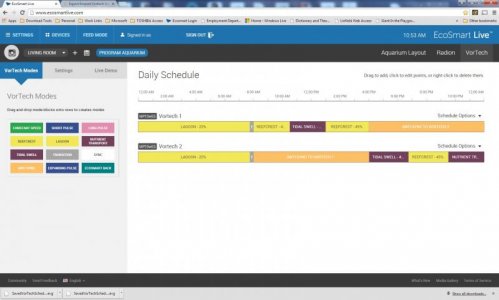
This is what I am currently running in my 180, in an attempt to get a gyre flow:

vortechsched_zps0fe1f382.jpg
 
Last edited:
I basically alternate between reefcrest and lagoon mode. I have one MP10 on each side of my 65g and one runs in anti-sync. I never tried configuring them to run the same mode at the same time. I thought that randomization was important with coral. I have LPSAnd SPS and things seem to doing well in my tank but it's still fairly young.
 
Overnight I have a constant mode essentially from Midnight until 10am, followed by reefcrest for 4.5 hours, followed by nutrient export for 4 hours followed by Lagoon for 5.5 hours. and they are synced.

Sorry don't have a picture of the graph.

I have 2 mp 40's on a 6 foot 225 tank.

Wish I could change the setting around some to do some experimenting but the connectivity to ESL has been awful. Waiting until Ecotech fixes the problems before I make anymore changes.

Thanks for starting this thread, hopefully other people jump on and explain why they chose their graph.

The reasoning for mine was to get a quick schedule done with alot of water movement before I got disconnected again.
 
Just created a new schedule for my two MP10WES

Just created a new schedule for my two MP10WES

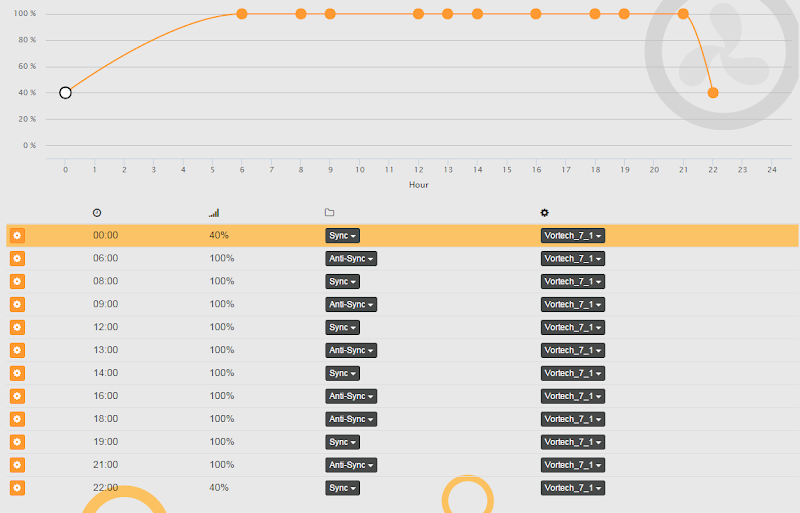
Here you go. Hope this works well. If any of you have suggestions for tweaking this let me know. I have included a screenshot and the saved schedule for each vortech labeled 1 and 2. I have the vortech 1 on the right side of my tank and the vortech 2 on the left side. My skimmer is on the right side back so at the end of the evening when my lights are almost off the nutrient transport mode kicks on for a couple of hours with the vortech 2 pump and the vortech 1 in antisync to push debris towards my skimmer.

Just trying to change up flow in the tank and the ecosmart live really gives you the ability to change things up.

Unzip the saved schedules on your desktop and then from ecosmart live on the vortech tab you can select schedule option on each pump and import a schedule.

Tank size is a 29 gallon. 36 L x 12 W x 18 H

If you have a bigger tank and need more movement you can increase the percentage to get the flow you want. For my tank this is just about right.

I have a single Koralia Nano 425 on the back wall to have water movement pushing from the back to the front. This may not be necessary, but want to avoid any dead spots.
 

Attachments

Last edited:
I run mine the same all the time. Would love to have some these cool programs. Are you guys controlling them via apex or what?
Also how do I set up slave/master?

Corey
 
I am controlling mine via Apex.

Apex gives me the option to switch the sync and anti-sync, as you can see, throughout the day.

The steps really will relate to what you are going to use to control them.

What are you using?
 
Wait you are using an APEX.. I realize who you are now. LOL Sorry.

Do you have the WXM module?
 
No graphs here, since I don't use EcoSmart Live and Fusion's graphing wizard doesn't given enough control, but you get the gist of it. I basically run each mode in its entirety throughout the day. Quiet is constant @ 50%, and Night is constant @ 30%.

[MP40wES-R] (Master)
Program Type: Advanced
Display Icon: Fan
Logging: Enabled
Program:
Fallback ReefCrst
Set ReefCrst
If Time 06:00 to 09:00 Then ReefCrst
If Time 09:00 to 11:00 Then Lagoon
If Time 11:00 to 12:15 Then Nutrient
If Time 12:15 to 13:30 Then TidalSwl
If Time 13:30 to 15:30 Then Lagoon
If Time 15:30 to 16:30 Then L-Pulse
If Time 16:30 to 18:00 Then ReefCrst
If Time 18:00 to 20:00 Then Quiet
If Time 20:00 to 06:00 Then Night
If FeedA 010 Then Nutrient
If FeedA 005 Then Const40
If FeedA 000 Then OFF
If FeedB 000 Then OFF
If Outlet AutoFeed = ON Then Feed
If Outlet WaterChange = ON Then Nutrient
If Outlet NTM = ON Then Nutrient
If Outlet Const100 = ON Then Const100


[MP40wES-L] (Slave)
Program Type: Advanced
Display Icon: Fan
Logging: Enabled
Program:
Fallback Anti60
Set Anti60
If Time 18:00 to 06:00 Then Sync60
If FeedA 010 Then Anti40
If FeedA 000 Then Feed
If FeedB 000 Then OFF
If Outlet AutoFeed = ON Then Const40
If Outlet WaterChange = ON Then Anti60
If Outlet NTM = ON Then Anti60
If Outlet Const100 = ON Then Const100
 
I used to have the custom named ones, too. Then fusion came out and gave me the options to edit it a bit better.

But now it looks like this:

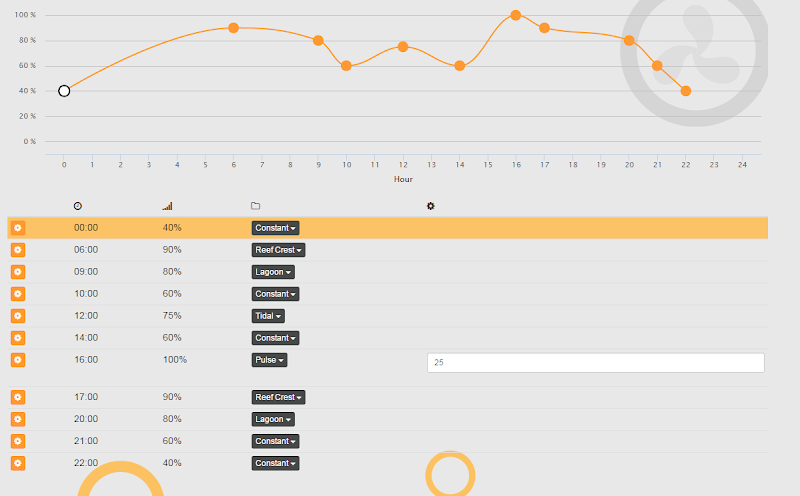
Fallback OFF
tdata 00:00:00,0,0,40,0,0,0,0,0,0,0,0,0,0
tdata 06:00:00,0,0,90,1,0,0,0,0,0,0,0,0,0
tdata 09:00:00,0,0,80,2,0,0,0,0,0,0,0,0,0
tdata 10:00:00,0,0,60,0,0,0,0,0,0,0,0,0,0
tdata 12:00:00,0,0,75,7,0,0,0,0,0,0,0,0,0
tdata 14:00:00,0,0,60,0,0,0,0,0,0,0,0,0,0
tdata 16:00:00,0,0,100,3,226,4,0,0,0,0,0,0,0
tdata 17:00:00,0,0,90,1,0,0,0,0,0,0,0,0,0
tdata 20:00:00,0,0,80,2,0,0,0,0,0,0,0,0,0
tdata 21:00:00,0,0,60,0,0,0,0,0,0,0,0,0,0
tdata 22:00:00,0,0,40,0,0,0,0,0,0,0,0,0,0
If FeedA 000 Then OFF
If FeedD 000 Then Slow
 
You know what? I was overthinking it and didn't even realize that I could just use the "Constant" profile and then set the max rate to replace my Quiet and Night modes. I may do that if only to actually see the graph when it's complete. :)
 
Back
Top