Arduino dosing controller build

Sv490665

New member
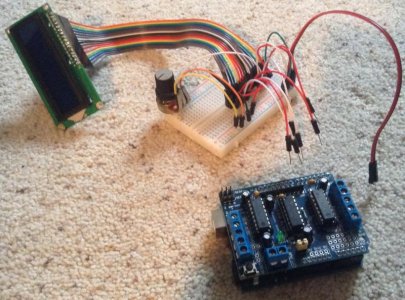
Hi all, new here to reef central. I have a 10 gallon mixed reef right now with everything except LEDs being diy'd (for the challenge of it) and in process of building an arduino doser. I've read a lot of other threads on here and other forums and need help for my particular hardware setup and coding needs. Should be a simple project, fingers crossed. So far here is where I'm at:

-brand new to arduino stuff but learning quickly
-for now all I want this project to do is dose mag/alk/cal/ph on a daily basis. It doesn't need to control anything else but eventually I may add probe sensors in the future.
-parts I have are: arduino uno, ds1307 Rtc, 16x2 LCD display, l293d motor shield, (4x) 6vdc mini peristaltic pumps with drivers from china (I know they may not have matched speeds and amp rating is unknown), and mini breadboard with jumpers for prototyping.
-pics of tank and doser project coming soon. I want this to be a step-by-step with pics for other arduino newbies trying to do the same thing.

-I need help wiring everything together and programming with the motor shield and pumps. Do i need to buy any other hardware? Thank you all for your input.
 
image.jpg
[/url] [/IMG]
 
I haven't done any programming with servos, or motor shields, but I'm working on a Arduino-based controller that's almost complete, so I speak to the rest of the project;

Do you have a power supply for the motors and the arduino? Arduino needs either a 7-12 V supply plugged into the power jack, or a 5V regulated supply plugged into the 5V pin (the former is recommended.) The motors will likely draw too much power to run off the Arduino, so they should have their own supply.

How do you plan on modifying your settings? If you don't have any means of modifying the program you need to plug it into a computer each time you need to change something like the time, the duration the pumps run, etc. I'm using a rotary encoder to navigate a menu on the LCD display for my project.

How are you connecting the pumps? Will they be hard wired, or do you plan on having some sort of plug so you can disconnect them?

The ds1307 RTC is reasonable, but has a fair amount of drift with it, so you'll want to be able to set the clock somehow.

Start slow and tackle one part at a time- write a sketch to use the RTC, then write one for the motors, etc.

There are a lot of people that know a lot on the Arduino forum, but people there tend to be a bit snarky, so don't take offense if you post a question there and get some rather brusque replies.
 
For power supply to arduino I was planning on using a 12vdc 750mA wall wart that I got for free. I don't know what the appropriate power supply would be for the motor shield but I do plan on having each pump run one at a time with 5 minute off pause between each pump. Any suggestions on pump power supply?

I would love to be able to change settings like on your controller so it is independent from my computer after the sketch is complete. I can foresee it being irritating to keep linking up with my computer. I like the idea of a rotary encoder. Do you need any other push buttons with that setup or does the one it already has work like an "enter" button once you select something with the rotation?

I was planning on having all pumps connect to the motor shield with male/female pin headers so I can disconnect them if need be. Motor shield and pin headers are being shipped to me right now. I was planning on doing the same with the Rtc.

Btw, What do you mean by "drift" in the Rtc?:uhoh2: like it slowly drifts from the precise time? If so that shouldn't be too much of an issue, as long as I can set the right time every so often in my menu with the rotary encoder.

So far I'm just at the hardware gather/hookup stage and I don't wanna burn out my new arduino so I need a very clear wiring diagram.

Oh yeah, and how do I delete that double post above? I tried reading about it and still don't understand.. I get how to upload better pictures now though.
 
I haven't done any programming with servos, or motor shields, but I'm working on a Arduino-based controller that's almost complete, so I speak to the rest of the project;

For a standard little DC motor - couldn't you simply use a powersupply and relay, without the use of any extra shield?
 
re: Adafruit rotary encoder: "This encoder also has a push-button built into it so you can press onto the knob to close a separate switch." So, you can use the push-button to act like an "enter" button.
Keep in mind you'll also need something like an LCD screen to see what you're doing. Programming the user interface will probably take much more time than just getting the pumps to run.

re: "drift": Yes, that is what sleepydoc was referring to.

re: motor controller:
If you have the Adafruit or SainSmart shield: http://playground.arduino.cc/Main/AdafruitMotorShield
You'll need a 6v power supply for the motor shield if that is what the motors require. You'll want to figure out how much current the motors draw in order to figure out how to appropriately size your power supply. If you are sure you will only ever run one at once, a 6V 1A power supply is probably sufficient. Even 0.75A or less may be sufficient; it depends on the motors. The smarter thing to do would be to have a power supply large enough to run all of them at once, in case you ever have a bug in your code during development (and you will. I promise.)
You can determine how much current motors draw by using a 6v power supply that is large enough for them and a multimeter to measure the current draw. Of course, by that time, you already had to buy a power supply, but then at least you'd know how much current they actually draw.

If you're connecting a motor shield, rotary encoder, and LCD screen you're going to start to run out of inputs/outputs quickly, so be sure to pay attention to what pins you are using on the arduino. (Some devices can only be connected to certain pins.)

Don't underestimate how much effort this will take to do well, especially since I presume you don't have any experience working with embedded controllers and hardware at all yet.
And I can't stress enough how important it is for you to test and retest this device before connecting it to your aquarium. I've run a home-built aquarium controller for about 6 years now and it's been extremely reliable, but only because I spent the time to test it incredibly well ever time I made a change.

Hope this helps.

Edit:
Also check out ReefAngel. It is an open-source aquarium controller. You may get some helpful insight from looking through the code and/or schematics.
 
Last edited:
I do have an LCD screen, just soldered up the header to it today so it's ready to be used. I THINK I have an adafruit motor shield. It says ladyada.net on it according to the picture here.. http://www.ebay.com/itm/L293D-Motor-Drive-Shield-Expansion-Board-For-Arduino-Duemilanove-Mega-UNO-/291070359722?pt=LH_DefaultDomain_0&hash=item43c52538aa

Also, if I run out of pins on the arduino could I just expand with a proto shield or even my mini breadboard?

Shorty, you're probably right about the relays. If possible it would be nice if I could learn how to rig it up with either the motor shield or the relays then determine which to use for the finished build.

Also about determining amp draw from my motors, could I just rig up some sort of thing on a breadboard with batteries to supply 6vdc and a potentiometer and multimeter to test the motors and determine where they're at?

I have seen reef angel before but I will do some more research. There's a lot of different set ups out there, confusing for a newb.
 
For a standard little DC motor - couldn't you simply use a powersupply and relay, without the use of any extra shield?

Generally, no. There are issues with current draw, interference/isolation, voltage spikes when the current is stopped, etc. Plus the motor shield provides a very convenient way to hook stuff up.

+1, +2, +3, & +4 on the testing. The last thing you want is to have the doser be an overdoser.

is the LCD a standard, i2c or SPI interface? Most of the 1307 clocks are i2c interfaces, so if you have an i2c interface on the LCD it will not take any extra pins. Sv490665 is right on the pins - you end up running out quite quickly. My project has 16 outlets, an LCD, a temp probe, float switch, rotary encoder a couple other switches and a wifi shield. I have enough pins, but just barely.

a proto shield will give you more holes to solder stuff, but it all has to go back to the same set of pins in the arduino. The only way to increase the number of pins is with a shift register or i2c expander chip. Those won't work for every use, but can help in many cases. They do add some complexity to the program, though.

The motors should say on them how much current they draw.

Sv490665 is also right on the menus (and pretty much everything else s/he said) - programming them will probably take you as long as the rest of the code. You're welcome to look at my menu code for ideas if you like. I started out just writing a controller to turn on some fans when the temp got too hot and it rapidly ballooned from there to a pretty much full-fledged controller; I haven't gotten the wi-fi server working yet or added a pH probe, but otherwise it's basically done. By the time I got all the parts (and a bunch of extras that I ended up not needing) and spent the time programming & debugging the code, and building enclosures for it all, I probably would've been just as well off paying for a commercial controller like an Apex or reef angel. It has been a fun project, though.
 
Yes sleepydoc, I will definitely be doing a whole lot of testing and careful calibration, I'm in no hurry on that part, especially because I'm only dosing a 10 gallon (for now). Good question on the lcd, I'm really not sure what the interface is- how can I tell? Here is the link where I got it from, it doesn't seem to specify, so is there a way of knowing or testing that? Sorry I don't have more info on it. http://www.ebay.com/itm/1602-16x2-HD44780-Character-LCD-Display-Module-LCM-blue-blacklight-New-2014-/181295337227?

Oh yeah, and I found out the amp rating on the peristaltic pump motors, they're rated at 30mA. What would be an appropriate power supply for that? Remember, I am only having 1 motor on at a time, ever. Giving some time for each supplement to mix in properly before the next is added- as is suggested by my Red Sea reef foundation pro test kit.

Btw, what exactly are you referring to when you speak of an "interface" on the lcd and rtc? Is that the order of how the pins are laid out on the board or something?

Also, here is the rtc i bought, it appears to be "I2C". http://www.ebay.com/itm/I2C-DS1307-AT24C32-Real-Time-Clock-Module-For-Arduino-Tiny-RTC-2560-UNO-R3-A071-/251053812518?
Thank you so much for your help, I know I have alot of questions, but I love learning and this is a good challenging project for me.
 
That LCD has a standard parallel interface. It would eat up a bunch of pins right off the bat. (as opposed to something like a "serial LCD", ex: https://www.sparkfun.com/products/9394)
This tutorial isn't for exactly the same control chip, but will give you a good idea of what is involved with a parallel LCD interface: http://learn.adafruit.com/character-lcds/wiring-a-character-lcd

If your motors are 30mA (that seems quite low, but I guess it could be that if they are very small) I would perhaps look at something like a 6v 0.3A~0.5A (300-500mA) supply just to be safe. You could get away with as low as 50-100mA with well-tested code and some additional components to deal with current draw spikes (such as when the motor starts moving), but I think that's not really worth the effort if you can find a larger supply easily (and larger supplies are abundant for cheap on ebay). It would be a good idea to put an appropriately sized fuse between the power supply and the motor controller, especially if you get a larger rather than smaller power supply.
Keep in mind that, though you only intend to ever run one pump at once in your final use case, it's quite possible you may have more than one active at once at some point during development, even if it is accidental.

Re: interface; "Is that the order of how the pins are laid out on the board or something?"
"interface" is the number of pins, their purposes, voltage levels, and the protocol used to communicate information across those pins. (In some cases it also involves the wiring between devices, current limits, internal resistance/impedance, and other things as well)
[extra stuff you don't need but may be interesting]
Some common ones for embedded goodies:
I2C: http://en.wikipedia.org/wiki/I2C
SPI: http://en.wikipedia.org/wiki/Serial_Peripheral_Interface_Bus
1-Wire: http://en.wikipedia.org/wiki/1-Wire
Many character LCD screens share similar "parallel" interfaces which use a bunch of pins to communicate what to show on the screen.
[/extra stuff you don't need but may be interesting]

You should be able to readily find arduino libraries to talk I2C with the DS1307, since it is very common. It will make it possible for you to just make simple function calls to set/retrieve the time/date. (see http://playground.arduino.cc/Code/time#.UxmKBtsjulM)
 
Ok, so I got the motor shield now. I was just playing with stacking on top of the arduino then realized it takes up most of the pins on my arduino and covers the rest up so I can't use them. It is quite clear that I'll need to use shift registers or i2c expander chip (not clear on the difference between the two). So, once I get those, I guess I will expand my pins to a breadboard, but, specifically, where do I connect from the arduino since all the pins are covered up now?
image.jpg
Also, I will be buying a 6vdc 500ma wall wart to supply power to motor shield, while my 12vdc 750ma wall wart supplies power to my arduino, once everything is programmed of course.
 
Last edited:
You'll have to solder on to the pins that aren't being used.
Better shields have pass-throughs so you can still plug things in easily. (You could order different pin headers and swap them out if you're comfortable removing the existing headers and soldering new ones in. It's not really hard, you just need the right tools. See: https://www.sparkfun.com/products/10007)

Shift registers are a basic logic way of using a few pins on the microcontroller to set values of a lot more pins, so you can control more individual outputs.
"i2c expander chips" are the same idea, but use the i2c bus to do this. Since you already have an i2c clock chip it would make sense to use the i2c bus for other things as well (since you can put a whole bunch of things on a single i2c bus).

Looks like you can still use digital pins 2,13, and probably 9,10 (assuming you're not using the servo outs for anything).
Also analog pins A0-A5 should still be available.
(This is all based on http://playground.arduino.cc/Main/AdafruitMotorShield .... you should probably verify by checking if those pins actually connect to anything on the motor shield.)

It's been a while, and I don't have an arduino in front of me right now, but I think you'd use A4 (SDA) and A5 (SCL) for i2c based on this page: http://www.arduino.cc/en/Reference/Wire

That leaves A0-A3 (four pins) and digital pins 2,13,9,10, so a total of 8 pins, for your LCD and encoder.
And that means things are going to start to get messy quickly.

You could potentially do something like this to keep costs down and use your existing display: http://www.instructables.com/id/I2C-LCD-Controller-the-easy-way/

That way the display wouldn't consume any more pins, so you'd be able to attach your encoder wheel and even have some pins for future ideas.
[A simple keypad may be easier for you to program than using an encoder... but if you're up to the challenge it can be a lot more fun to use an encoder in the end :-)]
 
Re: the interface, the DS1307 uses the i2c interface; pins A4 & A5 on an Arduino Uno. There are several interfaces for LCDs, the HD44780 is a standard parallel interface. It works fine, but takes a lot of pins, as mentioned above (that also makes it a bit more difficult it you're not going to have it in the same physical box as the arduino, as you have to run more wires.) You can get an i2c backpack interface like this one that converts it into an i2c interface. Since you're already going to use the i2c interface, it's essentially free in terms of pins used.

Looking at the motor shield you have, that may be about the only option anyway, since it uses a lot of pins. It appears you have 6 analog and 2 digital pins left. 2 of the analog pins are used for i2c, so that leaves 4. The analog pins can be used as digital pins, too, but since the LCD takes 6 pins, you'd be completely out of access. (you could use an i2c expander to get more pins that way; it looks like the motor shield uses some of the pins from the SPI interface, so shift registers would be out)

To access the unused pins, you can either solder to the board directly, or get a prototyping shield with stacking headers and put the motor shield on top of the proto shield. It still isn't the most convenient, but it would work.

What might be a better option is to get the newer version of the shield and use the stackable headers. The new version uses an i2c interface, so it only needs 2 pins, and with the stackable headers, you can plug directly on top of the motor shield.

edit - missed enigma's post above; basically repeated a lot of what s/he said, but it all still applies.
 
tagging along, I've been working on one for a while but not yet gotten beyond a lamp timer switching them on via relays, and just dosing proportionally measured solutions at the same rates........
 
Update: I've ordered trim pots kit, rotary encoder, and resistors kit to continue this project. I'll come back when the parts arrive. I'm beginning to realize that with the money spent on this project I will probably meet or exceed the cost of buying a manufactured doser. But, this is a cool project and I'm in it to learn some electronics skills...
 
Looks like a neat project! I have been trying to build a controller for lighting, temp, and salinity monitoring. I learned a basic timing script, only to disconnect my Arduino nano and re hook it, accidentally hooking up to communication instead of voltage in and ground (it was bad lighting!) lol. Fried the sucker from being able to program. Have you looked in an extra Arduino nano v3.0? I believe you can use them as a slave and get some extra pins. You should be able to communicate with it serially (2wires) and have a bunch extra pins. I paid 10$ with shipping for one. They are pretty small, if your limited on space, on the breadboard. Maybe 3/4"x1 1/4".
 
I'm beginning to realize that with the money spent on this project I will probably meet or exceed the cost of buying a manufactured doser.

Yup. Before building my own controller I looked long and hard at the commercial options that were out there (remember this was back in 2008/2009)
For what I've spent on mine I could have bought a DA or Neptune controller.
Ultimately I decided to do my own because the existing commercial controllers were not flexible enough to do some of the things I wanted to do. (That may have changed by now...)
It's a shame they are not more open.

There are enough of you out there building your own dosing systems now that you should all coordinate your work. I've found the ReefAngel controller in the past year or two and have started transitioning my homemade controller over to it; just haven't had the time to fix any of the major issues I have with their codebase and hardware design ;) But it's always better to build off the work of others.
 
Back
Top