Well, not super impressed so far. The responded to my emails quickly to purchase the Archon and after the phone call giving them my card info and telling me they would get an invoice and a tracking number right over to me its been silent. 2 days and 2 emails later, no response, no invoice, no receipt, not tracking info. Not good so far.

You are using an out of date browser. It may not display this or other websites correctly.
You should upgrade or use an alternative browser.
You should upgrade or use an alternative browser.
Digital Aquatics Archon Owners Thread
- Thread starter skripo
- Start date
cardinalfish78
Member
Gablett, If you had read through the 15 or some odd pages of this post, you wouldn't be surprised. You have had the only contact you will get from them. The only ones they respond to is the beta testers. If the testers decide to quit answering questions, which I think they should be getting paid for doing, we are all screwed.
If you have a couple of minutes, follow this link to the BBB site, and read the review.
http://www.bbb.org/alaskaoregonwest...atics-in-everett-wa-22687841/customer-reviews
If you have a couple of minutes, follow this link to the BBB site, and read the review.
http://www.bbb.org/alaskaoregonwest...atics-in-everett-wa-22687841/customer-reviews
Last edited:
cardinalfish78
Member
I will present these questions to the group again, as I have both called and emailed DA with the expected NO response.
From 6/9
Now, for the things I can not get working. I added an additional name and credentials to the "accesslist" file in the "db" folder, but It does nothing. Has anyone gotten this to work?
Another words, Is DigitalAquatics and password the only way in to the browser?
My server has a name, but I can not access it through a browser with anything other than its IP address. Is this working or not?
And now that I have a couple things actually working, I have another question. If I choose "Skimmer" as a control, It doesn't seem that I can turn it off at any time, like at night. Does anyone else run the skimmer part time?
On another note, does anyone know where to find an extension cable for the Jebao wavemaker? The one with the three prongs and screw together water resistant fitting.
From 6/9
Now, for the things I can not get working. I added an additional name and credentials to the "accesslist" file in the "db" folder, but It does nothing. Has anyone gotten this to work?
Another words, Is DigitalAquatics and password the only way in to the browser?
My server has a name, but I can not access it through a browser with anything other than its IP address. Is this working or not?
And now that I have a couple things actually working, I have another question. If I choose "Skimmer" as a control, It doesn't seem that I can turn it off at any time, like at night. Does anyone else run the skimmer part time?
On another note, does anyone know where to find an extension cable for the Jebao wavemaker? The one with the three prongs and screw together water resistant fitting.

janes_mw
Active member
I will present these questions to the group again, as I have both called and emailed DA with the expected NO response.
From 6/9
Now, for the things I can not get working. I added an additional name and credentials to the "accesslist" file in the "db" folder, but It does nothing. Has anyone gotten this to work?
Another words, Is DigitalAquatics and password the only way in to the browser?
My server has a name, but I can not access it through a browser with anything other than its IP address. Is this working or not?
And now that I have a couple things actually working, I have another question. If I choose "Skimmer" as a control, It doesn't seem that I can turn it off at any time, like at night. Does anyone else run the skimmer part time?
On another note, does anyone know where to find an extension cable for the Jebao wavemaker? The one with the three prongs and screw together water resistant fitting.
Not going to comment on DA's Customer Service, but I will attempt to answer my experience of running after a few months.
First, I love the user interface once you get proficient with it. I can change outlets quickly and anywhere in the world.
The username and password - no, I quit trying a while ago, but I do know it is in their list of things to do.
Renaming the Host - nope, been using the ip for local addresses and since you have to set the iP in the port forwarding, my DNS account is usually what I use.
I don't run my skimmer only during the day, so I can't respond to the skimmer function. If I was you, I would use multitimer anyway and use float for alarm if you have any safety controls on the skimmer (like cup overflow or high sump or .....).
Yes, there are extension cables for the jebae , but what I did was simply cut the cord at the Jebao end, solder extension wire and heat shrunk over the soldered joints. Looks and works great and doesn't cost you basically anything.
I understand everybody's frustration for sure as I have experienced, but I can honestly say, I have been running pretty good for a while here and I like the User interface and the ease of re-programming.
just my 2 pennies worth!
mike
Gablett, If you had read through the 15 or some odd pages of this post, you wouldn't be surprised. You have had the only contact you will get from them. The only ones they respond to is the beta testers. If the testers decide to quit answering questions, which I think they should be getting paid for doing, we are all screwed.
If you have a couple of minutes, follow this link to the BBB site, and read the review.
http://www.bbb.org/alaskaoregonwest...atics-in-everett-wa-22687841/customer-reviews
Yea I read it all but foolishly decided to go ahead with it and not the apex since I have so much DA stuff. 4 PC4's, SL1, Net, and so on. I didnt think just purchasing it would be this painful. My dad loves his apex, maybe I made a mistake.......


Pickupman66
New member
For now. The secondary login isn't working. Goal was to provide a seperate access level but I haven't seen it at all. A big update is on the horizon. I was hoping to see it this week but it's not complete. I really think the cloud portion is super close. Which will change a lot of things.

n2585722
Well-known member
Use an alarm tied to another channel to turn off the skimmer. Just make sure flash, beep and email are not turned on. You can set the alarm up to activate when your lights are off to turn off skimmer at night. You can also program an unused output with multi-timer and use that alarm with that.I will present these questions to the group again, as I have both called and emailed DA with the expected NO response.
From 6/9
Now, for the things I can not get working. I added an additional name and credentials to the "accesslist" file in the "db" folder, but It does nothing. Has anyone gotten this to work?
Another words, Is DigitalAquatics and password the only way in to the browser?
My server has a name, but I can not access it through a browser with anything other than its IP address. Is this working or not?
And now that I have a couple things actually working, I have another question. If I choose "Skimmer" as a control, It doesn't seem that I can turn it off at any time, like at night. Does anyone else run the skimmer part time?
On another note, does anyone know where to find an extension cable for the Jebao wavemaker? The one with the three prongs and screw together water resistant fitting.

jason2459
Well-known member
Yea I read it all but foolishly decided to go ahead with it and not the apex since I have so much DA stuff. 4 PC4's, SL1, Net, and so on. I didnt think just purchasing it would be this painful. My dad loves his apex, maybe I made a mistake.......
They still haven't gotten my order right. I'd have to look back in this thread but it's been many months now. Luckily I'm only out $15 so far. I'll just wait for Apex's next newest version or maybe Profilux. My RKL's are still just plugging away.
cardinalfish78
Member
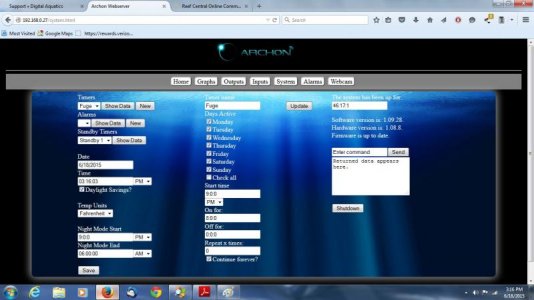
Here is another question. I attached a screen shot of my Fuge light timer setup screen. Does it look like it should come on at 9pm and run for 8 hours. I also have the On at Night box checked.
FYI I set this timer up yesterday afternoon and the light has been on ever since.
FYI I set this timer up yesterday afternoon and the light has been on ever since.
Attachments
janes_mw
Active member
Here is another question. I attached a screen shot of my Fuge light timer setup screen. Does it look like it should come on at 9pm and run for 8 hours. I also have the On at Night box checked.
FYI I set this timer up yesterday afternoon and the light has been on ever since.
The only thing different I have on my T5 set up is I have left the continue forever unchecked.
What Outlet setting are you using BTW?
Here is another question. I attached a screen shot of my Fuge light timer setup screen. Does it look like it should come on at 9pm and run for 8 hours. I also have the On at Night box checked.
FYI I set this timer up yesterday afternoon and the light has been on ever since.
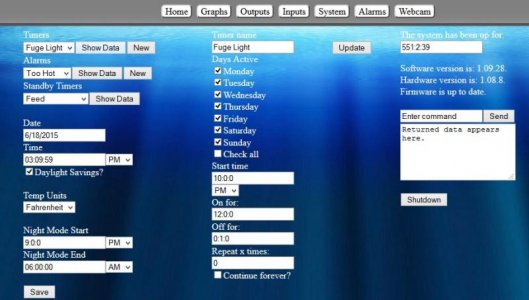
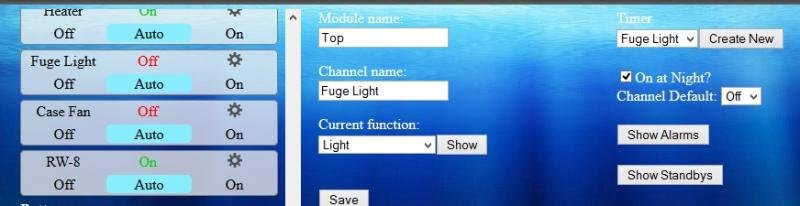
Here's the setup of my fuger light timer.
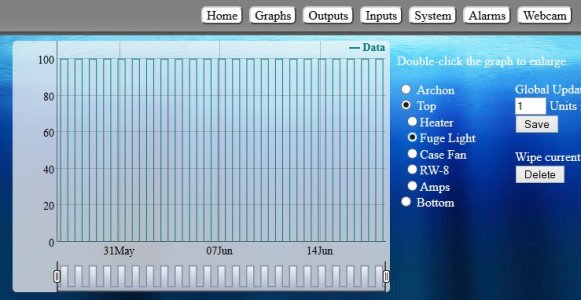
And the graph of it functioning.
Attachments
cardinalfish78
Member
Thanks, I will uncheck the continue forever box to see if that does it.
James MW I am not sure what you mean by Outlet Setting?
James MW I am not sure what you mean by Outlet Setting?
janes_mw
Active member
Thanks, I will uncheck the continue forever box to see if that does it.
James MW I am not sure what you mean by Outlet Setting?
sorry, meant outputs for the outlet setting. So the position you have plugged into on the power bar.
n2585722
Well-known member
Yes, continue forever is the same as oscillate on the RKE/RKL. It keeps repeating the on time and off time. Also a note if you use one of the 0-10 volt or pwm outputs you have to specify an off time for it to turn off. If you have a ramp time on these outputs the off time has to be more than the ramp time or else it will stay at whatever level it is at when off time expires. Hope this helps.
cardinalfish78
Member
sorry, meant outputs for the outlet setting. So the position you have plugged into on the power bar.
I am using outlet #3 in the PC4
I also changed the "continue forever" to unchecked last night, and the light has remained on all day. I would think that with the settings I have it on, I could turn it "off" through the web interface, and then reset it to "auto" and it should stay off until the programmed 9pm. It will turn off, but as soon as I return it to AUTO, it goes back on.
This thing is definitely not meant for the average person to operate, This is the instructions as written;
Click the New button to add a new timer to the “Timers” drop-down menu. Select the new timer from the drop-down menu and click the Show Data Button. (The screen should look similar to the image above)
Timer name: This allows the Timers to be customized with specific names (example: Actinic lights)
Days Active: Select which days of the week the timer to run be active.
Start time: Select the time of day the timer starts.
On for: Select how long the timer will be active.
Off for: If the timer is set to run miltiple times a day, set this to control how long the timer stays off between cycles. If the timer is to run only once, leave this field as is. (if the timer is a ramping function, set this to match the amount of ramping time.)
Repeat x times: Select the number of times the timer is to run during the day.
Continue forever: This will set the timer to constantly repeat; this can be tied in with the days of the week allowing it to run only on days selected.
Once everything is set, click the Update button to save the timer.
Are we sure the time format is 00:00:00 hours:minutes:seconds or is it days:hours:minutes?
Last edited:
Well I got the unit this morning and am finally getting around to messing with it and issues already. I have followed the instructions exactly in the manual. Plugged in the USB thing, the itemp probe, the power supply and waited until the yellow light was on by the LAN port. Then went looking for the network labeled ARCHON. Nothing. My laptop doesnt find it, my phone doesnt find it, my tablet doesnt find it. Ive tried powering it off and on several times and its been on now for 5-10 minutes and nothing. Its not hooked to any but the itemp probe. Does it need to be to do the initial set up? Any suggestions?
janes_mw
Active member
Well I got the unit this morning and am finally getting around to messing with it and issues already. I have followed the instructions exactly in the manual. Plugged in the USB thing, the itemp probe, the power supply and waited until the yellow light was on by the LAN port. Then went looking for the network labeled ARCHON. Nothing. My laptop doesnt find it, my phone doesnt find it, my tablet doesnt find it. Ive tried powering it off and on several times and its been on now for 5-10 minutes and nothing. Its not hooked to any but the itemp probe. Does it need to be to do the initial set up? Any suggestions?
Try pushing the reset button thru the tiny hole on the front. That usually will force the Archon to go back to the initial set up mode.
Similar threads

- Replies
- 0
- Views
- 188


- Replies
- 8
- Views
- 844

- Replies
- 13
- Views
- 2K