Digital Aquatics Archon Owners Thread

Alright, so played with it for a little while and was able update webpages and get the "Setup" tab. When I hit the tab I get this message "The server could not fulfill your request because the resource specified is unavailable or nonexistent."
Anyone else get this?
Thanks.
Rob
 
Shut down your archon from the system page and the pull bus's cables and finally the power. Pull the USB drive and scan it for errors with a PC. Once done, put back in and then apply power to archon with its supply first then the bus's.


Sounds to me like either it didn't pull that file down properly or it didn't intake it from the USB drive. Could be due to a permissions error.

sent from my pixelated Nexus 6p
 
When updating the web pages the screen grays out. When complete will it return to its normal color signifying it's finished? It seems to take awhile to download and I'm not sure if it froze.


Sent from my iPhone using Tapatalk
 
OK.

1. Did you download and install the firebug add on?

2. Web downloads to the flash drive. It it is in read only due to it needing to be scanned, it won't process properly.

sent from my pixelated Nexus 6p
 
For this most recent update it will take a while as there are a lot of steps. It will shut your system off. And require power to be pulled and then restarted.

sent from my pixelated Nexus 6p
 
No I need to download it. Not sure if I would benefit from the webpage update as I have this wired to a switch.


Sent from my iPhone using Tapatalk
 
It would be preferable to keep things up to date. There is more to it than just a setup page that it builds upon.


Not staying up to date will make things harder to diagnose if you have an issue or need setup help.

sent from my pixelated Nexus 6p
 
Sorry, back again with questions. I've had some help over on the DA boards from Danny as well and have made some progress but am still having issues. I've been able to get my Setup tab as said earlier. When I hit the tab though I was getting a message "The server could not fulfill your request because the resource specified is unavailable or nonexistent." I was emailed a missing file which resolved that issue. Now these are the actions I've taken and the results from it.

I cut power to the Archon pulling the module cable and unplugging it. I wait 10 - 15 sec. or so and plug both back in restoring power to the Archon. I wait for the orange light and press the reset button for approx. 10 seconds or so. System resets. I go to my computer and eventually see the Archon as one of my wireless connections. I connect to it and put in 192.168.10.1. I am then connected to the Archon and have view of the webpages. I go to the "setup" tab. I set it up to my homenetwork SSID with security type and password. I hit "update". The Archon in my wireless connections disappears and my computer connects to my home SSID. I put in 192.168.10.1 in my address bar and I can no longer connect.
For a very short time I can see the Archon in my Routers "Wireless Devices" list with the address 192.168.10.1 but then after refreshing the list it goes away. Am I doing this correctly? My router used to assign the Archon its own address when setting up the old way. Not the default 192.168.10.1. We also used to be able to set the time correctly, add our phone number for text updates and add a unique port number as well. These options are no longer there. Should they still be? What can I be doing wrong? I've also pulled the USB drive and run a fix on it on my computer a couple of times.
Any help would be appreciated.
Thanks once again.
Rob
 
You should have gotten a email giving you your new IP. If not go into your router and get it.

Sent from my XT1585 using Tapatalk
 
Rob, 192.168.10.1 is only good on the Archon hot spot. Your Network will assign you Archon a IP address. You can always select the Archon hotspot again and get that address from the setup page. All the IP addresses are displayed on the setup page. I think you are looking for the wireless IP. I don't think you need to press the reset button anymore. You now have full control on the hotspot not just setup as before this upgrade. That is why the setup page was added.
 
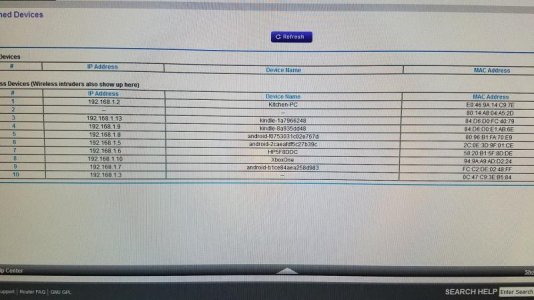
Here in lies the problem. Once I input my SSID data and hit update my router shows an IP of 192.168.10.1 for the Archon which shortly disappears and I'm only left with the Archon's MAC Address (See Pic - It's the second line #2). I also loose my Archon as a Wireless network connection after I hit update. It is my understanding that it should broadcast all the time now.

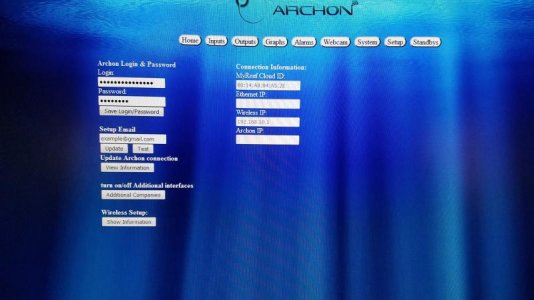
Second pick is of my SETUP tab after I have to go back to the Archon and physically do a reset from the front so I can see it again as a wireless network connection. Note the wireless IP is 192.168.10.1. My network is not giving me a new IP address. And when I put my Email address in to set up and hit test I get no test emails. I tried my personal email as well as my phone's text email which always worked before.

At this point I wish I could just revert back to the last revision and start over. I'm thinking something went wrong in the Software Update.

Thanks.
 

Attachments

  • 20170102_105719.jpg
    20170102_105719.jpg
    63.1 KB · Views: 4
  • 20170102_105928.jpg
    20170102_105928.jpg
    41.9 KB · Views: 4
Once you connect the arc on to your wireless network it will pull an IP address from your router. You need to look at the address scheme that your router provides. For instance mine is 192. 168. 1. 2. So long as you have the correct password for your network and put your email address in the archon will email you it's new IP address. You can also try opening your browser and putting HTTP://archon.local

sent from my pixelated Nexus 6p
 
Also. If it is not connecting to your network properly it is not going to get an IP address and it will not send the email.

sent from my pixelated Nexus 6p
 
I hear you but unfortunately that is not happening. When I hit update I loose the Archon wireless network connection in my list of connections. My computer then defaults to connecting to my homenetwork. When it connects I have my router's browser open and I will initially see 192.168.10.1. Where I used to see the name Archon is blank and the last column is the MAC address. Soon after, like seconds, when I refresh my router's wireless connections the 192.168.10.1 is gone and the only thing remaining is the MAC address. I can account for every other IP it shows. Unfortunately no Archon.
Basically my network is not assigning the Archon an IP address after I hit update on the Setup page.

On a side note, when I connect my USB drive to my computer and open it all the files show a shortcut arrow. Is that normal. When I double click the individual folders they open and show their content. Just wondering why each icon is a shortcut? Would like to copy files from the Archon USB to my computer for future use if usb stick was to go bad.

 
That is interesting. Do you know how to assign an IP address to a particular Connection in your router? If so try giving it one of those addresses. Also what is the maximum number of IP addresses your router will give out? You might want to check that.

sent from my pixelated Nexus 6p
 
I'm not sure I now how to or even can do that with my router. I'm now starting to feel there was a problem with my software update. Before update everything always connected without issue. Going to see if I can contact Eric over at DA and see if he can help.

Any other suggestions would be appreciated.

Thanks so much for trying to help out.

It's been frustrating and time consuming to say the least. It's nice to know there are people you can turn to to get some help when needed.

Thanks again.
 
have you tried unplugging it and then powering it back up???? make sure you turn of the PBs if you have then connected....
 
Lindsey, the update did not download the setup.html file. I sent it to Rob to add to www folder. I am guessing that some other file or files did not update also.
 
Back
Top