Digital Aquatics Archon Owners Thread

Lindsey is correct. The Archon has 4 switch ports already. The IOE is a breakout box for the ports that are on the two RJ45 conntectors on the Archon. It makes it easy to use these ports but is not a requirement for using them. I have a IOE module and I like the push to connect wire connectors. The IOE does break out the 4 switch ports on the Archon.
 
I wired up the switches today (been busy with work). It was a lot easier than I thought, as soon as I figured out not to strip the wire when using the splice connectors I bought. I guess that's what the directons on the package are for. I used an ethernet cable I had hanging around. Very simple, works great. :)
 
Lost all channel programming??

Lost all channel programming??

Its been a long time since I had to reach out for help. Archon has been rock solid. I am not sure what happened yesterday but I noticed last night all my channel names and their programming had gone back to default settings. It was fine earlier in the day. No event that may have triggered it to my knowledge. I tried a restart that did not help. Powered down, then a reset that did not help. Its not that hard to reprogram everything, and I don't want to get into the flashdrive and start fooling around. I will surely make matters worse.
Any easy fix anyone knows?
 
jack,

have you tried a Restore? IIRC, I had this happen once. Not sure why. it just did. I dont remember if the restore fixed it or not.

mine has been a rock as well. I havent touched it in months it seems.
 
jack,

have you tried a Restore? IIRC, I had this happen once. Not sure why. it just did. I dont remember if the restore fixed it or not.

mine has been a rock as well. I havent touched it in months it seems.

Thanks pickup.
I'm going home for lunch and will try restore. Fingers crossed.
 
Programming a Tidal Effect pump

Programming a Tidal Effect pump

SO, a few months back I decided I wanted to find a way for Archon to control my Jebao DC6000. Turns out that pump is VERy controllable with the DCI interace and one of the Archon 0-10v analog ports. Away we go.

plugged it up and the system controls it very well. So i decided to give a little tidal test. Initially I set up a timer to run at 40% for 30 minutes then at 60% or 30 minutes. this repeated forever and was nift but I wanted a bit more.

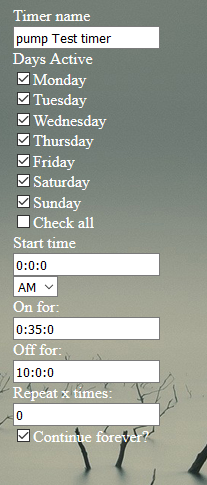
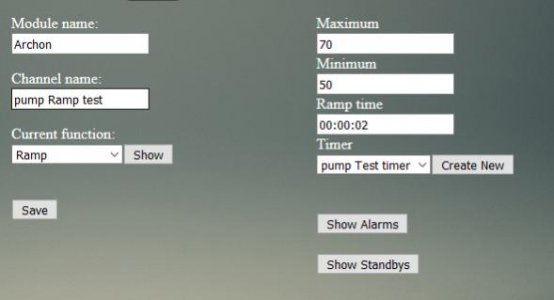
now my Tidal program. Tide does a full cycle every 24 hours and 50 minutes. how can I emulate this movement. I decided on a simple program that seems to work great. it can be used on Any of the analog or PWM archon ports. the timer runs on a 10 hour and 35 minute cycle. Long and short, the pump now runs at 50% for 10 hours and then 70% for 35 minutes. once that high portion is done, it reverts back to the 50% for the next 10 hours and repeats forever it cycles through this very well.

Pump function: Ramp, Max 70, Min 50. Ramp time 00:00;02

timer: All days active
Start time - 0:0:0
on for - 0:35:0
Off for - 10:0:0
repeat x time - 0
continue forever is CHECKED
 

Attachments

  • tidal cycle timer.PNG
    tidal cycle timer.PNG
    89.1 KB · Views: 5
  • tidal pump programming.jpg
    tidal pump programming.jpg
    17.4 KB · Views: 5
Cool program. Do you think Archon control will work with all Jebao pumps or just the DC models. Jebao has made several changes to their D.C. pump models DCP, DCT etc.


Sent from my iPhone using Tapatalk
 
Digital Aquatics Archon Owners Thread

Nice! I've got an IcaCap control interface for my Gyre that's never been set up. This is good inspiration to get it going.

Edit: Lindsay, do you see any negative reactions from your corals with changing the flow like that?

Reason I ask is, I switched from pulse to steady on my Gyre and my Purple Stylo started STN-ing... that or it didn't like my dosing ALK [emoji12]

Sent from my iPad using Tapatalk
 
I have not seen any negative reactions at all in my coral related to the changes in current. This just adds to the Randomness IMO. paired with this flow, I also have my pair of WP25's that alternate for 7 second pulses each at 60% max and 0%. I then have a WP10 that alternates for 3 seconds on and 3 off at 75% and then 20%. its all a big wash tub in there. at night the WP25 do go to a lower setting.


and that Gyre would do pretty awesome at this. I would love to hvae that kind of low in my tank, but since it is a cube for the most part, I dont think it would do as well for the laminar flow.
 
Last edited:
Hey Lindsay thanks for the post on Jebo Tidal programming. Probably my next project.
Re: my loss of programming earlier, I went home today and traced my problem back to a WI-FI outage. Waiting for service to be restored. Need a new carrier this Century Link has been disappointing.
Thanks for the help and advise.
 
Need help w/2 Point ORP Calibration

Need help w/2 Point ORP Calibration

Hi
A little over a year ago, I received the following instructions from DA on performing a two point ORP calibration. I did it and things worked fine until recently when my ORP readings dropped about 200 points over a 10 minute period. I just re-did the calibration measurements with the grounded prob and with the reference solution, but I now realize that the instructions are unclear about the port number that I should use in the PortCalibrate(...) command. Does anyone know the proper port numbering?

Thanks,
Phil
------------------------------

for the 2 point calibration, it stakes a few steps.

1 - make sure the Switch for the port your using for ORP is in the Down position.
2 - Make sure it is set as ORP on the input.

400.0 reading - place probe in the solution and wait about 15-20 minutes to make sure the reading are stabilized, then note the raw data number
0.0 reading - you will need to ground the out side of the BNC connection to the inside pin of the BNC. You will once again want to wait the 15-20 minutes for the number to stabilize. Note the raw data number.

Once you have the 2 raw data numbers, you will need to go to the system page and enter the following into the 'enter command' box.

PortCalibrate(0:x,400.0,y,0.0,z)

x will be the port number the top one is 9 the bottom is 9
y will be the raw data number for 400.0
z will be the raw data number for 0.0

press send once this is entered (you will get a report underneath that shows what you just entered). Then check your reading on the input page.
 
Which port do you have the problem plugged into? The archon is module 0 and itemp is #1. top ph is #2 bottom ph is #3. So if your bottom is the orp, then the first part of equation is 0:3. If you are using orp on another module u need to know it's number.

Sent from my Nexus 6P using Tapatalk
 
Thanks Pickupman66,

I'm using the upper port and my readings were:
400mv cal fluid: 113
Grounded input: -415

I executed the command:
PortCalibrate(0:2,400.0,113,0.0,-415)

And received the reply:
PortCalibrate(0:2,400.0,113,0.0,-415) returned:
<Warning>'No returned data!'</Warning>

Unfrotunately, when I return the probe to the cal fluid, I see a reading/graph value of -23.90 (and still see a raw data value of 113). It doesn't seem like my PortCalibrate command is 'taking'. Is a reboot required? Is 2 definitely the correct port?
 
Plugging in the above numbers and solving the simultaneous equations gives a slope of .76 and an intercept of 314. When I put the probe in my tank, I get a raw reading of -60 which should map to a very reasonable value of 268. Instead the Archon is displaying/graphing -24.10.
 
I got it. In an earlier email w/DA, I got a list of the filename endings for the log files on the flash drive:

-----------------
Hello,

all those can be editted directly from the flash drive. They will be in the log files.
Temp is 0:7
ph1 (the top one) is 0:8
ph2 is 0:9
you can plug the flash drive into a computer and look at the logs and search for the 2008 and delete them.

Eric Mileli
Digital Aquatics
-----------------

Assuming that the file name endings correspond to the device and port number, I'd be on port 8 making my calibration command:

PortCalibrate(0:8,400.0,113,0.0,-415)

Which immediately gave me a sensible ORP value of 319.70

It would be nice if this information were documented somewhere...
 
Oooooooops. My bad dude. So Sorry. I totally forgot about the outputs being first on archon in the port #s.

Sent from my Nexus 6P using Tapatalk
 
pwest, sorry I did not see the post until today. For the next time getting a port address. You can get the address from the port select drop down menu for selecting a port on alarms or one of the controller functions that use a port as a input. It shows up at the front of the name in the 0:8 format in your case. I have my ORP probe on the other pH port 0:9. Glad to see you got it calibrated OK.
 
Back
Top