Email stopped working

gerbilbox

New member
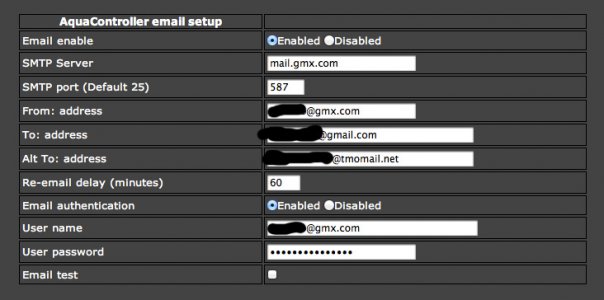
I don't know when this happened, but my Apex Jr. doesn't send emails/texts anymore. I don't know what changed that may have caused it, but I use GMX as the email service, and the Apex Jr is hooked up to a Netgear WNCE2001. Attached are my email settings. Thanks.

 

Attachments

  • ApexEmail.jpg
    ApexEmail.jpg
    67.7 KB · Views: 8
Can you log into GMX with that username and password?

Also, I see you use gmail, why not try there SMTP server and see if the problem persists?
 
That refers to using Google Apps mail servers, not GMail SMTP. Gmail requires SSL or TLS which is unavailable in the controllers.

I hate to split hairs, but there is a big difference, especially when offering guidance to non-technical users here.
 
Gerbilbox, follow the email diagnostic procedure in the unofficial user guide. On page 26 IIRC. Post the output here.
 
RussM, I understand. I'm using a gmail account, not google apps. I am authenticating at aspmx.l.google.com via SMTP (not SSL) to send emails to my own gmail account without problems. Admittedly I haven't tried sending to non-gmail accounts, but that wasn't the point of the testing, I was just trying to eliminate the mail host.

FYI, I'm a network admin, so I'm not just talking out of my butt here. :)
 
Can you log into GMX with that username and password?

Also, I see you use gmail, why not try there SMTP server and see if the problem persists?

Yes, I can log in to GMX just fine.

Gerbilbox, follow the email diagnostic procedure in the unofficial user guide. On page 26 IIRC. Post the output here.

I'm on Mac OS X, so I had to find out about using mode line in Terminal to avoid the annoying telnet issue, but I followed the procedure from unofficial user guide and got this:

SMTP: server = 4305d04a
SMTP: tcp connect error - -1​

That's all, it just pauses after that.
 
Feels like more of a networking issue than email. Who is your broadband provider? Are you doing anything funny in terms of your physical connection to the Internet (router, bridge, WIFI, etc) ?
 
Someone else reported that same error recently with emails send through GMX... same situation as you - it was working fine, then just quit working. That error usually due to one of 2 things... incorrect default gateway setting or incorrect SMTP port in the Apex. But if it was working, and nothing has changed, the next possibility is that something is blocking traffic to port 587.

Try this using Terminal on your Mac:
telnet mail.gmx.com 587
What is the response?

Next, try
telnet mail.gmx.com 25
What is the response?
 
Feels like more of a networking issue than email. Who is your broadband provider? Are you doing anything funny in terms of your physical connection to the Internet (router, bridge, WIFI, etc) ?

AT&T is my provider. Not sure about anything funny, but the setup is that the Apex Jr is physically connected to the Netgear WNCE 2001, which is wirelessly connected to the HomePortal 1000HW (I know, ancient).

Someone else reported that same error recently with emails send through GMX... same situation as you - it was working fine, then just quit working. That error usually due to one of 2 things... incorrect default gateway setting or incorrect SMTP port in the Apex. But if it was working, and nothing has changed, the next possibility is that something is blocking traffic to port 587.

Try this using Terminal on your Mac:
telnet mail.gmx.com 587
What is the response?

Next, try
telnet mail.gmx.com 25
What is the response?

telnet mail.gmx.com 587
Trying 74.208.5.67...
Connected to mailout-us.gmx.com.
Escape character is '^]'.
220 mail.gmx.com GMX Mailservices ESMTP {mp-us006}
Connection closed by foreign host.​

telnet mail.gmx.com 25
Trying 74.208.5.67...
telnet: connect to address 74.208.5.67: Operation timed out
telnet: Unable to connect to remote host​
 
I am having the same problem but have not found the solution yet. I get the same output from telnet. My ISP is AT&T also so maybe it has something to do with them?
 
Back
Top