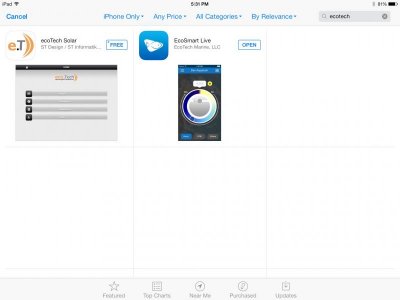
iPhone/iPad App

Search for ecotech and Change the setting in the top left to Iphone only
 

Attachments

  • image.jpg
    image.jpg
    29.6 KB · Views: 3
Much easier ;)

Good to know he is working on a new app. Thanks for that

Also, the app does work with a laptop plugged in
 
Last edited:
I don't have a ReefLink and I had my Radion G2 connected to the ecosmartlive website and I could control it from the app over wifi and LTE 4G
 
I don't have a ReefLink and I had my Radion G2 connected to the ecosmartlive website and I could control it from the app over wifi and LTE 4G

So you have it tethered with USB to the computer and then you can control it on the app ?

I want to know if I need the reeflink to be totally wireless ... don't want teh USB always connected
 
So you have it tethered with USB to the computer and then you can control it on the app ?


I want to know if I need the reeflink to be totally wireless ... don't want teh USB always connected


If I want to use the app, I noticed I have to have it plugged in and running with ecosmart live, other wise you need the ReefLink
 
The reeflink and the app are totally wireless with no need to be connected to anything via USB


If you don't have a ReefLink, you can plug your Radion into your computer and run Ecosmart Live to connect to the app using wifi, 3G, or 4GLTE. If you have a ReefLink, you don't have to have it plugged in at all. Otherwise you have to have your Radion plugged in and running with Ecosmart Live
 
Back
Top