
You are using an out of date browser. It may not display this or other websites correctly.
You should upgrade or use an alternative browser.
You should upgrade or use an alternative browser.
Digital Aquatics Archon Owners Thread
- Thread starter skripo
- Start date


jason2459
Well-known member
Have to say I got a quick refund. Cory Lo with a dynoninstruments addressed emailed me again asking if I was still interested and I just let him know that I was no longer interested and that's all I said. Didn't ask for a refund and not 2 minutes later I got another email from squarespace showing I was refunded $14.73. Kudos to Cory for the service with out even asking for it.
I think the Archon looks like a great controller and hope the best to everyone getting one.
I think the Archon looks like a great controller and hope the best to everyone getting one.
cardinalfish78
Member
Can anyone tell me what the minimum pulse time would be using the Advwavemaker function through a DCI interface? I currently have it set to 0:1.0 and I tried 0:0.5 and all it did was continuously run. I am using a Jebao RW.
Also, is there an estimated time frame for the newest Archon firmware update to be released?
Also, is there an estimated time frame for the newest Archon firmware update to be released?

Pickupman66
New member
Cardinaldish that's about the best I was able to do. Maybe .75 and it worked. I have mine on a 3 second oscillation ant it works best for my tank . I have the apc module. I don't think it did any different on the rke.
The pulse time can go down to the milliseconds, but I doubt the pump will respond to it that fast. It is probably a function of both the Archon and the pump that you are using. Some pump controls are probably more sensitive than others.
cardinalfish78
Member
The best I have done is 1 second. Unfortunately, I dont get any wave action at that speed. The original Jebao controller is much faster.

shellsea
Member
Got it! Eric worked me through it. Seems like my router did not take the host name so we just had to find the IP address. Up and running!
mike
or anyone
If you see this can you share the steps to get the ip address instead of the host name, or point me to a post where it was shared? Not sure what I am missing. Had Archon up and running back in February. all was GREAT. Love it. Did an update to HW & SW recently and messed things up. Eric w/ DA did a stand up job responding to my issues. It was my mess up but he got it straight. I now have a new flash drive and I can connect to it, and go to set up page with SSID password etc for my network. Fill in all fields with what I believe to correct info and I hit send and not sure if it is sending to Archon or not. But after I go back to my wi fi and look for the Archon it says "Can not connect. Server is not responding". Either the "Send" is not getting to the Archon or I can't find the Archon by using the name or http://Archon.
Anyone?
Pickupman66
New member
Jack,
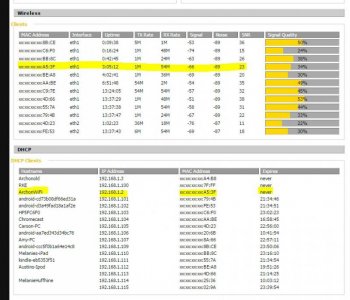
are you seeing the Archon MAC address and or host name in your router tables? see the image below from my DD-WRT router setup. yours may be different.
What I did when I got a new unit was I determined what it was in my router because when I did the setup of it, I called it ArchonWifi on the index.ap setup page. I went into my router and then determined its MAC address. then I took that and reserved it an IP outside my DHCP table (in my case 192.168.1.2).
now I just hit that IP and it goes to it.
are you seeing the Archon MAC address and or host name in your router tables? see the image below from my DD-WRT router setup. yours may be different.
What I did when I got a new unit was I determined what it was in my router because when I did the setup of it, I called it ArchonWifi on the index.ap setup page. I went into my router and then determined its MAC address. then I took that and reserved it an IP outside my DHCP table (in my case 192.168.1.2).
now I just hit that IP and it goes to it.
Attachments
Pickupman66
New member
sure thing. I always try to drive everything from the router side.
ONce the cloud is up and working, it shouldnt matter.
ONce the cloud is up and working, it shouldnt matter.

janes_mw
Active member
Thanks Pickupman
I will try to approach from this angle. Appreciate your input.
Jack - this is what I did as well. I went to the router and found the IP. In the past I have also used "angryip" as well.
hope you get back running!
Pickupman66
New member
Oh yea. AngryIP is a great little program to find it.
Pickupman66
New member
That button is used if you want to restart the system and have access. It basically allows the archon to fully close the log files it has open.
shellsea
Member
Jack,
are you seeing the Archon MAC address and or host name in your router tables? see the image below from my DD-WRT router setup. yours may be different.
What I did when I got a new unit was I determined what it was in my router because when I did the setup of it, I called it ArchonWifi on the index.ap setup page. I went into my router and then determined its MAC address. then I took that and reserved it an IP outside my DHCP table (in my case 192.168.1.2).
now I just hit that IP and it goes to it.
Well I made a little progress. Please understand I am not a computer savvy guy. 65 years old and learning. Got into my modem and found Archon ip and Mac address. Now how do I reserve it an IP outside my DHCP?

Overt
New member
I'll try to be more specific about it
I'll try to be more specific about it
Sorry for being so vague.
The archon goes into a non communication mode when an alarm is triggered.
The PC4's go offline and flash orange which means, no heat, no circulation etc.
I can unplug everythng and then bring Archon back on then connect the PC4's and they go back to their defaults and are green lighted
However, the Archon won't communicate with anything connected via bus cable.
The input/outputs show up for the Archon (see pics) and I can interface with the settings tab
EXCEPT, the alarms tab is frozen on the system screen. The 'show data' button does not work.
I keep getting alarm notifications on the alarms tab even though i removed the ORP plug
I connected on an Ipad and also had all the same issues.
I deleted the list of alarms with the 'clear alarm and clear log' keys but archon just generates more alarm notifications.

the home screen looks like this and no buttons are active

THanks for your help!
I'll try to be more specific about it
Sorry for being so vague.
The archon goes into a non communication mode when an alarm is triggered.
The PC4's go offline and flash orange which means, no heat, no circulation etc.
I can unplug everythng and then bring Archon back on then connect the PC4's and they go back to their defaults and are green lighted
However, the Archon won't communicate with anything connected via bus cable.
The input/outputs show up for the Archon (see pics) and I can interface with the settings tab
EXCEPT, the alarms tab is frozen on the system screen. The 'show data' button does not work.
I keep getting alarm notifications on the alarms tab even though i removed the ORP plug
I connected on an Ipad and also had all the same issues.
I deleted the list of alarms with the 'clear alarm and clear log' keys but archon just generates more alarm notifications.
the home screen looks like this and no buttons are active
THanks for your help!
Pickupman66
New member
Can you screen shot your system page?
Pickupman66
New member
Shelsea without knowing your router I cannot help. Google your router and then how to reserve ip.
Similar threads

- Replies
- 0
- Views
- 186


- Replies
- 8
- Views
- 843

- Replies
- 13
- Views
- 2K