
You are using an out of date browser. It may not display this or other websites correctly.
You should upgrade or use an alternative browser.
You should upgrade or use an alternative browser.
Digital Aquatics Archon Owners Thread
- Thread starter skripo
- Start date

jason2459
Well-known member
Most that have a dhcp setup area/tab/page will let you set a range. Otherwise with the way dhcp works you would be safe setting the IP to a high value like x.x.x.200. ie. 192.168.1.200. Unless you have 200 friends and devices online with in a 4-8 day period you'll be safe.Well I made a little progress. Please understand I am not a computer savvy guy. 65 years old and learning. Got into my modem and found Archon ip and Mac address. Now how do I reserve it an IP outside my DHCP?

Pickupman66
New member
OK. login to your router, then on the left. does it say DHCP reservation? if so, go there, put in the MAC address of Archon and the IP that it is currently on.
this link shows port forwarding on your router. just use port 80 for the Archon and its IP instead of what they show.
http://portforward.com/english/routers/port_forwarding/ZyXEL/PK5001Z-CenturyLink/PS4.htm
this link shows port forwarding on your router. just use port 80 for the Archon and its IP instead of what they show.
http://portforward.com/english/routers/port_forwarding/ZyXEL/PK5001Z-CenturyLink/PS4.htm

shellsea
Member
Thanks Pickup. I am work now and not at router but I was putting all the tips you guys have given me into a list so I can get this done. Worst case I have an IT guy at work that I will bribe with pizza and beer to help me!!
I am close. Not sure why I am having trouble connecting to it this time. I was running fine before. Really appreciate you and all the guys that contribute to others.
I am close. Not sure why I am having trouble connecting to it this time. I was running fine before. Really appreciate you and all the guys that contribute to others.

Overt
New member
I am able to interface with Archon but only with the elements of the system that are contained in the Archon unit itself. I can still see my Ph and switch position and timers but I cant access the alarms in the system page or any modules via bus cable.
I have tried misc. variations of bus cable connection with several cords to rule out the bad cord issue.
Regarding my wifi/net connection.
I have a ethernet line running 30 feet to my net modem that runs the main Netgear router located in a far away part of the house.
I worked with DA support to figure out the IP address that the modem had assigned and things have at times worked perfectly albeit intermittently.
I don't know how to interface with the sbg6580 Motorola modem to change any settings.
I am still getting alarm warnings despite having disconnected the Ph and ORP probes from the Archon and clearing the alarm history several times.
I seem to have partial connectivity with Archon. I assume that interfacing with Archon would be 'all or nothing' not the partial access.
Should I reinstall the Archon operating system?

I have tried misc. variations of bus cable connection with several cords to rule out the bad cord issue.
Regarding my wifi/net connection.
I have a ethernet line running 30 feet to my net modem that runs the main Netgear router located in a far away part of the house.
I worked with DA support to figure out the IP address that the modem had assigned and things have at times worked perfectly albeit intermittently.
I don't know how to interface with the sbg6580 Motorola modem to change any settings.
I am still getting alarm warnings despite having disconnected the Ph and ORP probes from the Archon and clearing the alarm history several times.
I seem to have partial connectivity with Archon. I assume that interfacing with Archon would be 'all or nothing' not the partial access.
Should I reinstall the Archon operating system?
Overt
New member
ok, so, a LOT of trian and error troubleshooting with re boots and bus connections has reveled that everything is OK until I connect the SL2.
SL2 with probes, SL2 without probes, SL2 via. bus to PC4, SL2 via bus to Archon etc.
Whenever the SL2 is connected the communication with Archon drops.
With 2 PC4's is was fine, add SL2 and communication with anything other than the core Archon 'on board' functions drops.
I tried by old SL1 and everything works fine.
I MUST have a temp probe working or my heaters are useless so thank God the SL1 works.
I am going to buy the iTemp DA probe that connects to Archon via. bus.
Has anyone seen that sort of behavior from an SL2?
SL2 with probes, SL2 without probes, SL2 via. bus to PC4, SL2 via bus to Archon etc.
Whenever the SL2 is connected the communication with Archon drops.
With 2 PC4's is was fine, add SL2 and communication with anything other than the core Archon 'on board' functions drops.
I tried by old SL1 and everything works fine.
I MUST have a temp probe working or my heaters are useless so thank God the SL1 works.
I am going to buy the iTemp DA probe that connects to Archon via. bus.
Has anyone seen that sort of behavior from an SL2?
Pickupman66
New member
Do you have the archon plugged into a power supply? Is this the sl2v2 or original sl2? Is software up to date on my reef for it?
shellsea
Member
Guys
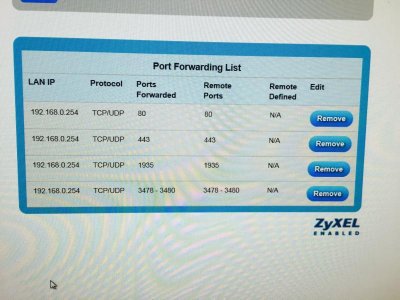
I been at it all night. No luck in accessing Archon. It is getting to my modem. See reservation list and port forwarding photo below. I tried going to ip address but no luck.
Hate to be a dummy. It was set up before. No idea why I can't log into now. Did have several Archon ip's in modem reservation list. Deleted all and reset new one.
At a loss.Pizza and beer for anyone?????
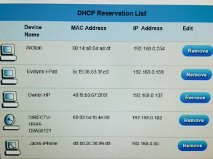
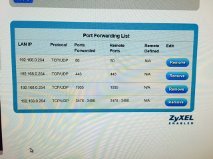
I been at it all night. No luck in accessing Archon. It is getting to my modem. See reservation list and port forwarding photo below. I tried going to ip address but no luck.
Hate to be a dummy. It was set up before. No idea why I can't log into now. Did have several Archon ip's in modem reservation list. Deleted all and reset new one.
At a loss.Pizza and beer for anyone?????
Pickupman66
New member
Have you tried to download angry ip and see what ip it says archon is on to verify? I may could remotely help tomorrow eve. It's late here already.

n2585722
Well-known member
Overt, do you have a SID and myReef software? Another question is this a SL2 or the SL2v2? This is important. The SL2v2 can be updated with the latest firmware. The original SL2 cannot. It will not work at all if upgraded to the latest firmware.
Before you do anything check the buss connectors on the SL2. See if they are corroded. If not try updating the firmware if it is a SL2v2. I don't have a computer handy so I cannot get the firmware version for the original SL2.
Before you do anything check the buss connectors on the SL2. See if they are corroded. If not try updating the firmware if it is a SL2v2. I don't have a computer handy so I cannot get the firmware version for the original SL2.
shellsea
Member
Have you tried to download angry ip and see what ip it says archon is on to verify? I may could remotely help tomorrow eve. It's late here already.
I tried Angry IP. Picture attached. Same IP number I have in DHCP Reservation list. Blue light, 23 ms. Reservation Picture also attached.
Tried setting up Port Forwarding.
I try to go to IP for Archon and can't connect to it. I suspect it is a modem router issue not Archon. Should I exchange my modem and start over?
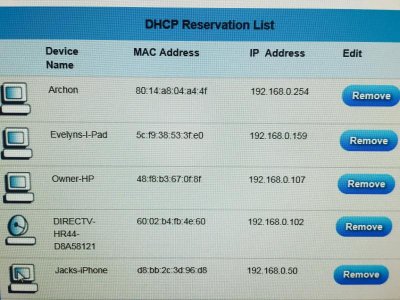
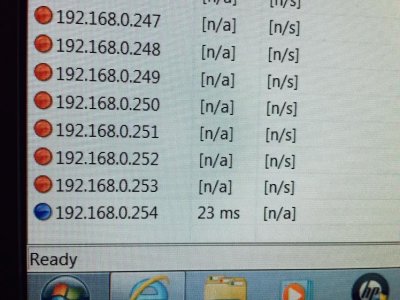
Pickupman66
New member
Can you get to the archon using 192.168.0.254 with Firefox? that seems to be the best browser. if you can from INSIDE your home, then i suspect your ISP is blocking port 80 regardless.
now, if you cannot get to your archon using the IP address shown and you are inside, you have something else going on entirely.
now, if you cannot get to your archon using the IP address shown and you are inside, you have something else going on entirely.
Pickupman66
New member
Be sure that you reset the Archon using the reset button so that you completely reconnect to a new router from scratch

atreis
New member
I tried Angry IP. Picture attached. Same IP number I have in DHCP Reservation list. Blue light, 23 ms. Reservation Picture also attached.
Tried setting up Port Forwarding.
I try to go to IP for Archon and can't connect to it. I suspect it is a modem router issue not Archon. Should I exchange my modem and start over?
When you say you "go to the IP" are you going to the 192.168.0.254 IP, or your current ISP-assigned IP?
Is the device you're attempting to connect from part of your home network (also has a 192.168.0.nnn IP) or is it external (e.g. a phone not using WiFi)?
The port forwarding only affects traffic from outside your home network. It has no affect on traffic from inside your home network.
If you're inside your network, you would go to http://192.168.0.254/whatever (not sure what the "whatever" would be for the Archon - it might be nothing - I don't have one).
If you're connecting from outside your network, you would go to http://a.b.c.d/whatever
To find out what the a.b.c.d is, google literally: what is my ip?
Google will tell you the external IP address assigned by your ISP. (This IP likely changes periodically.)
shellsea
Member
In response to atreis questions;
I type the ip that was assigned to Archon by my router.
I only use device(s) on my home network
Forgetting about port forwarding for now. Just need to get to Archon after set up from inside my home network.
Last night I reset my modem/router to all original settings (which worked with first Archon). Did not help. I can get to Archon set up page but after hitting send and reconnecting to my home networkl I can not reconnect w/ Archon.
It is Saturday. I have a 9 am meeting in the office that will go an hour or two. After I am going to stop by a local computer shop and see if they can help. If not, anyone available for a phone call later today that might help? It must be a simple setting I am missing somewhere.
I type the ip that was assigned to Archon by my router.
I only use device(s) on my home network
Forgetting about port forwarding for now. Just need to get to Archon after set up from inside my home network.
Last night I reset my modem/router to all original settings (which worked with first Archon). Did not help. I can get to Archon set up page but after hitting send and reconnecting to my home networkl I can not reconnect w/ Archon.
It is Saturday. I have a 9 am meeting in the office that will go an hour or two. After I am going to stop by a local computer shop and see if they can help. If not, anyone available for a phone call later today that might help? It must be a simple setting I am missing somewhere.
Pickupman66
New member
It has to be something simple. I'll send you a pm.
Pickupman66
New member
Shelsea. Good to talk today. Have fun
Similar threads

- Replies
- 0
- Views
- 186


- Replies
- 8
- Views
- 843

- Replies
- 13
- Views
- 2K