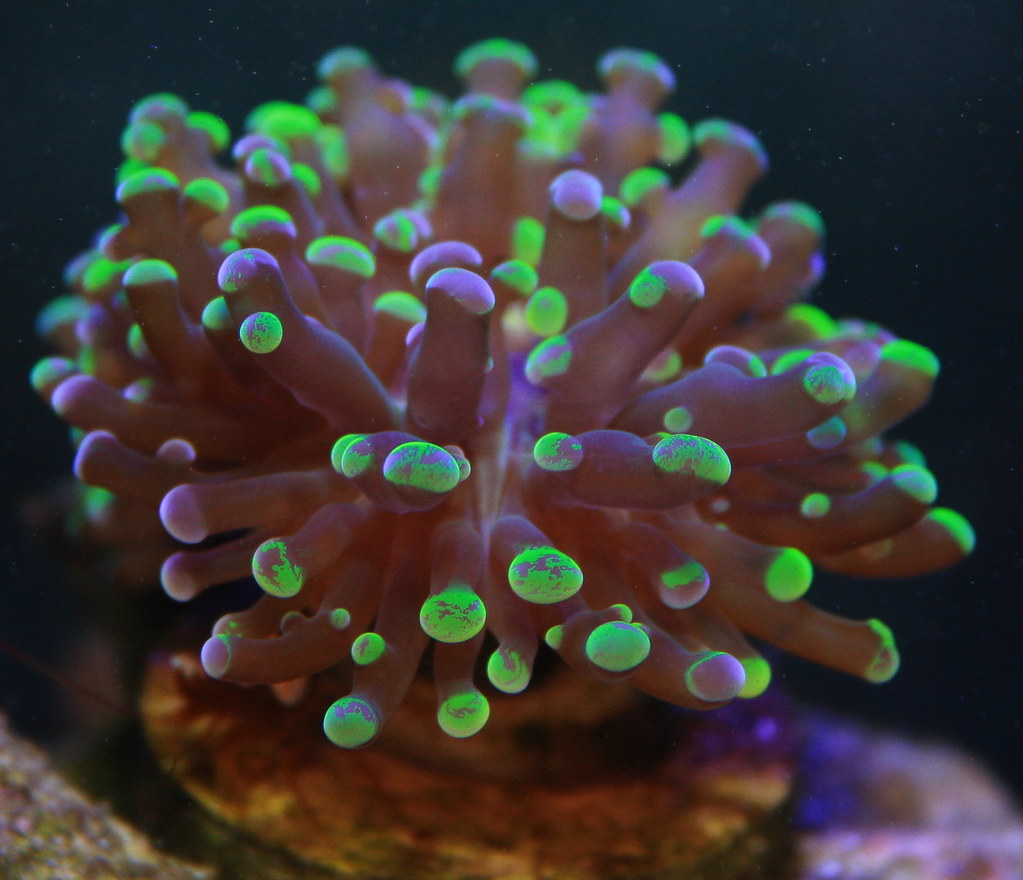
How to take pictures of tank

vai6921

Member
I wanted to know how I can take amazing shots of my corals when the blue light is on? I have a Sony Alpha Nex 3 and I can't get any colors to show. All I can see if BLUE like as if you were to take it from a phone.

Any suggestions on how I should be taking the pictures to get that color pop?

Thanks!
 
I bought a top down camera lens case to take pictures. I have leds and its hard capturing the colors you see with a camera through the tank glass, especially with just the blues on. Its MUCH better doing top down or using a lens/camera case and go under water.

Took this using a camera lens case with just the blues on.

IMG_3500_zpsaaaf6123.jpg

IMG_3498_zps00a2d904.jpg

IMG_3492_zps7e34c209.jpg
 
Last edited:
You don't need a fabulous expensive DSLR camera (although I wish I had one). Here's a pic I took today on my phone...

20121224165441.jpg


Tips in general -

Clean the glass before the shoot.

Don't use a flash.

Wear dark clothing and turn off all lights in room [not tank lights]. This ensures you don't get reflections of the room into your shot.

Try to steady your shots... Tripods work great, but I don't have one, I improvise. Great method I've found is to hold the camera with both hands, and put my middle fingers out and "lean on" the tank surface... Giving the camera a very stable shooting platform.

Don't have the lens right up against the glass, distortions and/or failure to focus properly might occur... leave at least 3/4-1" between glass / lens.

Be aware of how curvature of glass effects shot. Ergo, if you shoot from a skewed angle, the picture might come out even more warped.

Turn down flow to minimize agitation / debris in water column the camera might accidentally focus on.

Fool around with Camera Settings. My old camera had an 'underwater' setting. My Galaxy III phone camera has a 'cloudy' setting that removes the excess blue-saturation from the shot.

Basically you have to adjust your camera's intake of blue down to compensate for the amount of blue light we throw out. Up the red spectrum more to compensate if you can in your settings (what those camera settings mentioned earlier did).

Feed a few minutes before to make creatures feel more secure / corals open up.

Patience. Take lots of pics and hope 1-2 out of every 10 are usable.


Some fish are camera shy, and dart if you try to follow them. Pic a spot you know they will swim through and wait... wait... eventually you will get your shot.

My leopard wrasse is next to impossible to catch on camera... patience and enough photo's taken (95% blurry) finally netted me a few gems like this...

lepp1172.jpg


With my old camera, a Sony Cybershot, I set it to 'multi-shot' so I would hold the shutter button and the camera would take 3-5 continuous shots. This basically upped the shutter-speed for faster moving targets.

My Galaxy III tends to do that on its own.


Composition.

Most go by the 2/3rds rule. AKA have your target/focus point 2/3rds of the way into the frame.

Another good rule is to try to make all 4 corners of the photo be different (in shading, texture, etc).

Note how the leopard wrasse pic above was cropped with those two theories in mind. :)

Hope that helps get you going!
 
I bought a top down camera lens case to take pictures. I have leds and its hard capturing the colors you see with a camera through the tank glass, especially with just the blues on. Its MUCH better doing top down or using a lens/camera case and go under water.

Took this using a camera lens case with just the blues on.

IMG_3500_zpsaaaf6123.jpg

IMG_3498_zps00a2d904.jpg

IMG_3492_zps7e34c209.jpg

wow that is an awesome coral,,,what is the purple tip acro in the first picture?
 
Thanks! It does look awesome in both blues and whites. Here is a picture of it under full lights. Its a granulosa. If I tried to take a picture through the glass, it would come out nothing like how I actually see it and how it looks.

IMG_3516_zps2a71dba0.jpg
 
its a sweet piece. i dont think i have seen one quiet like that one.

ya know it looks damn near similar to my avatar pic...lol
 
I almost always use the flash. Oftentimes flash can help when the tank is overly-blue, and also with fast-moving targets. Otherwise, look for the white balance setting on your camera or adjust in a photo program afterwards. This shot was taken with the flash with ONLY blue LEDs on, no white at all.
 
@ReeferBatman - you said you used a GS3 phone for that picture, and it has a cloudy setting. I have the GS3 and I can't find this setting anywhere? Did you maybe download another camera app?
 
@ReeferBatman - you said you used a GS3 phone for that picture, and it has a cloudy setting. I have the GS3 and I can't find this setting anywhere? Did you maybe download another camera app?

Nope. Go into camera mode -> Settings -> White Balance -> Cloudy

:beer:
 
Back
Top