LED Fixture Build --Kcress--

What exactly are you using for your PCB machine? I'm always interested in that subject.

It's an EverPrecision EP2002H with a controllable (60,000 rpm max) spindle. You can see the specs at http://everprecision.com/e-epseries-3.html - that's for the 2006 model, but its essentially the same device. Mine claims 4-mil accuracy as well, but on a test grid, only about 50% of the traces actually conducted at 4 mil. At 6 mil, they all did. I don't need better-than-6-mil accuracy, so I'm ok with that.

One of the reasons it repeatedly works at that resolution is that it does a surface-scan of the copper before it mills away the surface. I attach a GND-lead to the copper top, and the toolhead makes an electrical connection as soon as it touches the copper. That gives it a very sensitive measurement of height variations in the FR4, and you can see it compensating in Z as the toolhead moves across the surface when milling. Very cool.

I think the machine itself is excellent, but the service frankly sucks. The current dealer won't upgrade my software because I bought it from the previous dealer... EverPrecision themselves don't want to get involved, so basically I'm stuck with the old software. Fortunately, that software is pretty good, and I'm unlikely to need an upgrade. If the worst comes to the worst, I guess I can write something - it's all just g-code, and I am a software engineer :)

Simon.
 
kcress,

I'm curious as to why you didn't go with your DIY Driver? Did you ever end up building a rig with it?

Dear sir I think you have me confused with DWZM. I've built no LED driver I've shown in RC.


Spaced Cowboy; Thanks for the info. I'll PM you so we don't run this baby off-the rails any further. :D
 
Picking up were we left off.
I want to go back a bit and show the fire-up process of a parallel string build.

Once you have everything wired up you need to check your wiring. You should really NEVER turn on a build and have parts of strings not correctly go on. That's really bad form. So the first thing you do is use a DMM with a diode test. Set it to DIODE and run down every single LED. Touch the solder blobs not the other pads. We don't care about the other pads, we only care about the ones we actually used. (Sorry for the hazy pictures the camera focused on my fingers!!)

Here I probe a blue LED in the proper direction and you can see it lights up. If it doesn't you have a problem. You could also do this with the two AA batteries method.

0yq77h2h3p.jpg


Next I move one probe to the chassis leaving the other in place. If I botched something that shorted the other lead to the chassis the LED will light up again - incorrectly.

erdx6u0nh1.jpg


Then I go back across the LED to light it up again and swap the opposite probe to the chassis to check for a short on the other side of the LED. Do this on every single LED on your build before powering up. It takes only a few minutes and will prevent any ugly, expensive, surprises.

ragjy5zfp0.jpg


That done we can move on to adjusting the driver. I turn the current limit allllll the way down. Sometimes they ship them all the way up. If they do this and your strings are badly balanced you could toast one. If you turn it all the way down you likely won't toast anything even with horribly mismatched strings.

aefpmsf5re.jpg


Also take the time to turn the voltage limit all the way down too. This is a safety thing that can also save you in a mess up. Large currents tend to require higher voltages. Turning the voltage limit down limits the current that can occur through a secondary aspect.

9hv1q5gizv.jpg
 
The moment of truth!

Flame - on!

Immediately - if not sooner - measure the current thru the strings. You need to know if you are over driving a string so you can power down if you have to.

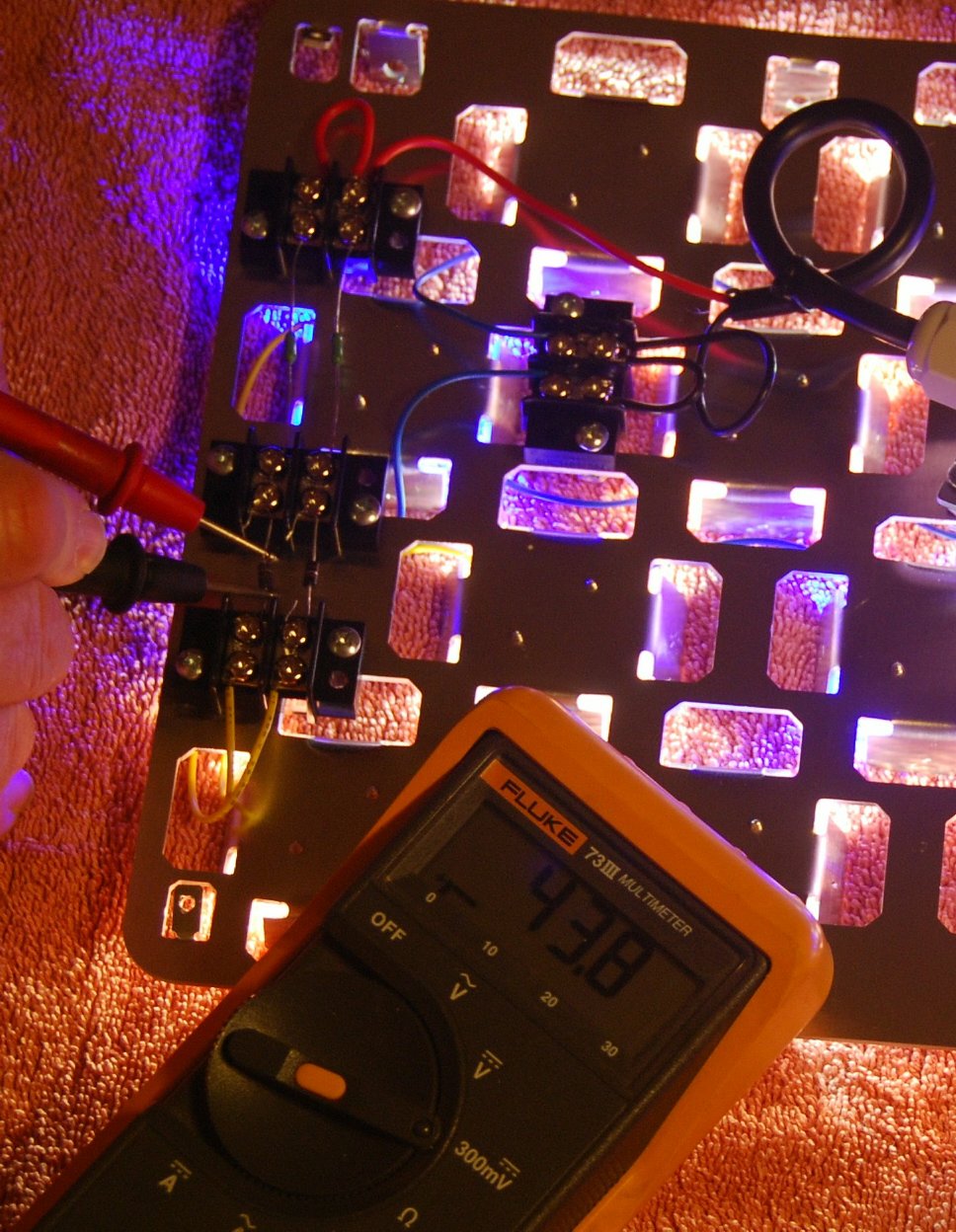
So, quickly, quickly, I measure one string.
I have 0.1 ohm resistors so I have to do some math. Notice the meter is set to show a maximum of 300mV. This means I'm seeing 43.8mV. Multiplying this by 10 because of my resistor values, tells me I have 438mA running thru the left string. This is great, not too much.

katvk3tlfz.jpg


Over to the right string...
425mA

Wow. Happy days! They are very close together in current. Close enough that I don't have to do anything about it.. At this point I turn the voltage limit back up all the way. (more on that later)

ou9oj3gqts.jpg


This means I can just turn up the current to where I want to run at.
And so I do. I crank it up to 754mA on this side.

vbkaf7iq8e.jpg


And that gives 740mA on the other side. No problems here.

Everything looks good. So now I turn down the voltage limit again while monitoring the current in one of the strings. I turn down the limit until I see the current start to drop. I then turn the limit back up until the drop disappears again. Then I turn it up a tiny bit more to cover temperature and age drifts. However in this particular build I could turn the voltage limit all the way down and never had the current drop! This means these string's Vf totals are so low that the driver voltage needed to reach 750mA is even below the voltage limit range. Perhaps I could've run another LED in each string..

rzlppxccr3.jpg


The astute reader will note that this 1.3A driver appears to be delivering 748mA + 754mA which equals 1.5A.
How can this be?!
There are two reasons. One is that our drivers are really power drivers at their cores. Since this is only 12 LEDs they are not demanding anywhere near 48V to run at this current level. This means the driver can provide a little more current and still be below the 60W rating.
Another reason is probably the ripple. My meter reads the RMS current. That means it's looking at the peaks and averaging them. There are peaks with this driver.

What are they? Let's look. Setting my meter to AC Volts will show the AC current running in my strings.

Here we see 12mV (note this meter doesn't have a 300mV AC setting).

Back to my multiplying by 10. This means each string has about 120mA of ripple current running thru them. So my average current is about 750mA and this means I really have a cycling value of about 690mA to 810mA.

So, several hundred or thousand times a second my strings have the current varying thru them between those two values. This is well below the current limit for these LEDs and so does not concern me in the least. Ultimately this will make them run probably 1 or 2 degrees warmer than a totally smooth 750mA pure DC current would. If this build was running right at the maximum current limit the heating would be greater and might need further study. In this 750mA case - not at all.

At this point

9gnc2th4yj.jpg


On to checking out the light! Here's the color against a white ceiling. Note the slight blue.

nsbqv4rts5.jpg


Here's a mug shot of it.

shmif255cz.jpg


Here's a shot with the camera stopped way down running a 1/4000 sec shutter. This really shows the LED colors. Neutral whites, cool whites, and royal blues.

bk39z39ye8.jpg


Here it is tipped up lighting my towel.

jj7qir65iz.jpg


Here it is for chuckles propped up on two books lighting my big build.

It fell off the books into the bottom of the tank and never blinked. Try that will a running MH and see what happens... LOL

orhkv3zm7j.jpg
 
Nice work sir..... quality DIY but still need a sharp heatsink to keep everything cool unless its a test run, love the whole idea behind custom reflectors ;)
 
Color @ last pic looks great to me. So what's your plan? Going to make a couple more? Same color mix?
 
Absolutely fantastic!
I'm pleased to see that driver worked out.

Thanks for taking the time to show the set up process in so much detail. How to test the ripple was especially useful. I'm now not so nervous about testing the ripple monster drivers I have.

It's so hard to tell from a photo, what do you think of the colour mix you have there?
 
but still need a sharp heatsink to keep everything cool unless its a test run

Hi tahiriqbal. Not sure what what you're getting at here. This is it. This is the heatsink. This is what's been runnig for a week. I'm running a temp test right now and will let you know.

Color @ last pic looks great to me. So what's your plan? Going to make a couple more? Same color mix?

Not sure. Of course I'd need about 5 of these for my tank and optics are also a definite requirement. But then I also have to avoid the solar beam paths. I will likely use this style for for whatever I end up doing. Perhaps a giant one with two holes for the sun? This one was sort of spec'd to be an ATS light.. But man.. I do love the color for the livingroom as does everyone who sees it.


Absolutely fantastic!
I'm pleased to see that driver worked out.

Thanks for taking the time to show the set up process in so much detail. How to test the ripple was especially useful. I'm now not so nervous about testing the ripple monster drivers I have.

It's so hard to tell from a photo, what do you think of the colour mix you have there?

I really love the color. Realllly love it. But since I have no coral I can't really speak for its coral 'popping' ability.

After seeing the ripple result here I don't think I'd worry about it further, if you're going to run around the 7-900mA region. I was really fearing it would be causing 500mA current ripple or worse. Having sub 200mA ripple is a don't-care. As a person I am exceedingly flicker annoyed. I see flicker where no one else does. There are stores I can't even go into because of their lighting. These drivers run at such a high frequency that the actual light modulation this ripple causes is completely undetectable. It's likely way too fast for any aquarium inhabitants to respond to. Go ahead and let your ripple monsters out of the closet. :p

Would you stop messin around and put some fish in that thing already...

??? And end up with fish poop all over my nice rock? Never!! I'm switching to Terrarium Central...
 
I would just get drunk and sleep in it to reassure the wife that it will get done when it gets done :)

Did you steel my bench supply and meters? Do you want my variac too?
 
Looks good, just curious if its fish only why would you need more than one? Looks like it has decent cover as it is.

Also good to know about the diode tester, had no idea it would actually light the led, I simply used a wall wart hooked to a decade box (with a ton of resistance) to make sure each fired pre-wiring.
 
I would just get drunk and sleep in it to reassure the wife that it will get done when it gets done :)

Did you steel my bench supply and meters? Do you want my variac too?

Why yes I would like your Variac too. Mine's a huge one for mounting in a stage lighting panel - that's not mounted in a panel. So I have to prop it up and be v e r y careful of where I touch it.

Looks good, just curious if its fish only why would you need more than one? Looks like it has decent cover as it is.

I agree. I think it would be fine, as is, (maybe without the books holding it up :D ), for a FO tank.
I'm going for a coral tank this time around.

Also good to know about the diode tester, had no idea it would actually light the led, I simply used a wall wart hooked to a decade box (with a ton of resistance) to make sure each fired pre-wiring.

Yeah, they all light up on Diode Test. It's nice. You have to be careful using a wallwart as these LEDs have a low reverse voltage. Resistors or not you could possibly exceed the reverse voltage and damage the LEDs. Remember that the circuit open is where all the voltage is. You could have high resistor values and you will still have the total WW voltage appear across a reversed LED.

A meter keeps the diode test voltage low enough that it won't do this. If you do use a WW you should probably try to keep it around 5V.
 
..... I see flicker where no one else does. There are stores I can't even go into because of their lighting. These drivers run at such a high frequency that the actual light modulation this ripple causes is completely undetectable. It's likely way too fast for any aquarium inhabitants to respond to. Go ahead and let your ripple monsters out of the closet. :p

Yes. Without a scope I would have to guess at somewhere around ~500Hz or more. Contrast that with the 60Hz you commonly see in store lights.
 
Out of curiosity why bend the fins down instead of up. I suppose it doesn't make much difference in heat managment, but I also dont see it impacting the light as much either. Any chance of PAR readings and some running surface temps?

Regardless the rig looks awesome can't wait to see it enclosed.
 
Yes. Without a scope I would have to guess at somewhere around ~500Hz or more. Contrast that with the 60Hz you commonly see in store lights.

I just looked and actually the majority is 120Hz. But I also saw a definite 250kHz overlaid on it all. Interesting.

Out of curiosity why bend the fins down instead of up. I suppose it doesn't make much difference in heat managment, but I also dont see it impacting the light as much either. Any chance of PAR readings and some running surface temps?

Regardless the rig looks awesome can't wait to see it enclosed.

Hi nauticac. Two reasons the fins are bent down. One is that I saw an opportunity to block the piddling but obnoxious side glare caused by seeing the sides of the emitters. It worked! If optics are used it wouldn't have mattered. As dull as aluminum is I can still see the emitter reflected in the petals from directly in front if the petals are bent to the correct angle. That means some of that piddling light is being redirected into the tank and away from the sides. A good thing!

Secondly if bent them up, it would complicate mounting anything on the top like terminal blocks and drivers.

I don't own a PAR meter unfortunately.

Yes it needs to be enclosed!!

That's awesome Kcress!

So you love the color, huh? Is it what you expected? Bluer? Yellower?

Thanks. Yes I do like the color. Love? Why... yes! I do.
Honestly, I didn't know what to expect I just figured algae would like some red, some blue, and white, to fill in the spectral gaps. The result was so nice I'm working on a large sconce for the living room just for room light.
 
Kcress, sweet build man!

Couple things I'm still new at the LED builds. Could you explain why you used monitor resistors and fuses? I don't even know what a Monitor resistor is.

Also why use 2 terminal blocks with Jumpers? Just to have clean wiring?

When you were testing the current in the pic did you have both test leads on the monitor resistor?

And finally whats a good formula to determine how big of fuse and resistor to use?

Your builds are very informative! And you rock! Thanks for answering my "noob" questions.
 
Monitor resistors are large carnivorous animals that ea... Wait no! Wrong monitors!

:D

Your question has been asked and answered about a dozen times so I'll just repeat one of those here if you don't mind.

kcress- Can you explain why you actually need the resistor and how you wire it in?

This is why.
It's required so you can measure the inter-string currents in situ.

You can put them anywhere in the string. By definition with series, all current in a string must pass thru all elements of the string. The resistor will be an element of the string. Stick where ever you want. However.. If you stick them all on one end of all your strings, (one driver lead), when you want to compare the currents in all the strings to each other you only need to move ONE lead of your meter to measure the various strings. If you put the resistor in any other locations you would have to move both meter leads for every measurement.

In parallel string driving YOU MUST HAVE BALANCED STRINGS. Otherwise you can have two or three times more current running in adjacent strings. This means you could plan on having 700mA running thru all your strings before you balance them and you could easily have 2A running thru one and 0.05A running in the neighbors! The 2A string is gonna die in seconds.

You cannot do this by looking at it. The human eye can't decipher in detail ANYTHING about a light source that is as bright as these LEDs. (You should never even look straight at them anyway.)

With a (one)(1)(uno) ohm resistor installed in each and every string you can instantly measure the exact current flowing thru that string with just a voltmeter. No wires to open. No careful power down, then cool down while you cut/solder open the string, followed by installing an ammeter. Then powering up. Now reading the current that is no longer the same because the whole system has cooled down. Then taking this not quite right reading, writing it down, powering down, re-soldering the open string. Powering up. Next... Only 10 more?

No, No, NO. With the aforementioned resistor permanently installed in the chain, just whip out your voltmeter, set the selector to volts, and measure across the resistor. The number you read IS THE ACTUAL CURRENT flowing thru the string. No soldering. No temperature issues.

If you measure your strings like I just described and see 680mA, 720mA, 702mA, 698mA. You are good to go! Do not be an anal-idiot and try to get them all identical. They will all drift with age anyway. However, with the handy dandy resistors permanently in place you can check any time you want.

More likely you will probably see 590mA, 639mA, 727mA, 880mA, etc.

You then need to take your meter and while everything is running measure all the individual LED Vfs of the 590mA string. Write them down.
Do the same for the 880mA string. Write them down too.

Take the highest Vf one out of the 590mA string and swap it for the one with the lowest Vf in the 880mA string.

Remeasure ALL the string currents with the handy resistor again. You would now see something like: 690mA, 639mA, 727mA, 780mA, etc.

Keep working this same game plan until your strings are all within about 30mA. This will result in a long trouble free life for your strings. Periodically check all the string currents with the handy permanent resistors. Check maybe a month later. Make sure they are still in that 30mA range. If they are, recheck in six months. After that check every year.

Your neighborhood street signal lights can't be checked like this so in about 5 or six years the string currents shift so far that only certain strings carry most the current and fry. Not us though - because of the little miracle resistor.


The terminal blocks are to keep things clean, stable, cooling in the air, and available. They also allow easy fuse replacement. If you run dangerous sting voltages you would need to protect from accidental touches.

You use both meter probes across the resistors.

No formula. Use 1 ohm, 2 or 3W resistors. Use 1A fuses and use whatever terminal blocks you want to.

 
Back
Top