LF help with Apex...

Derekbc

But I quarantined!
First, thanks to Jason for organizing the aquarium controller demo at Reef Culture...

Setting up the Apex I received last Christmas doesn't seem so daunting now, except for figuring out how to get it hooked up to my home network. The problem is my router is about 300 ft. away from my tank.

Any help with getting Internet connectivity--minus running a 300 ft. cable--would be greatly appreciated.

The cry for programming help will undoubtedly come next.

Thanks,

Derek
 
^Agreed. The Netgear WNCE2001 makes the job a cake walk. You can get them for $26 on Amazon refurbished, or $45 new.
 
^Agreed. The Netgear WNCE2001 makes the job a cake walk. You can get them for $26 on Amazon refurbished, or $45 new.

Plus 1 on this. Plug and play. Just remember that when you perform an update, you need to hardwire the Apex to a router. I bought a really long run of CAT5 that I only take out when I need to do an update.
 
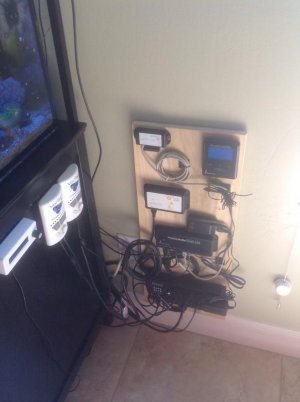
So the router was just a little under 100 ft. away--it seemed so much further... After being intimidated for a year and a half, the controller has been installed. It has proven to be a bit daunting in terms of getting the network set up, and I have yet to do any programming for the feed cycle and such, which involves turning off the skimmer and vortechs... The next task is setting up an additional float switch to the breakout box to make sure my ato doesn't overfill my sump again... And work a bit more on making the wiring a bit neater...
 

Attachments

  • image.jpg
    image.jpg
    41.6 KB · Views: 2
You still need the network adapter for fusion to work. And I still use the original dashboard, you will need it to upgrade firmware, add modules and many other things. Fusion is just a pretty, easy way to look at it away from home.
 
Ya sorry was trying to be a jerk just saying it so nice to not have to do all the crazy port forwarding stuff
 
I got a wireless network extender that plugs into an electric plug, connects to your wieless, and has a router plug on it to plug the Apex to. Cost $45 at Lowes with no issues, even updating firmware and upgrading to Fusion over it.
 
I got a wireless network extender that plugs into an electric plug, connects to your wieless, and has a router plug on it to plug the Apex to. Cost $45 at Lowes with no issues, even updating firmware and upgrading to Fusion over it.

This will work, as will updating your firmware over a wireless connection but it's pretty risky. The problem is the stability of the signal to the Apex, especially during an update. And, from experience, a bricked Apex is just no fun. I picked up a 100' Cat 5 cable a couple of years ago. Whenever I need to update the Apex, it takes me a couple of minutes to run the cable from my router to the head unit. No worries with updates. For everything else, I use a wireless gaming port.
 
Thanks for all of your input.

I did purchase a Netgear wireless gaming adapter and have it plugged into the controller. I also took Stolireef's suggestion and purchased a 100 ft. ethernet cable from Amazon--it is easily stored away in the box in which it arrived.

I'm using the Fusion platform and still trying to figure out how to get my system linked to the dashboard ap on my iPad, which only connects wirelessly to the home network.
 
Thanks for all of your input.

I did purchase a Netgear wireless gaming adapter and have it plugged into the controller. I also took Stolireef's suggestion and purchased a 100 ft. ethernet cable from Amazon--it is easily stored away in the box in which it arrived.

I'm using the Fusion platform and still trying to figure out how to get my system linked to the dashboard ap on my iPad, which only connects wirelessly to the home network.

If your using Fusion, you simply sign on to Fusion using the Internet on your I-pad (or any phone), you do not need to be signed into your home Network with your I-Pad (although your Controller still does)
 
I can get fusion to work on my iPad, it's the dashboard ap that I can't get configured. Hoping for an alternate access method should the fusion website ever go down.
 
I can get fusion to work on my iPad, it's the dashboard ap that I can't get configured. Hoping for an alternate access method should the fusion website ever go down.
Okay, yeah if you can figure that out, let me know. I have an Android phone, and gave up...
 
Back
Top