Losing Connection to APEX

I too am still having the issue on and off. All be it not as often as I once.did. I believe it happened thr beginning of last week last time. I've just about given up on the issue and just deal with it. It's a shame though cuz at $600 this was my most expensive purchase yet the one.I have the most trouble with. I believe a lot more people have this issue they just don't realize it because they don't access their unit remotely as much or at all and just use it as a really expensive timer/powerstrip. I've done firmware updates, checked IPs , etc. Etc. No dice
 
I too am still having the issue on and off. All be it not as often as I once.did. I believe it happened thr beginning of last week last time. I've just about given up on the issue and just deal with it. It's a shame though cuz at $600 this was my most expensive purchase yet the one.I have the most trouble with. I believe a lot more people have this issue they just don't realize it because they don't access their unit remotely as much or at all and just use it as a really expensive timer/powerstrip. I've done firmware updates, checked IPs , etc. Etc. No dice

That is so true!
 
I am having the issue also. Except mine is effected multiple times per day. I can't walk into my house and have either the web page or Iphone app work. I telnet and it is fine for an hour or so then out again.

I am hoping they fix this issue since I really like the controller and it's capabilities!
 
A solution for some of you?

A solution for some of you?

I've had numerous issues with my internet connections also. Sometimes it would work but often it would crash or be very sluggish. I think I have finally found the problem.

What none of the documentation makes clear is that the apex will still work on occasion even if the DHCP server, DNS server and Default Gateway settings are INCORRECT. I had set mine to specific numbers that I obtained from my login page of my router and it worked (sort of). I therefore thought that this setting was not the root of my problems. Recently I was rereading the apex guide and it mentioned that these three numbers are usually the same address as your router. I tried changing mine to the router address and suddenly the apex was connecting like a charm - fast page loading etc. I then inadvertently entered the IP address of my apex in these three fields (it is only one digit different from my router) and the apex still connected! (when I was in the house, I didn't check from outside).

I'm a networking novice, but clearly the apex can be set up with alternate addresses and it will still work, but with sluggish performance. Perhaps someone with more networking knowledge can explain what is going on, but I would suggest you play with these three settings to see if it helps...

btw, I'm running a Linksys router and wireless bridge.
 
I'm a networking novice, but clearly the apex can be set up with alternate addresses and it will still work, but with sluggish performance. Perhaps someone with more networking knowledge can explain what is going on
There are a number of incorrect or incomplete settings that can be made and Apex will still be accessible locally.

For example, the default gateway setting has no effect on local access... it only comes into play for access from the Internet and for the Apex to send email.

The DNS server setting has zero impact on local or remote access - it only affects the ability of the Apex to send email.

There are certain cases where an incorrect subnet mask can affect local and remote access, and other where things will still work to an extent. This heavily depends on the specific router in the network.

but I would suggest you play with these three settings to see if it helps...
I totally disagree... Anyone without adequate understanding of IP addressing and general networking should not just tinker with such settings.

For the majority of Apex owners, simply letting the Apex initially get IP addressing info from the router via DHCP, and then disabling DHCP is all that is needed to get all of the proper settings on the Apex.

The only thing that should routinely be changed manually is the last part of the IP address (to one outside the address pool used by the router's DHCP function.
 
Granted my choice of "play" was perhaps a bit flippant (and maybe even risky!), however as a user that was as frustrated as many that have posted on this forum, I would not have discovered the solution to my problem if I hadn't experimented with some other settings. My main point is that there is nothing in any of the documentation that indicated to me that these settings could be incorrect and you might still gain access to a degree - rather they state that if you are getting a connection then you are done, which is not necessarily true...
 
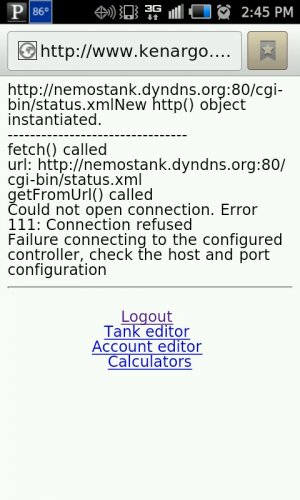
I'm getting this message today when trying to access from my phone.....

uploadfromtaptalk1344281939390.jpg

Sent from my SCH-I510 using Tapatalk 2
 
I've been down five days already. The way I fix it, is by shutting the APEX off for 15 min as well as my router. I also disconnect the nic cable from the APEX and router. When I connect the nic cable back into the router, I don't use the same port. I use a differnt one on router.
I haven't fixed mine yet cause I've been getting out of work really late and I would like to contact Neptune to see if they can find something wrong with it. Maybe this Friday I'll have a chance to call them. I've had this problem for a very long time now, with different versions. I think I've even posted early in this thread or another one just like this one.
 
After many emails with Neptune, I finally had a phone convo with them on Monday and they were able to fix the issue. Been up and running since Monday (longest since I have had the APEX). Mine had something to do with having a static IP address which was causing my issue. Not using a static IP address seems to be working for me. I suggest contacting Paul and have the screen share software installed so he can view your settings.
 
I updated the firm ware on my APEX from Version 1 to Version 12. I had to constantly reboot the Apex prior because of a lost connection that was from the wireless bridge to the APEX. Now I never do. I can log in anywhere in the world and of course from my Iphone too. On the old version when I rebooted the APEX the time would be reset to 2050 July 2nd 2:00 AM so all the lights went off. With the new firmware I purposely unplugged the Apex from the energy bar and it goes right back to the correct date and time when reconnected. On the clock setup page Auto clock Set and Daylight savings should be enabled.
 
I was going to call Neptune today about my problem, but when I got home last night, my lights were off. The outlet led was blinking amber. I disconnected the APEX for aprox 15 min like I stated in the previous post and now I'm able to connect from the internet. This happens around every 4-6 weeks. Now I have to wait till it happens again to call them..
 
I'm going to toss a question here.

Just over a week ago, my Apex did some of what you all are seeing. The web interface went out, and I couldn't get to it from the local net (my home PC or my iPhone) or the Internet (via my iPhone - didn't try Internet PC access). Also, I was getting e-mail every 10 min or so saying the tank was at 19.3C and a PH of 3.54 (I have it set to F, and the temp and PH are not that low). The display also says it's at 19F and 3.54PH. When I cycle power, it all comes back and runs fine. I have a static IP for my APEX (on the local net) and for my gateway (on the Internet). I did change the port for the web interface, and I just realized I didn't check the default port when the web wasn't working. (I'll check that next time.)

A bunch of you say the web is not working, do you all think my problem is the same as what you all are seeing? I didn't read all pages in this thread (yeah, I know I should. sue me :P ), but it didn't seem that you all were having measurement issue, just web interface issues. It seems like mine has a hiccup and goes to some default settings (power blip maybe?), but I figured I'd get your opinions on what's happening.
 
A bunch of you say the web is not working, do you all think my problem is the same as what you all are seeing? I didn't read all pages in this thread (yeah, I know I should. sue me :P ), but it didn't seem that you all were having measurement issue, just web interface issues. It seems like mine has a hiccup and goes to some default settings (power blip maybe?), but I figured I'd get your opinions on what's happening.
Don't bother reading the whole thread... it's a
trainwreck.jpg

:lol:

There are so many different things going on in this thread that it has become little but mass confusion. The only thing in common here is some form of issue accessing an Apex... there's everything from user error to misconfiguration of a router to other network issues unrelated directly to the Apex to a known intermittent web server bug in the Apex. It should be allowed to die a quiet death IMO.

What you describe has been reported here in the forum a few times recently, and seems to me to be a relatively new problem. BTW, the web server bug I just mentioned (and which is discussed several times in this thread) only affects the web server itself... probe readings are not impacted, so that bug is not your problem, as you have already noted.

I suggest you contact Neptune support directly.
 
Actually i think the thread is quite informative if you are having the same symptoms i had when i originally started the thread. Yes there is alot of user error but once you have it up and working with the right parameters it should stay up and working. Mine didnt. I was able to rule out a router issue because i have two wireless IP cameras on the same router that i access multiple times a day and they have never lost connection unless the IP addresses were refreshed.

With that said, i spoke to a rep at MACNA a couple weeks ago and he whole heartedly agreed that there was an issue on their end. He advised me to upgrade the firmware to the latest version. well i did that, and im happy to say that i have not lost connection once yet since MACNA. So in essence, if you were having the same problems I WAS HAVING, excluding the non relevant posts, if you upgrade to the latest firmware it should resolve it.

The aquanotes andriod app has been working consistently since then as well.
 
I'm going to toss a question here.

Just over a week ago, my Apex did some of what you all are seeing. The web interface went out, and I couldn't get to it from the local net (my home PC or my iPhone) or the Internet (via my iPhone - didn't try Internet PC access). Also, I was getting e-mail every 10 min or so saying the tank was at 19.3C and a PH of 3.54 (I have it set to F, and the temp and PH are not that low). The display also says it's at 19F and 3.54PH. When I cycle power, it all comes back and runs fine. I have a static IP for my APEX (on the local net) and for my gateway (on the Internet). I did change the port for the web interface, and I just realized I didn't check the default port when the web wasn't working. (I'll check that next time.)

A bunch of you say the web is not working, do you all think my problem is the same as what you all are seeing? I didn't read all pages in this thread (yeah, I know I should. sue me :P ), but it didn't seem that you all were having measurement issue, just web interface issues. It seems like mine has a hiccup and goes to some default settings (power blip maybe?), but I figured I'd get your opinions on what's happening.

I dont think that what you are experiencing is relevant to my original post. With me a simple reboot of the head unit would fix the issue and all measurements were fine. Also i believe was able to access the system locally even when i was not able to access remotely. This sounds like a different issue than just a network connection issue.

in any event, make sure all your settings are correct and that your running the latest firmware.
 
i have been using my neptune apex for over a year with a d-link router with out issues. Ever since changing to Verizon Fios and their Actiontec router it has been nothing but headaches. I experience the same thing in which i would lose connectivity after some time. The remedy would be to restart the head unit and then everything works fine. I have updated the firmware through the internet interface so i assume that i have the latest firmware installed. When i go into my router setup page it shows that the apex is not connected to my network although i have it connected with an ethernet cord. It has became very annoying that i have to reset the controller every other day.
Has anyone overcame this problem?
 
Back
Top