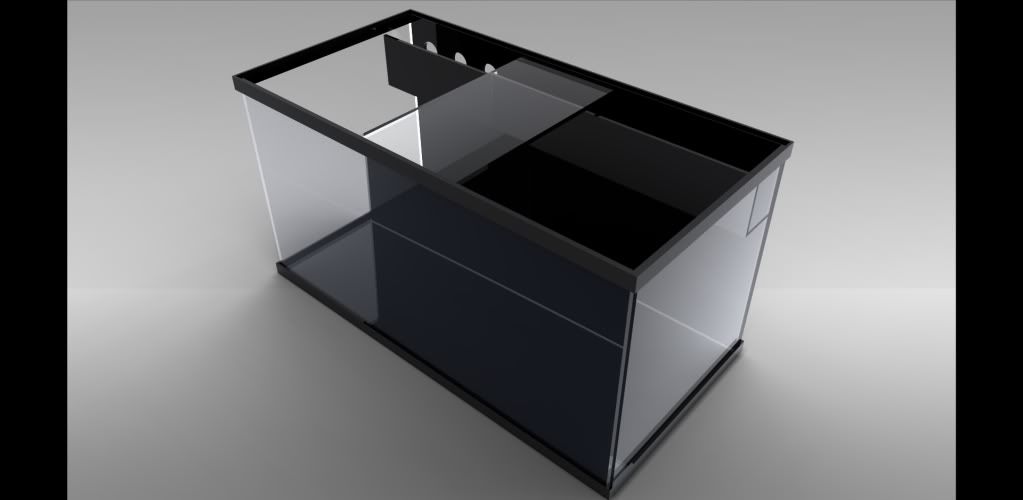
Plumbing in sketchup

Decadence

New member
I think that I am doing very well with my first ever time using sketch up but am having serous trouble figuring out how people do plumbing such as elbows, bulkheads, etc"¦ pumps are proving difficult as well.

Any advice? Is there a tutorial for advanced design anywhere? It's the complex objects (bend squares and circles) which are getting me.

1521454_10154506783890595_7537134208564011072_n.jpg
 
If you google PVC plumbing sketch up you should be able to find blocks that people have already modeled. Then just import them in
 
I will throw you a bone. (sketchup has a short but very steep learning curve.)

Using the rectangle tool, make a rectangle laying flat, do not extrude it. Next draw a rectangle perpendicular to the first rectangle like a doorway and floor with the two, touching but outside the rectangle, hope that makes sense.

Like this:

Untitled_zps54da82fb.jpg


Select the outside edges (ctrl + select tool.) Find the FOLLOW ME tool in the large tool set, and using the follow me tool, click on the face you want to follow the selected path, and the extrude will happen automatically.
This will end up like this:

Untitled1_zps10af1059.jpg


Elbows, sanitary tees, etc. use the same technique using curved paths, with the path to follow in the center of a hollow circle. (look and play with the tools in the large tool set (under the view menu > toolbars) pumps and more complex objects are just small objects placed together and grouped into components. You can find some of the stuff I have done floating around here...
 
You guys rock. I didn't even know that the library of downloadable items existed.

I have used the "follow me" tool before when I was making the cone of the skimmer but I didn't really know what I was doing and got the right curve pretty much by chance both times. Thanks for clearing up how to use it.
 
Another option is to get a pre-built system and scavenging parts: pumps, skimmers, frames, PVC, containers, etc...
 
I've been struggling to import a bulkhead, shrink it to size, and rotate for use... Sketchup does have a steep learning curve. I can build a tank and cut holes in it for bulkheads, but that's where I get stuck.
 
I've been struggling to import a bulkhead, shrink it to size, and rotate for use... Sketchup does have a steep learning curve. I can build a tank and cut holes in it for bulkheads, but that's where I get stuck.

I have found bulkheads readily available in the size that I need. I didn't know that you could import things before posting this thread. 3D warehouse has a lot of stuff in there. I have found that the easiest was to rotate things is to highlight them and then click the rotate tool and click it on an object on the plane which you wish the rotation to take place. If you don't do that, I have found it impossible to rotate on the correct axis.
 
I used to design all my "dream" setups on graph paper, now I don't use anything other than sketchup. XD

Piping I use the "follow me" tool. I place a circle the od of the pipe, then offset inwards the wall thickness. Run a center line where I want the piping to go, highlight it, click the "follow me" tool and voila. Plumbing. :-)

@ president> go to bulkreefsupply.com, look at their bulkheads. they have all the measurements you need. then it's just a matter of making the profile and iirc, I used the follow me tool there as well. :-)


oh! guidelines, guidelines, guidelines for having your plumbing centered in holes, aligning bulkheads etc.

edit for pic of my sketchup:
40B40B_zpseba84068.png
 
Last edited:
That's pretty sweet. Times have certainly changed. I remember designing my house on graphing paper.. It was built into a mountain and the walls were made of pizza. :-)

This is where I am at right now with the designs of my new system:
10509705_10154521289410595_4706417470230390234_n.jpg
 
Wow, some of those sketchups probably too longer to draw than to actually build :)

So wish I had kept my 3D mouse.
 
Man… I spend HOURS on mine and you make it look like poop, lol.

10527561_10154525602340595_831812243722932901_n.jpg


10592678_10154525602345595_7478686300236478166_n.jpg


I still have a lot of work to do but 3D warehouse is down for maintenance.
 
Sorry, I cheat...it is a sketchup plugin for bunkspeed hypershot....but I also have experience with high end software such as Maya, Alias Studio Tools, Lightwave, Autocad, blah blah...

120_4WideTank.jpg
 
Back
Top