Kessil A360WE

Guys, need some advice on lighting schedule for 1x Kessil A360WE on my 50g tank [1x Torch, 2x Zoas] for now.

I don't have the controller yet, so don't worry about sunrise or sunset , as yet. Will buy it when it is released here in Australia.

I'm sure before you have the controller (or APEX etc), you would have done the lightings purely by timer.

My questions are:
1. As you won't have sunrise or sunset capability without controller, what intensity did/do you use? 1/4, 1/2 or full intensity?

2. What blue did/do you use? 1/4, 1/2 or full blue?

3. Timing? Pretty much, what is your schedule? I would prefer to hear it from you guys that work office hours i.e. 9 am to 5 pm, so when you are at home approx. 6 pm, you would want the lightings to be ON and corals to be OPEN from 6 pm to 11 pm. What was/is your schedule?
 
Sorry about the lack of information. My tank is a standard 90 gallon 48Lx24Hx18W. I have the lights installed about 10" above the water line.

After doing a little more research on what other Kessil owners (including you), are running them at, it seems that I am low on the intensity. I bumped them up to 70%. I feel comfortable with that as the corals were accustomed to Radions which I was running at 60%. I then had two Kessil 350Ws on the tank for a week before putting these on. I will keep an eye on my corals but feel that they will be okay.

I actually did take PAR of the Radions but have to wait in line as I do not own a PAR meter and use the one from my reef club.

Okay, so that didn't work. I got home from work and noticed that the corals were getting lighter (bleaching)! I am taking it that it was to much to fast. I turned the intensity down to 50% and will see what that does.

I read that it takes corals time to adjust, especially to Kessils with the True UV. I will just have to give it time.
 
Guys, need some advice on lighting schedule for 1x Kessil A360WE on my 50g tank [1x Torch, 2x Zoas] for now.

I don't have the controller yet, so don't worry about sunrise or sunset , as yet. Will buy it when it is released here in Australia.

I'm sure before you have the controller (or APEX etc), you would have done the lightings purely by timer.

My questions are:
1. As you won't have sunrise or sunset capability without controller, what intensity did/do you use? 1/4, 1/2 or full intensity?

2. What blue did/do you use? 1/4, 1/2 or full blue?

3. Timing? Pretty much, what is your schedule? I would prefer to hear it from you guys that work office hours i.e. 9 am to 5 pm, so when you are at home approx. 6 pm, you would want the lightings to be ON and corals to be OPEN from 6 pm to 11 pm. What was/is your schedule?


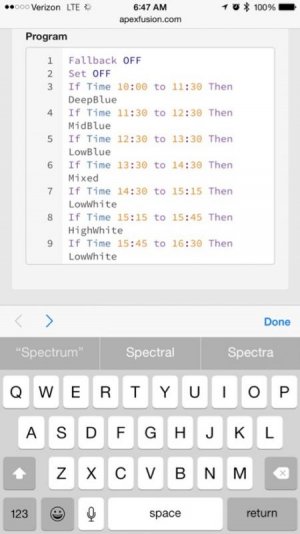
Here is what I do with mine on the apex.
Spectrum
ImageUploadedByTapatalk1412336916.502044.jpg

9hours 100% intensity on 20" deep tank, with them hung about 8" off water. All corals are doing great on sand less bottom. I never acclimate any corals to the lighting and haven't lost one yet. I have chalices, Zoas, acans, lps, and a lot of sps. My sps is getting coloration closer to T5s since switching.

Intensity
ImageUploadedByTapatalk1412336951.786202.jpg
 
Okay, so that didn't work. I got home from work and noticed that the corals were getting lighter (bleaching)! I am taking it that it was to much to fast. I turned the intensity down to 50% and will see what that does.

I read that it takes corals time to adjust, especially to Kessils with the True UV. I will just have to give it time.

Just give it some time and take it slow. You are certainly going about it the right way. That said, did you try to match the color to your previous lighting? When I made transition from my Reeftech LED's to the Kessils, I first matched my color to the original lights. I then matched par and started out with lower par levels.
 
Just give it some time and take it slow. You are certainly going about it the right way. That said, did you try to match the color to your previous lighting? When I made transition from my Reeftech LED's to the Kessils, I first matched my color to the original lights. I then matched par and started out with lower par levels.

Thanks for getting back to me. I am trying to match what I had or rather what I like. The problem is (that I miss) the Radions blue spectrum was spectacular! It really made the tank look like a black light was on the tank, which made the corals really pop! I haven't yet seen that out of the Kessils so getting the exact color is difficult.

I put myself on the list for the Par meter from my reef club so I will be able to get readings as soon as I can. In the meantime I just need to chill and let the corals adjust. Maybe in a week or two start moving the percent up. I still don't see how people are running theirs at 70%+ without bleaching everything!

Another Apex question: Is there a way that I can pick a point on the graph and have the lights stay at that point? When I wanted to do this with the Radions, all I had to do was double click the point and the lights would show that color then exit from there and it would go to where it was in the program.

Or, if I want to see what the color looks like at a certain percent, how would I do that?
 
Question for those with some Kessil experience.

It seems like the logical configuration for a 4x2x2 tank would be 2 of the A360W for the 24" coverage.

Would two 360N's and one 360W make any sense? For instance, the N's mounted on the ends with the W in the middle? Would this provide better coverage/less shadowing and reduce the urge to supplement with T5?

Or, are two 360W's wholly sufficient?
 
Question for those with some Kessil experience.

It seems like the logical configuration for a 4x2x2 tank would be 2 of the A360W for the 24" coverage.

Would two 360N's and one 360W make any sense? For instance, the N's mounted on the ends with the W in the middle? Would this provide better coverage/less shadowing and reduce the urge to supplement with T5?

Or, are two 360W's wholly sufficient?

IME two 360W will work fine for this

I agree.. Two W's would be best.
 
Thanks for getting back to me. I am trying to match what I had or rather what I like. The problem is (that I miss) the Radions blue spectrum was spectacular! It really made the tank look like a black light was on the tank, which made the corals really pop! I haven't yet seen that out of the Kessils so getting the exact color is difficult.

I put myself on the list for the Par meter from my reef club so I will be able to get readings as soon as I can. In the meantime I just need to chill and let the corals adjust. Maybe in a week or two start moving the percent up. I still don't see how people are running theirs at 70%+ without bleaching everything!

Another Apex question: Is there a way that I can pick a point on the graph and have the lights stay at that point? When I wanted to do this with the Radions, all I had to do was double click the point and the lights would show that color then exit from there and it would go to where it was in the program.

Or, if I want to see what the color looks like at a certain percent, how would I do that?

You should be able to get a similar blue with the Kessils but adjusting the color. It probably won't be quite the same as I am not sure how much royal blue the Kessils have.

As for setting a point and having it stay there with the Apex, you would just set two points at the same level.

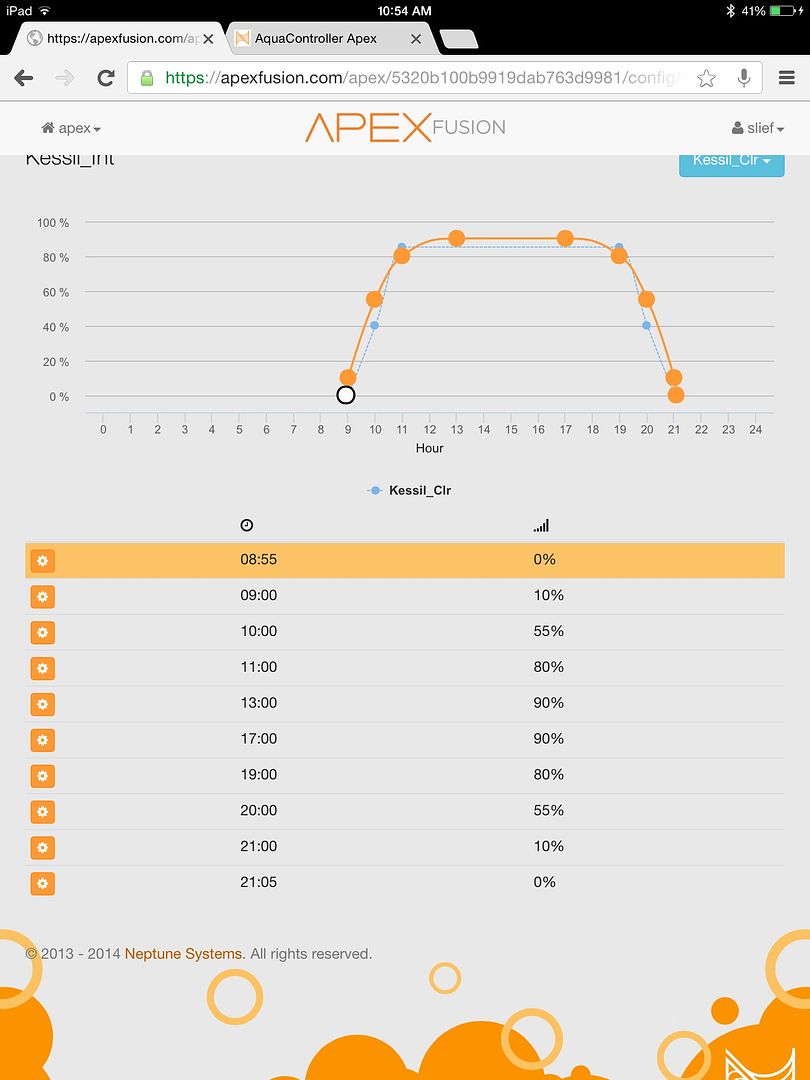
If you look at the Fusion graph below, the points at 13:00 and 17:00 were set to 90% intensity and color to about 83%. With this, the lights would stay at 90% from 1PM to 5PM. To test that, you would have to set up two points with what ever value you want to test that fall in line with your testing time and upload it to the controller. Then the lights will automatically change to the new settings so you can see what they look like. Once you find the color and intensity you are after, you then setup your lighting curves for color, intensity and time. There is the playback feature but as I mentioned in a previous post, 24 hours is consolidated into a handful of seconds making it almost useless in my opinion. Fortunately, with Fusion, testing and setting up the lights color and spectrum takes just a minute or two once you are familiar with the interface. As such, it makes doing some light color and intensity tests a breeze just as it does creating your full lighting program.
imagejpg1_zps475ac93f.jpg
 
I agree.. Two W's would be best.

Thanks for the input. Mostly, I just wondered if anyone experienced shadowing or if 2 360W's really provided the 24x24 coverage they are advertised to cover, thus adequately lighting a 4x2x2 tank. :)
 
You should be able to get a similar blue with the Kessils but adjusting the color. It probably won't be quite the same as I am not sure how much royal blue the Kessils have.

As for setting a point and having it stay there with the Apex, you would just set two points at the same level.

If you look at the Fusion graph below, the points at 13:00 and 17:00 were set to 90% intensity and color to about 83%. With this, the lights would stay at 90% from 1PM to 5PM. To test that, you would have to set up two points with what ever value you want to test that fall in line with your testing time and upload it to the controller. Then the lights will automatically change to the new settings so you can see what they look like. Once you find the color and intensity you are after, you then setup your lighting curves for color, intensity and time. There is the playback feature but as I mentioned in a previous post, 24 hours is consolidated into a handful of seconds making it almost useless in my opinion. Fortunately, with Fusion, testing and setting up the lights color and spectrum takes just a minute or two once you are familiar with the interface. As such, it makes doing some light color and intensity tests a breeze just as it does creating your full lighting program.
imagejpg1_zps475ac93f.jpg

Yes, I understand how to make the lights stay at the same intensity for a certain period of time. I currently have my daylight intensity to run from 1:00-9:00pm, then ramps down to turn off at 11:00.

I am more wanting to be able to see the light at a particular spectrum, no matter where in the program it is at. Example, on the weekends I am up way before my lights come on. If I want to do some cleaning in the tank and want for my lights to be at say what I have programmed for daylight, how would I do that through the Apex? Another example, I am up late and the lights shut off, but I would like to see the tank with the blues on, how would I do that?

I guess I just need to know how to turn the lights on at a particular spectrum outside of the program.
 
Yes, I understand how to make the lights stay at the same intensity for a certain period of time. I currently have my daylight intensity to run from 1:00-9:00pm, then ramps down to turn off at 11:00.

I am more wanting to be able to see the light at a particular spectrum, no matter where in the program it is at. Example, on the weekends I am up way before my lights come on. If I want to do some cleaning in the tank and want for my lights to be at say what I have programmed for daylight, how would I do that through the Apex? Another example, I am up late and the lights shut off, but I would like to see the tank with the blues on, how would I do that?

I guess I just need to know how to turn the lights on at a particular spectrum outside of the program.

You could create a profile for a specific intensity and one for a specific color. Then use a feed timer to control that or even a momentary switch.
I use a garage door opener button that is plugged into my break out box to turn my mixing pump on for an hour when I mix salt or transfer water. You could do the same with the lights if you wanted to. A feed timer or a mechanical switch of some sort to control a set of dedicated profiles for you lights.
 
You could create a profile for a specific intensity and one for a specific color. Then use a feed timer to control that or even a momentary switch.
I use a garage door opener button that is plugged into my break out box to turn my mixing pump on for an hour when I mix salt or transfer water. You could do the same with the lights if you wanted to. A feed timer or a mechanical switch of some sort to control a set of dedicated profiles for you lights.

Okay, now we're talkin. I see on my Apex dashboard in Fusion there are about 4 Feed modes. What are the steps for creating a lighting profile that could be used with one or two of them that by just pressing one, the light would be on and when I'm done, the light turns off or continues with the light schedule (if I chose it while running the lighting program)?
 
Okay, now we're talkin. I see on my Apex dashboard in Fusion there are about 4 Feed modes. What are the steps for creating a lighting profile that could be used with one or two of them that by just pressing one, the light would be on and when I'm done, the light turns off or continues with the light schedule (if I chose it while running the lighting program)?


That is a bit of a complex program.. I'd have to think about how to program that and test it myself before giving advice on what you would need to do. If you know the intensity % and the color % you want to start with, I would suggest starting a thread at the neptune forum and you should get a quick description of the steps and code involved. You will need to do the programming through the native web interface as opposed to through Kessil.
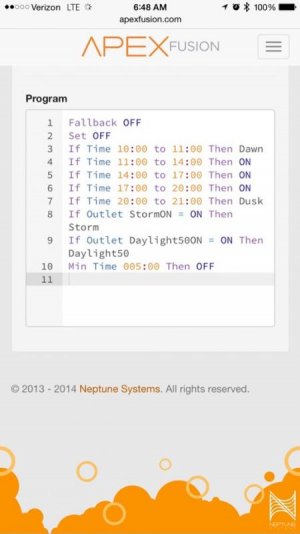
What I can tell you is that you would create two profiles. One for color and one for intensity. The would be ramp profiles with the same start point and end point percentage. We will call the color one Feed_Clr and the intensity one Feed_Int. You would set the percentage for the color and intensity as you would like it. There are two ways that I would think about approaching it. My first would be the simplest but I am not sure it will work because I don't know if you can use a feed timer to trigger a profile. If you can, that program would look like this.
In the Variable Speed Outlet for Color you would have a line of code at the end of the existing programming that reads:
If FeedB Then Feed_Clr

In the variable speed outlet for intensity you would have a line of code at the end of the exising programming that reads:
If FeedB Then Feed_Int

The other alternative would involve using virtual outlets to trigger the profiles.

I would suggest starting a thread at the dedicated Neptune Systems forum titled:
Need help programming feed mode to set intensity and color with Kessil 360WE.

Tell them that you are looking to create a program to turn your kessils on after hours for a set amount of time using one of the feed modes and would like some suggestions on how to go about creating that program.

Start the thread here and I'd bet you will have detailed instructions within an hour or so rather than waiting on me to create a program and test it out. Something I won't have time to do for a day or two.
http://forum.neptunesystems.com/forumdisplay.php?16-Apex-Programming-for-Lighting
 
Last edited:
That is a bit of a complex program.. I'd have to think about how to program that and test it myself before giving advice on what you would need to do. If you know the intensity % and the color % you want to start with, I would suggest starting a thread at the neptune forum and you should get a quick description of the steps and code involved. You will need to do the programming through the native web interface as opposed to through Kessil.
What I can tell you is that you would create two profiles. One for color and one for intensity. The would be ramp profiles with the same start point and end point percentage. We will call the color one Feed_Clr and the intensity one Feed_Int. You would set the percentage for the color and intensity as you would like it. There are two ways that I would think about approaching it. My first would be the simplest but I am not sure it will work because I don't know if you can use a feed timer to trigger a profile. If you can, that program would look like this.
In the Variable Speed Outlet for Color you would have a line of code at the end of the existing programming that reads:
If FeedB Then Feed_Clr

In the variable speed outlet for intensity you would have a line of code at the end of the exising programming that reads:
If FeedB Then Feed_Int

The other alternative would involve using virtual outlets to trigger the profiles.

I would suggest starting a thread at the dedicated Neptune Systems forum titled:
Need help programming feed mode to set intensity and color with Kessil 360WE.

Tell them that you are looking to create a program to turn your kessils on after hours for a set amount of time using one of the feed modes and would like some suggestions on how to go about creating that program.

Start the thread here and I'd bet you will have detailed instructions within an hour or so rather than waiting on me to create a program and test it out. Something I won't have time to do for a day or two.
http://forum.neptunesystems.com/forumdisplay.php?16-Apex-Programming-for-Lighting

Thanks for your patience with me! I totally understand the time it would take for you and would not expect that from you. I really didn't know if it would be that difficult. Seeing that it is, I will take your advice and go to the forum and ask. Heck, there may be something already there on this.

On another note, I wrote Kessil about my intensity question and did get a reply from them:

Hi Wesley,

Congrats on your new lights!

Our lights are very powerful -- the dense matrix led creates very strong light that penetrates through the water very well, and our spectrum is specifically customized for coral growth. That being said, you will definitely need to acclimate your corals. Many people have their lights on 70%+, but we wouldn't suggest immediately hitting them with that much light. It is a good idea to start out at about 50% intensity and slowly ramp up 5-10% every week while keeping an eye on your corals.

Feel free to contact us if you have any other questions about your lights!

Best Regards,
Yujia Zhao
Kessil Lighting
(510) 620-5107
 
That is a bit of a complex program.. I'd have to think about how to program that and test it myself before giving advice on what you would need to do. If you know the intensity % and the color % you want to start with, I would suggest starting a thread at the neptune forum and you should get a quick description of the steps and code involved. You will need to do the programming through the native web interface as opposed to through Kessil.
What I can tell you is that you would create two profiles. One for color and one for intensity. The would be ramp profiles with the same start point and end point percentage. We will call the color one Feed_Clr and the intensity one Feed_Int. You would set the percentage for the color and intensity as you would like it. There are two ways that I would think about approaching it. My first would be the simplest but I am not sure it will work because I don't know if you can use a feed timer to trigger a profile. If you can, that program would look like this.
In the Variable Speed Outlet for Color you would have a line of code at the end of the existing programming that reads:
If FeedB Then Feed_Clr

In the variable speed outlet for intensity you would have a line of code at the end of the exising programming that reads:
If FeedB Then Feed_Int

The other alternative would involve using virtual outlets to trigger the profiles.

I would suggest starting a thread at the dedicated Neptune Systems forum titled:
Need help programming feed mode to set intensity and color with Kessil 360WE.

Tell them that you are looking to create a program to turn your kessils on after hours for a set amount of time using one of the feed modes and would like some suggestions on how to go about creating that program.

Start the thread here and I'd bet you will have detailed instructions within an hour or so rather than waiting on me to create a program and test it out. Something I won't have time to do for a day or two.
http://forum.neptunesystems.com/forumdisplay.php?16-Apex-Programming-for-Lighting

I found this, but will need to try it once I get home. For some reason, the work network is having a problem displaying Fusion:

http://forum.neptunesystems.com/sho...estion-about-turning-them-on&highlight=kessil
 
I found this, but will need to try it once I get home. For some reason, the work network is having a problem displaying Fusion:

http://forum.neptunesystems.com/sho...estion-about-turning-them-on&highlight=kessil

Bingo!!! Glad you founnd that. That is exactly what I was talking about. I searched there for a topic on the subject before suggesting you start a thread there but couldn't find anything. I was also searching for "feed" and doing it by title to help narrow it down which would explain why I didn't see that thread.

Let me know how it works out! By the way, you coudl also go into fusion and just switch the color and intensity outlets from auto to on. That would light them up but it would do it at 100% which may not be ideal. It could also be an issue if you forget to put it back to auto.
 
Bingo!!! Glad you founnd that. That is exactly what I was talking about. I searched there for a topic on the subject before suggesting you start a thread there but couldn't find anything. I was also searching for "feed" and doing it by title to help narrow it down which would explain why I didn't see that thread.

Let me know how it works out! By the way, you coudl also go into fusion and just switch the color and intensity outlets from auto to on. That would light them up but it would do it at 100% which may not be ideal. It could also be an issue if you forget to put it back to auto.

One more question, on the dashboard when I see the color and intensity outlets, there is a number in blue that reads as a percent, what does it represent? It doesn't correlate to the current percent on either outlet so why is it there?
 
One more question, on the dashboard when I see the color and intensity outlets, there is a number in blue that reads as a percent, what does it represent? It doesn't correlate to the current percent on either outlet so why is it there?

That is the percentage of color or intensity that the channel is currently at. If for example you are at 85% color and 80% intensity from 12PM until 4PM, when you look at those outlets from the dashboard between those hours, the color channel should read 85% and intensity should read 80%.
 
Back
Top